SPECIFYING THE ORIGINAL SCAN SIZE USING
NUMERIC VALUES
Overview
When scanning a non-standard size original such as a postcard, specify the original size
by numeric values after placing the original. The width can be from 1" to 17" (25 mm to
432 mm), and the height can be from 1" to 11-5/8" (25 mm to 297 mm).
Operation
Tap the [Original] key.
After tapping the "Scan Size" key.
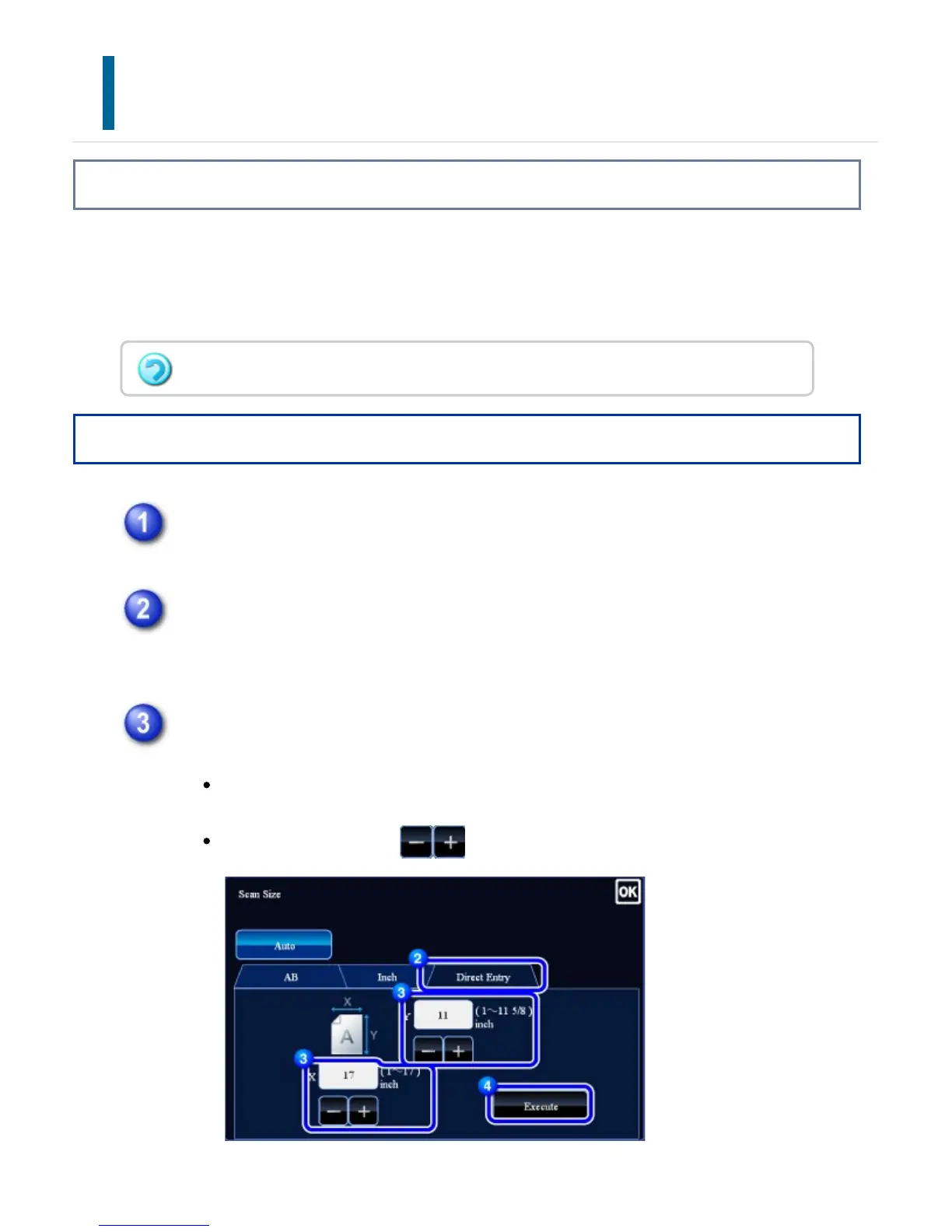
Tap the [Direct Entry] key, and enter the scan size.
Tap the areas displaying sizes in width and height respectively, and enter
the sizes using the numeric keys.
It is convenient to use to finely adjust the entered size.
When the scan size is specified by numeric values, the send size cannot be specified.
USER'S MANUAL | MX-M365N/MX-M465N/MX-M565N USER'S ... http://siica.sharpusa.com/portals/0/downloads/Manuals/MX-M365N-M...
585 of 1441 3/17/2016 7:14 AM



 To Next Page