USING A SEARCH NUMBER TO RETRIEVE A DESTINATION
RETRIEVING A DESTINATION NUMBER FROM A GLOBAL ADDRESS
BOOK
USING A TRANSMISSION LOG TO RESEND
SENDING BY CHAIN DIALING
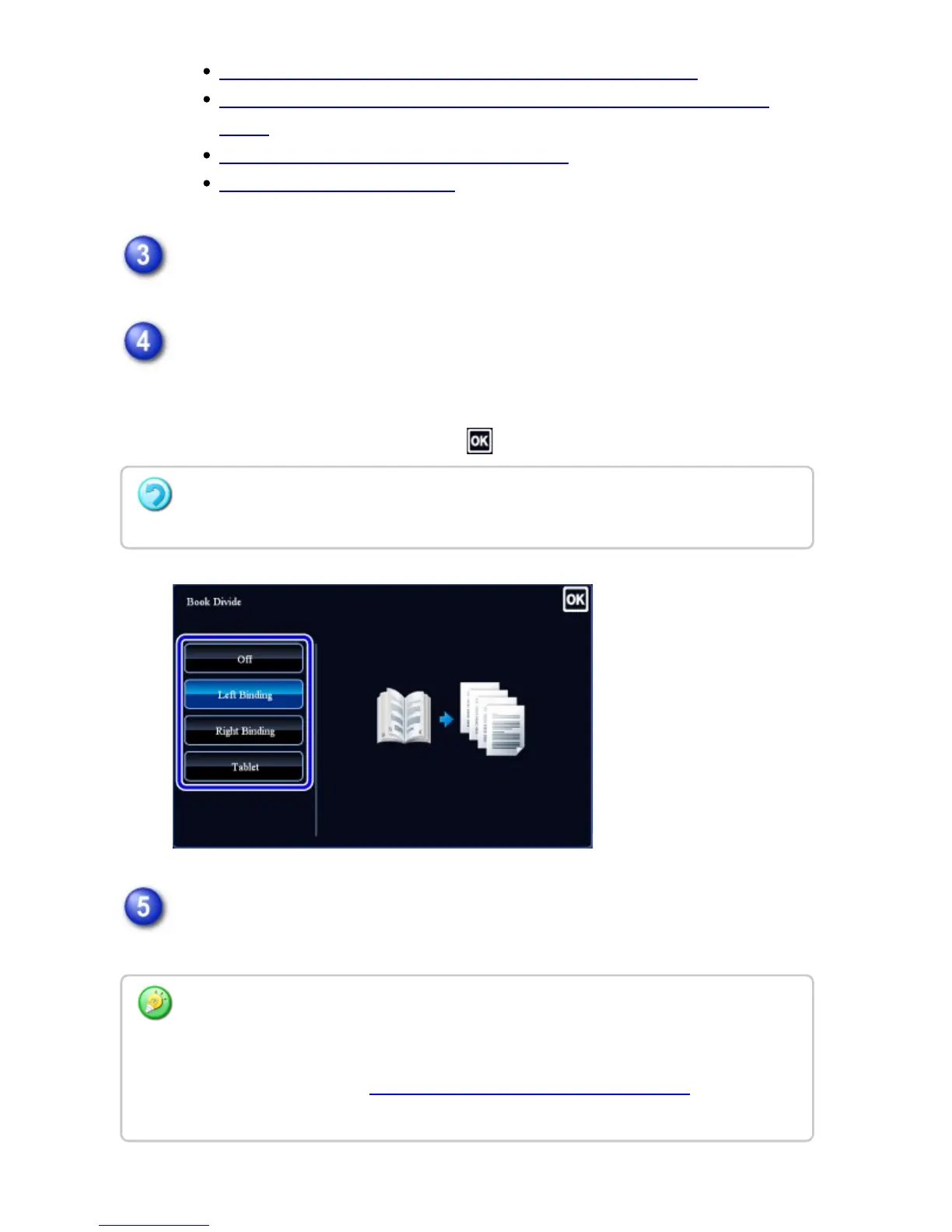
Tap the [Others] key, and tap the [Book Divide] key.
Select the binding edge of the pamphlet original.
Check the preview image displayed in the screen, and make sure that the binding
edge is correct.
After the settings are completed, tap .
Tap the [Start] key to start scanning of the original.
A beep will sound to indicate that scanning and transmission have ended.
To cancel the Book Divide setting:
Tap the [Off] key.
Tap the [Preview] key to preview the output image before sending it. After you have
scanned an original by tapping the [Preview] key, tap the [Additional Scan] key to scan the
next original. Tap the [Start] key to start sending an image.
For more information, see "CHECKING THE IMAGE TO BE TRANSMITTED". However,
settings for this function cannot be changed in the preview screen.
USER'S MANUAL | MX-M365N/MX-M465N/MX-M565N USER'S ... http://siica.sharpusa.com/portals/0/downloads/Manuals/MX-M365N-M...
639 of 1441 3/17/2016 7:14 AM



 To Next Page