SENDING TWO PAGES AS A SINGLE
PAGE
(2IN1)
Overview
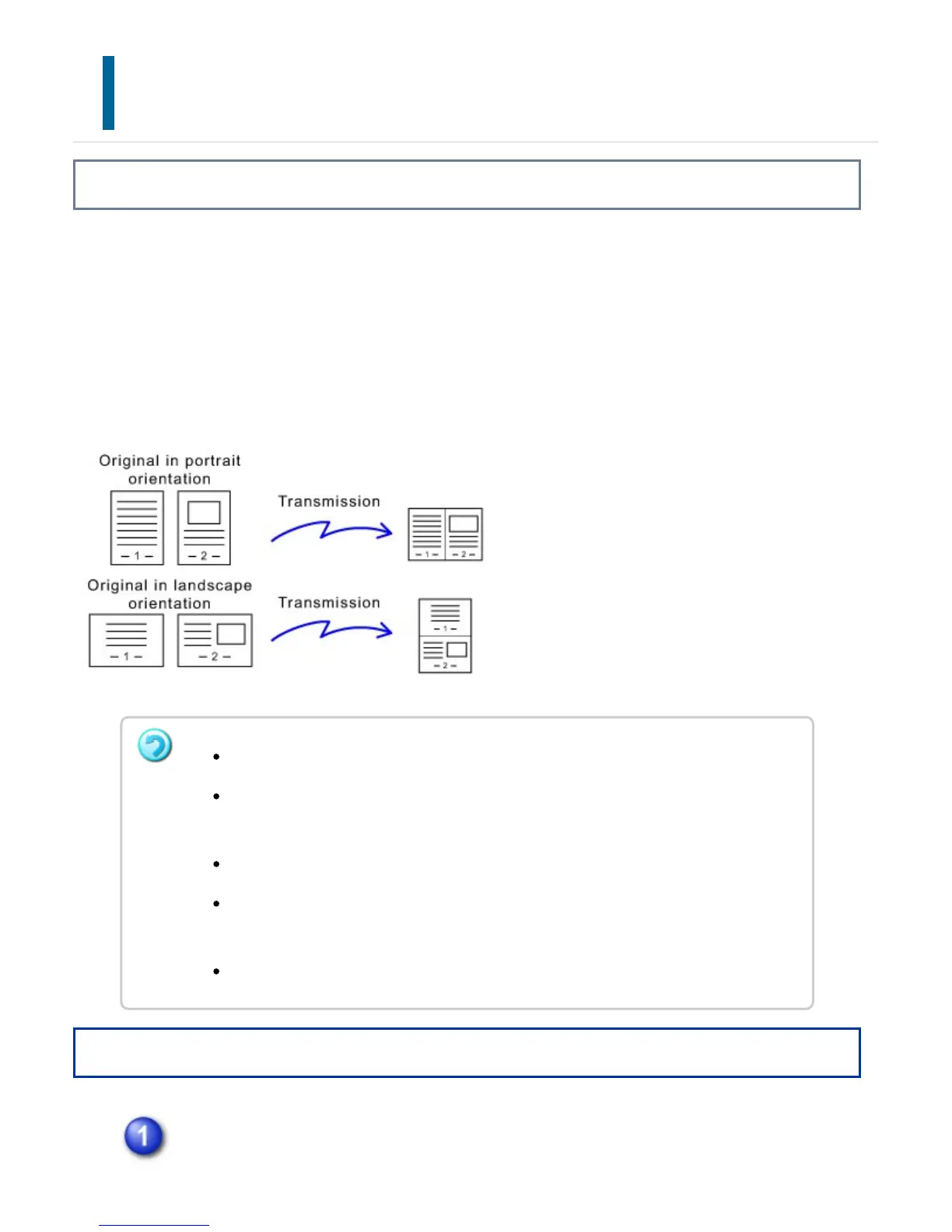
Reduce two original pages to the equal size and sent them as a single page. This
function is convenient when you have a large number of original pages and wish to
reduce the number of pages sent.
For the standard size (8-1/2" x 11" (A4) or 5-1/2" x 8-1/2" (B5 or A5)), original pages
are scanned from both the single pass feeder and document glass.
Operation
Place the original.
This function cannot be used in scan mode or data entry mode.
The 2in1 is only available for originals with a size other than a standard size (
8-1/2" x 11" (A4) or 5-1/2" x 8-1/2" (B5 or A5)).
Transmission is not possible at a size smaller than the original size.
When the scan size of the original is specified by numeric values, this function
cannot be used.
This function cannot be used together with Dual Page Scan or Card Shot.
USER'S MANUAL | MX-M365N/MX-M465N/MX-M565N USER'S ... http://siica.sharpusa.com/portals/0/downloads/Manuals/MX-M365N-M...
791 of 1441 3/17/2016 7:14 AM



 To Next Page