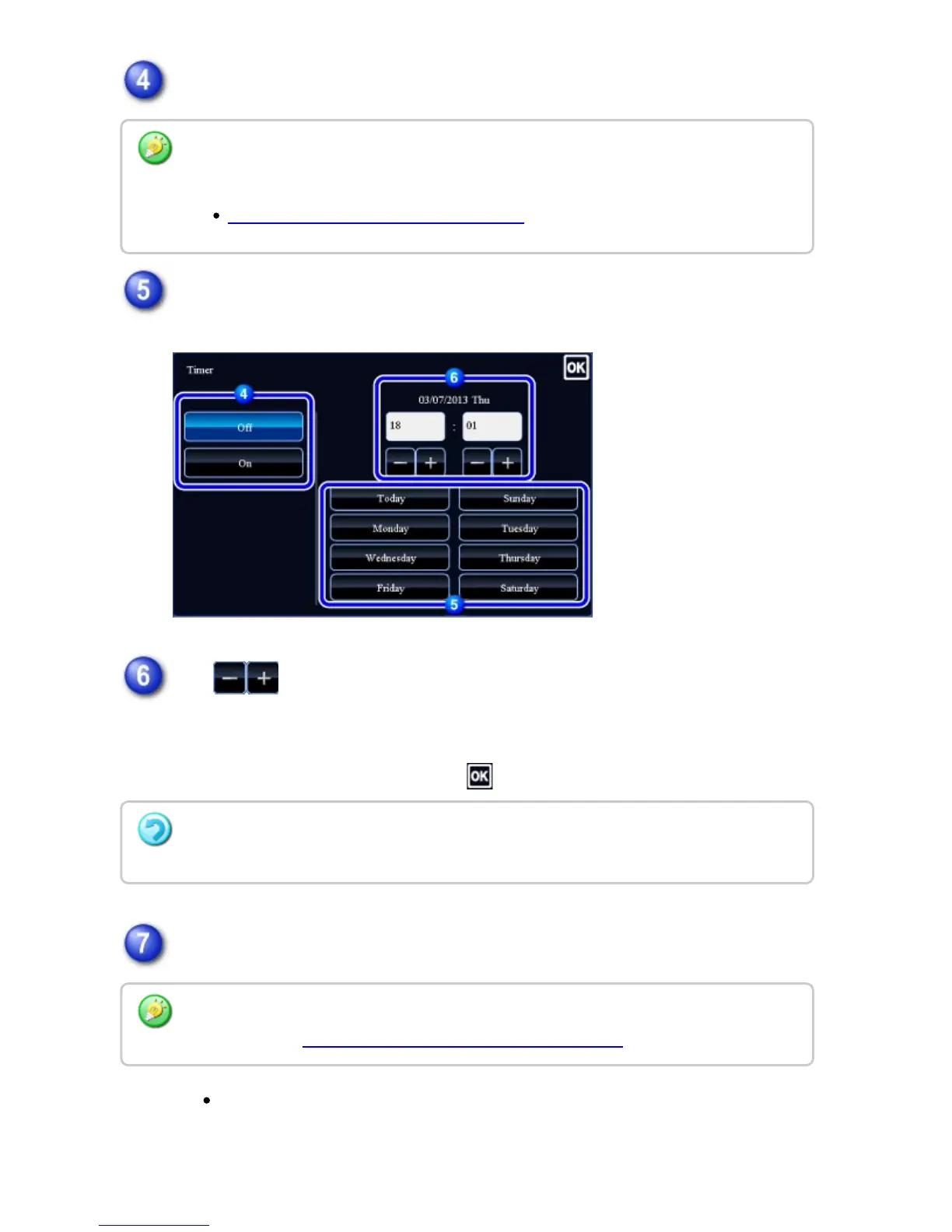
Tap [On] key.
Specify the date.
Tap to specify the time (hour and minute) in 24-hour format.
Tapping a key in the numeric value display field allows you to directly enter a
numeric value.
After the settings are completed, tap .
Tap the [Start] key to start scanning of the original.
If you inserted the original pages in the document feeder tray, all pages are
scanned.
A beep will sound to indicate that scanning has ended, and the machine
The setting will show the current time. If the time is different, correct it in the setting
mode before starting a job.
BEFORE USING THE NETWORK SCANNER
To cancel the Timer Transmission settings:
Tap the [Off] key.
Tap the [Preview] key to check the preview of an image before sending a fax. For more
information, see "CHECKING THE IMAGE TO BE TRANSMITTED".
USER'S MANUAL | MX-M365N/MX-M465N/MX-M565N USER'S ... http://siica.sharpusa.com/portals/0/downloads/Manuals/MX-M365N-M...
838 of 1441 3/17/2016 7:14 AM



 To Next Page