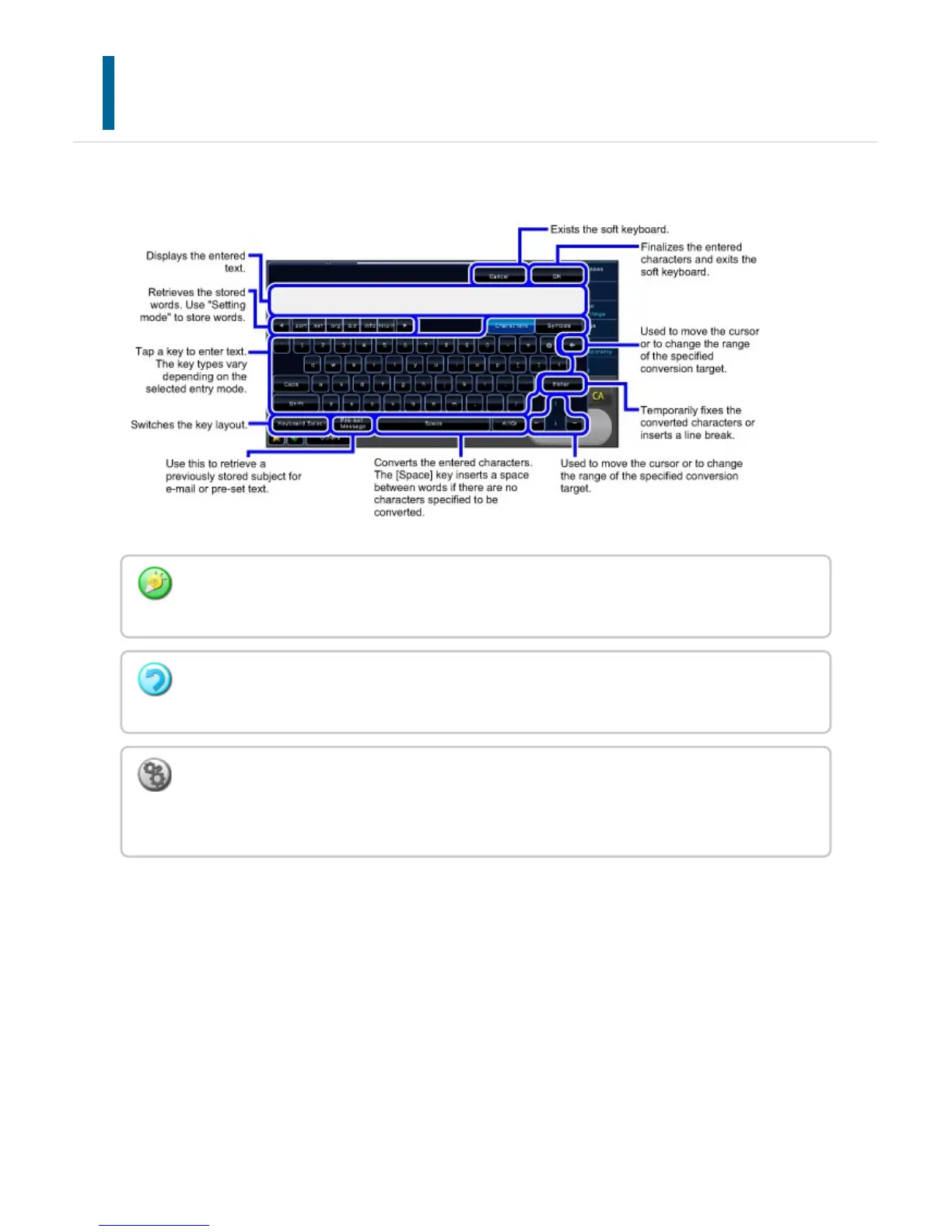
NAMES AND FUNCTIONS OF SOFT KEYBOARD
KEYS
Display the soft keyboard to register the name of a file, program, folder or user.
The soft keyboard shown here is an image for your reference. Different keys may be enabled
depending on the actual situation and condition under which you enter characters.
If "External Keyboard Priority" is selected in [Setting mode] →[System Settings]
→[Operation Settings] →[Set Keyboard Priority], the soft keyboard will not appear.
To register words:
In "Setting mode", select [System Settings] →[Operation Settings] →[Soft Keyboard
Template Setting].
USER'S MANUAL | MX-M365N/MX-M465N/MX-M565N USER'S ... http://siica.sharpusa.com/portals/0/downloads/Manuals/MX-M365N-M...
97 of 1441 3/17/2016 7:14 AM



 To Next Page