EasyManua.ls Logo

Sharp PC-1403 - Page 215

Sharp PC-1403
252 pages
Print Icon
To Next Page IconTo Next Page
To Previous Page IconTo Previous Page
Loading...
209
Note
:
The following ke
y
s ca
n
no
t be
u
se
d
i
n
th
e BASIC
m
ode
(
R
UN or
P
R
O mode)
.
lfg]
I
S
HI
FT
I
~
'
'=!]
I
S
H
I
FT
I
lfu!:
.
I
SHIFT
I
~
.
~
lliMJ
'
[M±l
'
[±d
,
ana Keys used
t
o
obtai
n
t
h
e
s
t
at
i
s
t
ics
(
i.
e.
,
n
,
x,
e
t
c
.
}
M
o
de
S
tat
e
ITT
rtl
RU
N
Prog
r
am being ex
e
c
u
te
d
-------
Progr
am
i
s
te
mp
orar
i
l
y
T
o
e
x
e
cut
e
th
e
ne
xt
T
o
d
is
pla
y
t
he
in
ter
rupted
l
in
e
prog
r
am
l
i
ne
be
ing
I
NPUT
statem
e
nt
b
ei
ng
e
x
ecuted or
a
l
r
ea
dy
e
x
e
c
uted
executed, hold thi
s
k
e
y
do
w
n
.
P
R
INT
statemen
t
j
u
st
now
exe
cu
t
e
d
Und
er break
E
rror
cond
i
t
i
on
du
r
i
ng
~
T
o
disp
l
ay
th
e error-
execu
t
i
ng
prog
r
a
m
prod
u
c
ing
li
n
e,
h
old
t
his
k
e
y down.
T
RON
co
n
d
i
tio
n
T
o ex
e
cu
t
e
d
ebuggi
n
g
T
o
di
s
p
l
a
y the
o
p
e
r
ati
o
n
prog
r
am
lin
e
be
i
ng
executed
o
r
al
r
eady
executed
,
h
old this
key
down
.
~
--
·
--
··
Ot
h
er
conditio
n
s
T
o
d
i
s
p
l
ay
a
n
an
s
w
e
r
Sa
m
e as
l
e
ft
j
u
s
t
p
rev
i
ous
l
y
ca
lc
ulate
d. (L
as
t
an
s
w
er fun
c
ti
o
n}
PRO
(
Wh
e
n the mode
i
s
c
h
ange
d
fr
om
R
U
N
t
o
P
RO and
prog
r
a
m
l
i
n
e is not
be
i
n
g
display
e
d
}
Prog
ra
m is
tempo
r
a
ri
ly
T
o
d
i
s
p
l
ay
t
h
e
l
in
e
Same as left
i
n
terrupted
i
nte
r
r
u
pted
E
rror
con
d
i
t
io
n
To
d
i
splay the
li
ne
Sa
m
e
a
s left
w
i
t
h
erro
r
O
t
he
r
c
ondit
i
ons
To
dis
p
l
a
y
t
he
f
i
r
st line
To display the
la
s
t
line
(When
t
he program
li
n
e is
b
e
in
g
di
sp
l
a
y
ed
}
T
o
displa
y
t
h
e
nex
t
To
d
i
spl
a
y the
p
ro
g
ram
l
ine
preceding
p
r
ogr
a
m
li
n
e
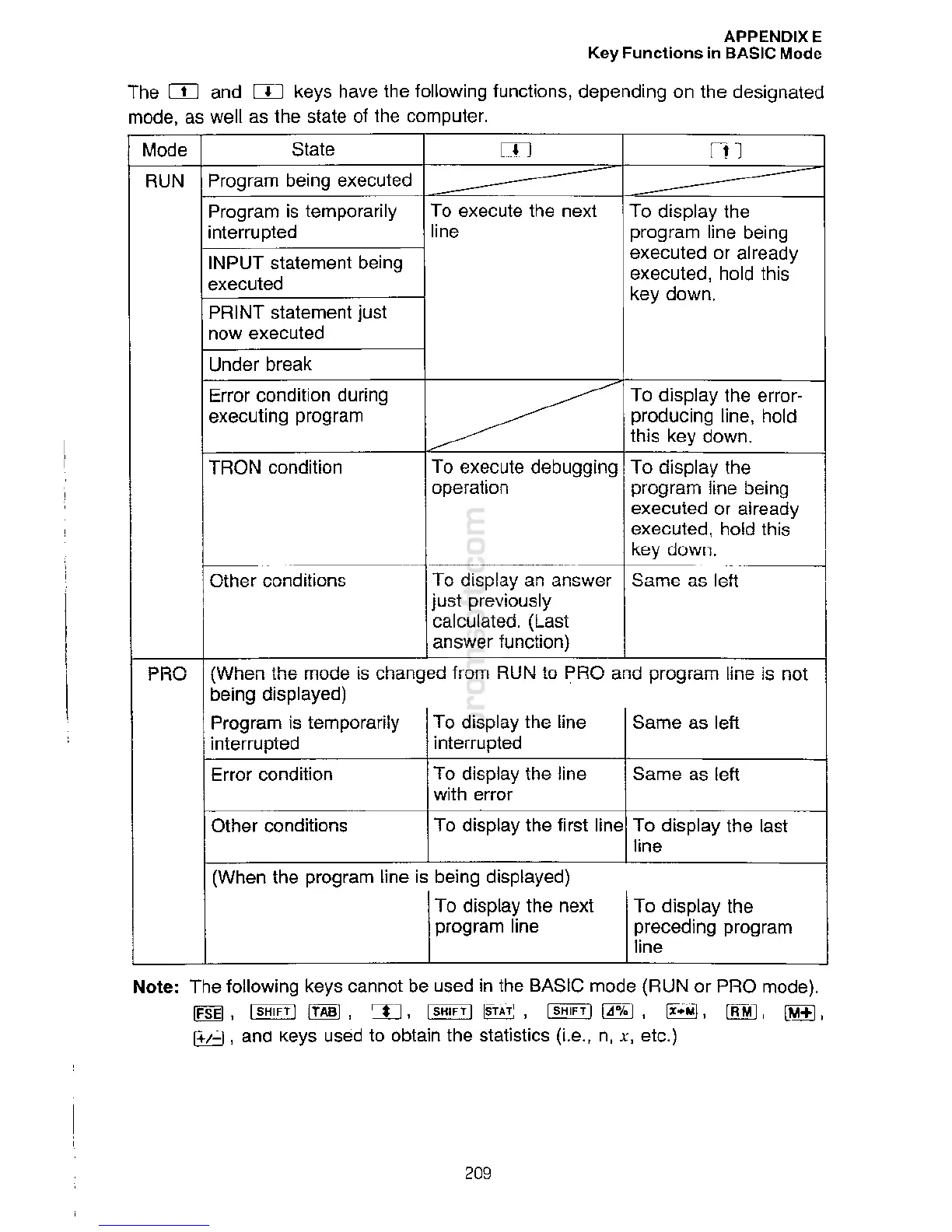
The
[I]
an
d
[I]
keys
h
a
ve
th
e
fo
ll
o
win
g
f
u
ncti
o
n
s
,
depend
i
ng
o
n the
des
i
gnated
m
ode, as well as
t
h
e state
o
f the co
mp
uter
.
APPENDIXE
K
e
y
Fun
c
t
i
ons in BASIC Mode

Related product manuals