EasyManua.ls Logo

Sharp PC-1403 - Page 71

Sharp PC-1403
252 pages
Print Icon
To Next Page IconTo Next Page
To Previous Page IconTo Previous Page
Loading...
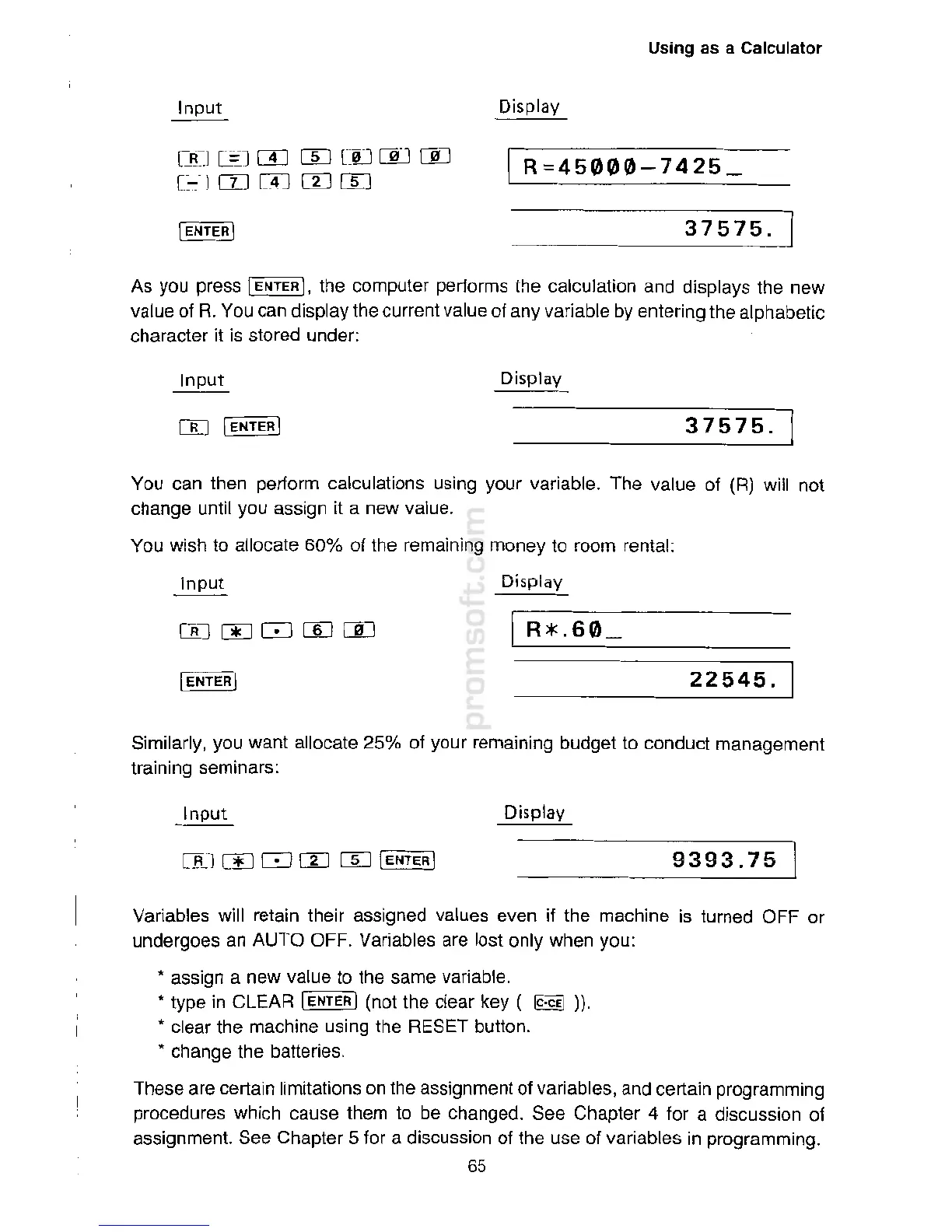
Var
i
a
bl
es
w
i
ll
r
e
ta
i
n
their
ass
ign
ed
v
a
l
ues
e
v
en if
t
he mach
i
n
e is turned
O
F
F
or
und
er
go
es an AUTO
O
F
F.
V
ar
ia
b
le
s
ar
e lost
o
nl
y when yo
u
:
*ass
i
gn a
n
ew
v
a
l
ue to the same
v
ariab
le
.
type
i
n
C
LEAR
I
EN
T
E
R
I
(n
o
t
the
c
l
ea
r key
(
~
)).
c
lear
t
h
e
mac
h
ine
usin
g
the
RE
S
ET
button
.
c
h
ange
t
he
ba
tter
i
es
.
These are
certa
i
n
limit
a
t
i
o
n
s
o
n
t
he
as
s
i
gnm
e
nt
o
f
v
a
ria
bl
e
s,
a
nd
ce
rt
ain
p
r
og
r
amming
procedures
wh
i
ch
ca
use
t
he
m to be
chan
ge
d.
S
ee
C
hap
t
er 4
fo
r
a
discuss
i
on of
ass
ign
men
t. See Chapter 5
f
or a
di
sc
u
ss
i
on
o
f
th
e
use
o
f
v
a
riab
l
es
in
prog
r
amming.
65
9393
.
75
Di
s
p
l
a
y
Si
mi
larly, you want
a
ll
o
c
a
te
2
5% of your
rem
a
in
i
ng budget
t
o
c
on
du
c
t m
anage
m
ent
t
r
ai
n
ing
semi
n
ars
:
22545.
D
isp
l
a
y
in
p
ut
Yo
u
can then
perf
o
r
m
c
al
c
u
lations
u
si
ng
y
our
v
a
ria
b
l
e
.
Th
e
v
a
l
ue
o
f (R) will not
c
h
a
ng
e until you assign it a
n
ew
v
a
l
u
e
.
Yo
u
w
i
sh to allocate
60
%
o
f
th
e
r
e
ma
i
n
i
n
g money to
ro
om
r
ental:
37575.
D
isp
la
y
As you
pr
e
s
s
I
E
N
TER
I,
the
com
p
ut
e
r
pe
rform
s
the
cal
c
u
l
a
t
ion
a
n
d
di
s
pl
a
y
s
t
he
new
v
alue
o
f
R
.
Y
ou
c
an
d
is
p
lay
t
h
e current
v
a
lu
e
of
an
y v
a
r
i
ab
l
e
b
y
en
ter
in
g
th
e
alphab
e
t
ic
c
har
ac
t
er
it is
store
d
un
d
er
:
375
7
5
.
R
=
45000-7425_
rn
]@1m
m
c:
u
oooo
c:-::
·
1
com rn m
Di
sp
l
a
y
Using as a
Calculator

Related product manuals