EasyManua.ls Logo

Sharp PC-1500 - Page 137

Sharp PC-1500
182 pages
Print Icon
To Next Page IconTo Next Page
To Previous Page IconTo Previous Page
Loading...
1
32
All and more about Sh
ar
p PC-1500 at http:/lwww.PC-1500
.in
fo
0)
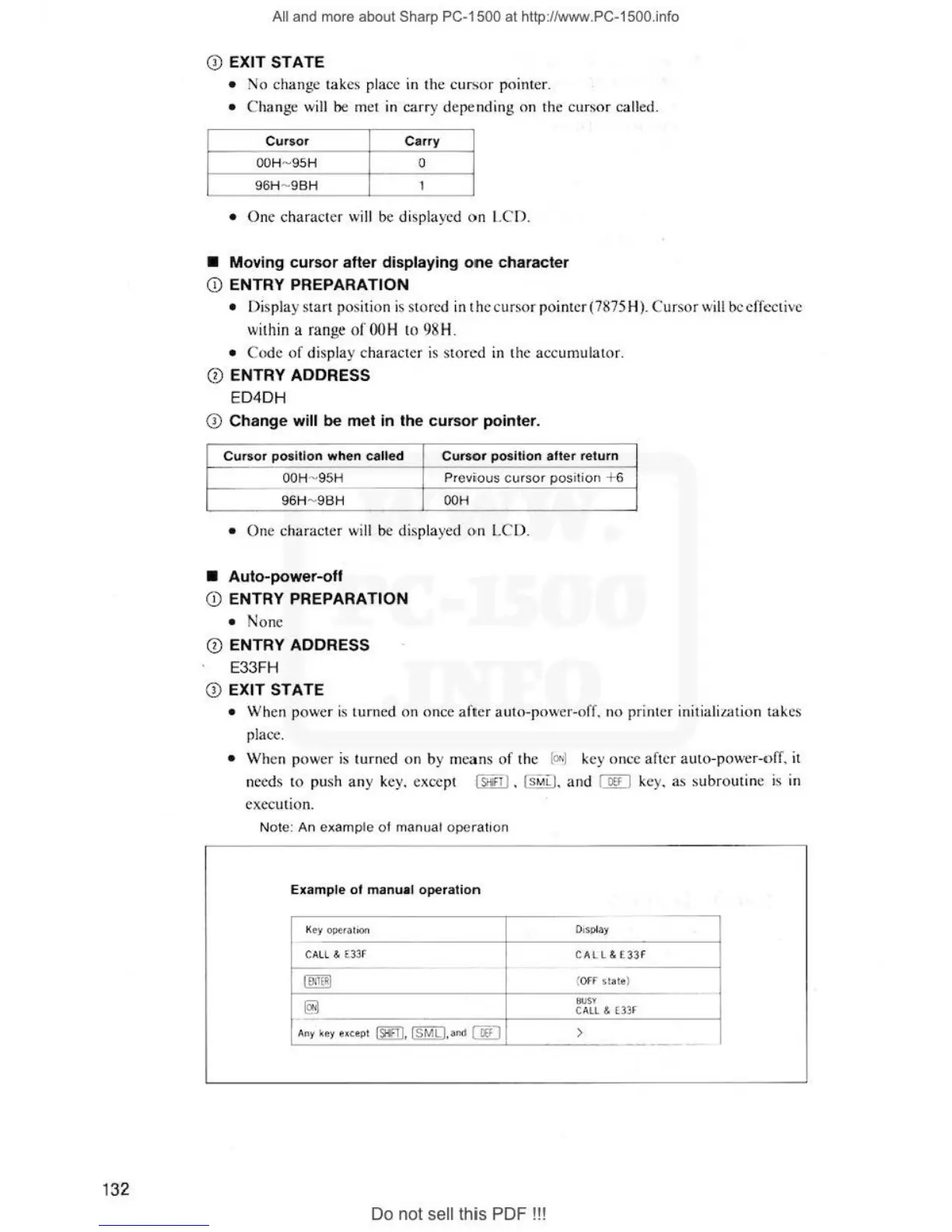
EXIT
STATE
No
change tak
es
pl
ac
e in the c
ur
sor pointer.
Change wi
ll
be
met in carry depending on the
cu
rsor called.
Cursor
Carry
OO
H-
9S
H
0
96H
- 9
BH
1
One character will be
di
splay
ed
on
LCD.
Moving
cursor
after
displaying
one
character
(i)
ENTRY PREPARATION
Display start p
os
ition is sto
red
in thccurso
rpoi
nter(78
75
H). C
ur
sor w
ill
be effective
wi
th
i
naran
gcofOOH to98H.
Co
de
of
display character is stored
in
the accumulator.
Q)
ENTRY ADDRESS
ED4DH
CD
Change will
be
met
in
the
cursor
pointer.
Cursor
position
when
calle
d
Cu
rs
or
position
alt
er
return
OOH
- 9
5H
Prev
iious c
ursor
positi
on
+6
9
6H
-
98H
OOH
One character wi
ll
be
displayed on
LC
O.
Auto-power-off
CD
ENTRY PREPARATION
None
CD
ENTRY ADDRESS
E33FH
Q) EXIT STATE
When power is turned on once
aft
er auto-
pow
er-o
ff
. no
pri
nter initiali
za
tion ta
ke
s
pl
ac
e.
W
he
n power is turned on by means of the
[ON]
k
ey
on
ce
after auto-power-nff.
it
need
s to push any ke
y.
exce
pt
[ffi]
. (
sM
L)
. and I
Off
I k
ey
.
as
subrout
in
e is
111
execution.
Not
e:
An
exam
ple
of
manual ope
ration
Example
of
manual
operation
Key
o~ra
ti
o
n
0 J
SJ)
l
ay
CA
LL &
€33
F
C A
LL
&
E33
F
1--
IENJERI
(
OFF
si
ate)
@]
BUSY
CALL &
(3
3F
A
ny
key except
fID
, I
SMLI
, and
[filJ
>
---
Do not sell this PDF !! !