23
1
2
3
4
5
6
7
8
9
...
...
Controlling temperature
The refrigerator controls its temperature automatically. However, you can adjust the temperature as below.
How to check the current
temperature setting
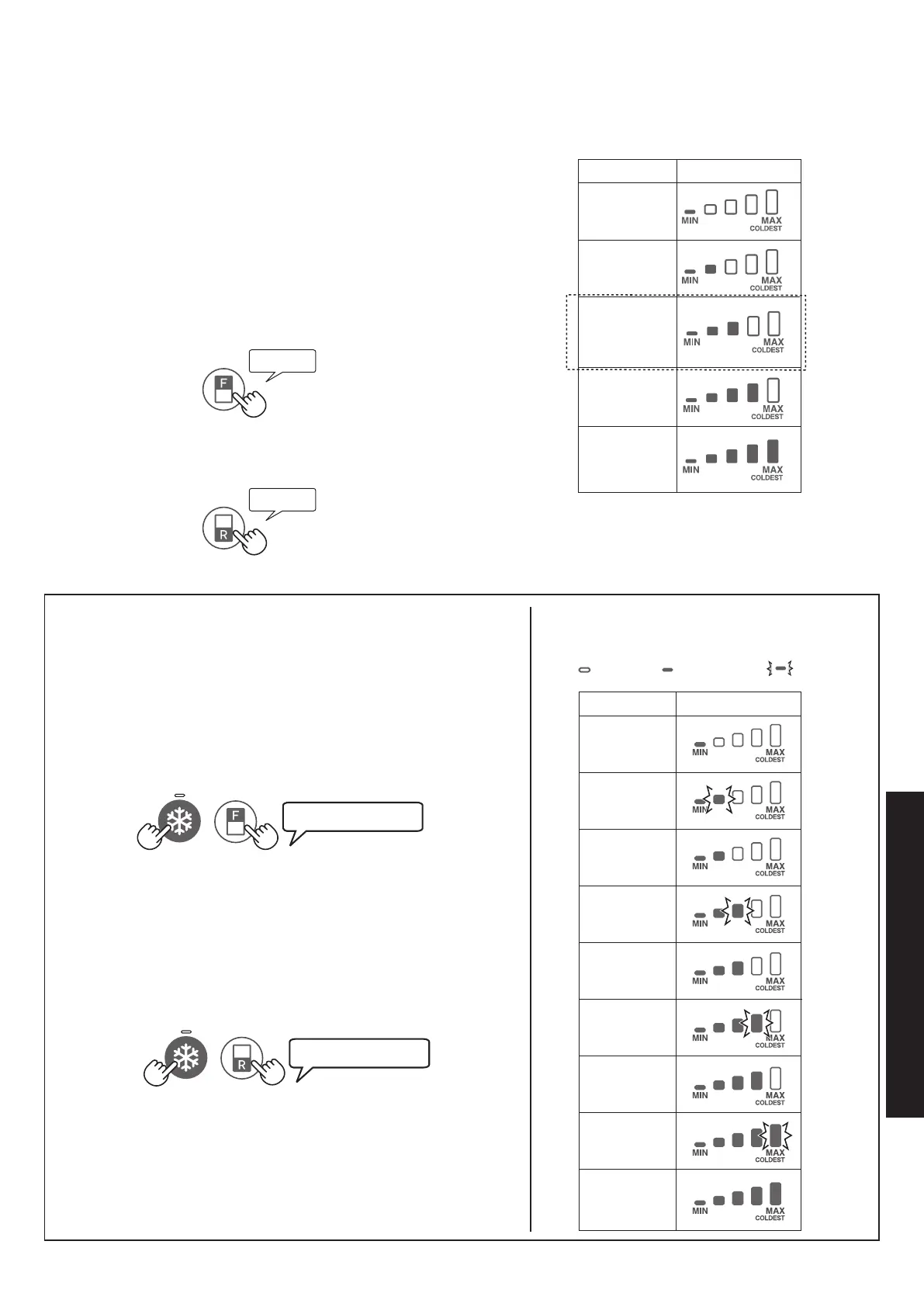
The indicator lights up to show the current temperature
level by pressing “F” or “R” button.
Freezer compartment : Press “F” button.
Refrigerator compartment : Press “R” button.
Setting of Freezer/Refrigerator
compartment
Freezer compartment
Press “F” button.
Press “F” button to change the temperature level.
Refrigerator compartment
Press “R” button.
Press “R” button to change the temperature level.
• Temperature indicator changes as the picture below
() by pressing “F” or “R” button.
1
2
3
4
5
• After adjusting the temperature level, the indicator turns
off approximately 5 seconds later.
• The temperature setting remains the same even after
power failure.
Default setting
Advanced Setting of Freezer/Refrigerator
compartment
The temperature of refrigerator compartment and freezer
compartment can be adjusted in 9 levels (level 1 ~ 9) by following
the steps a to b.
Freezer compartment
Press “F” button rst. Hold down “F” button and then press
“Express freezing” button for 3 seconds or more.
The indicator returns to “Default setting”.
Press “F” button to change the temperature level.
Follow the steps a to b if you want to adjust the temperature in 5
levels.
Refrigerator compartment
Press “R” button rst. Hold down “R” button and then press
“Express freezing” button for 3 seconds or more.
The indicator returns to “Default setting”.
Press “R” button to change the temperature level.
Follow the steps a to b if you want to adjust the temperature in 5
levels.
Beep beep beep
Beep beep beep
• Temperature indicator changes as the picture
below () by
pressing “F” or “R” button.
Default setting
OFF Lighting Flashing
Beep
(B652).indb 23 2015/04/21 10:05:37



 To Next Page