ENGLISH
EN-6
ENGLISH
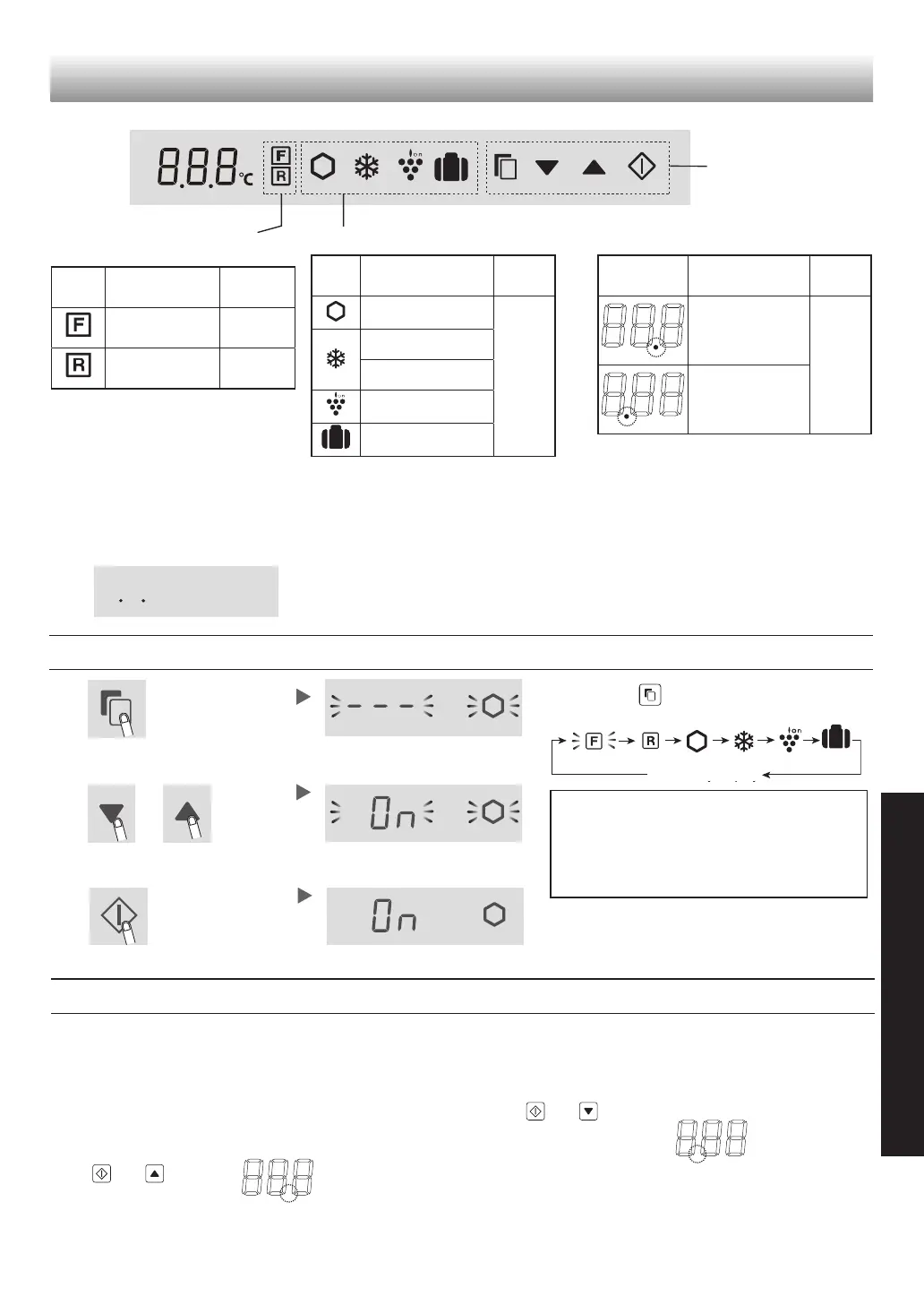
Control panel
(SJ-XG60PG)
Operation keys
Controlling temperature
icons
Useful modes icons Additional modes
Note
• When you press one of the keys, all icons ash once
and show the standby display.
• Mode icons or indicators in operation light up on the
standby display.
When Express cool is in operation, the icon ashes on
the standby display.
• When there is no operation for approximately 1
minute, the display returns to the standby display
automatically. The standby display turns off if there is
no operation for another 1 minute.
• If the refrigerator stops because of power failure, the
modes except for Extra cool
,
Express freezing and
Express cool operate the same way as before at the
time of re-power.
Turn-on state
When press
button, the icons change in
the order shown as below.
Select the mode icon.
“Express cool”only
3
Complete the setting by pressing
for 3 seconds or more.
(Beep, Beep, Beep)
Operations of useful modes
1
2
3
Select on/off.
ON/OFF switches in the order by pressing the key.
Complete the setting.
Current setting
(This indication shows OFF.)
The setting is changed.
Operations of additional modes
Door alarm
• When the refrigerator door is left open for over 1
minute, door alarm sounds once, and again after 1
minute.
• If the door is left open for approx. 3 minutes, the alarm
sounds continuously.
• The alarm stops after close the door.
Turn off operation
Press and
simultaneously
for 3 seconds or more.
(Beep, beep, beep)
Sound of button operation
• The electric sound is operated when touching each
keys.
Note
When you want to turn on the additional mode, follow
the same step again. (The indicator turns on.)
Turn off operation
Press and
simultaneously
for 3 seconds or more.
(Beep, beep, beep)
The indicator
turns off.
The indicator
turns off.
Icon Meaning
Default
setting
Freezer
compartment
-18°C
Refrigerator
compartment
3°C
Icon Meaning
Default
setting
Extra cool
OFF
Express freezing
Express cool
Plasmacluster
Vacation mode
Indicator Meaning
Default
setting
Door alarm
ON
Sound of key
operation
Standby display


 To Next Page