EasyManua.ls Logo

Sharp VC-MH321HM - Page 31

Sharp VC-MH321HM
41 pages
Print Icon
To Next Page IconTo Next Page
To Previous Page IconTo Previous Page
Loading...
CUSTOMISED
INSTALLATION
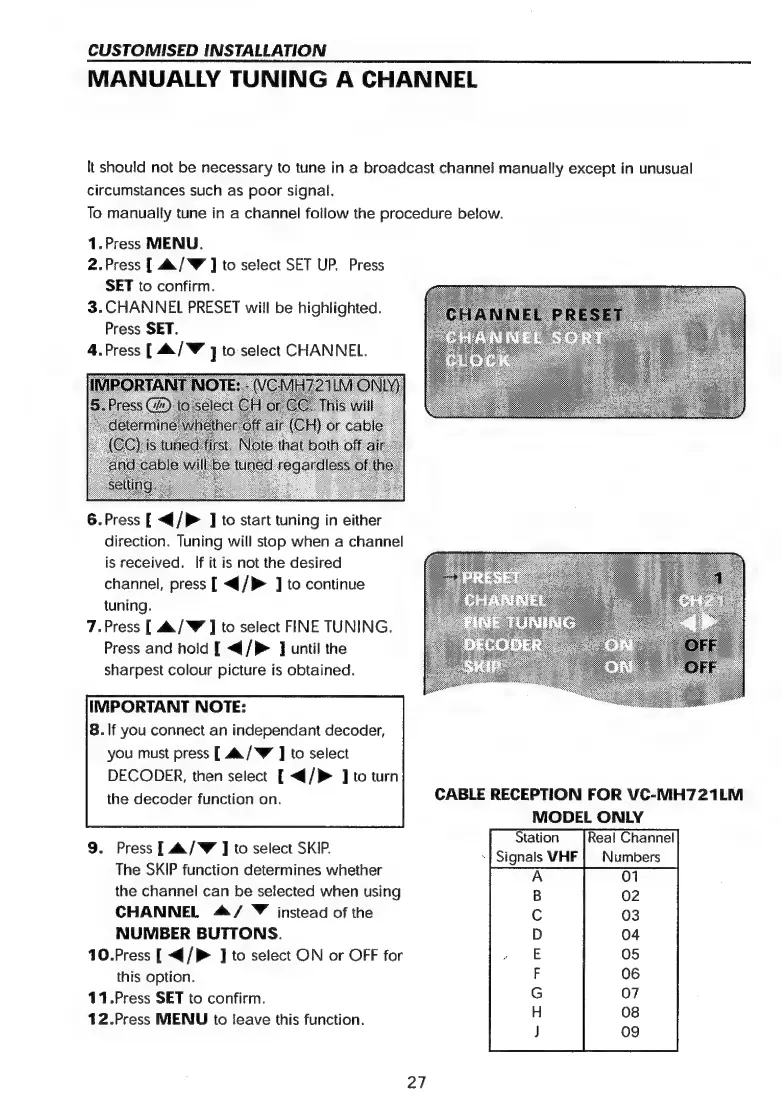
MANUALLY
TUNING
A
CHANNEL
It
should
not
be
necessary
to
tune
in
a
broadcast
channei
manually
except
in
unusual
circumstances
such
as
poor
signal.
To
manually
tune
in
a
channel
follow
the
procedure
below.
1.Press
MENU.
2.Press
[
4./W
]
to
select
SET
UP.
Press
SET
to
confirm.
3.CHANNEL
PRESET
will
be
highlighted.
Press
SET.
4.Press
[
&/W
]
to
select
CHANNEL.
6.Press
[
<{/}
]
to
start
tuning
in
either
direction.
Tuning
will
stop
when
a
channel
is
received.
If
it
is
not
the
desired
channel,
press
[
</P>
J]
to
continue
tuning.
7.Press
[
&/W
J
to
select
FINE
TUNING.
Press
and
hold
[
</P>
]
until
the
sharpest
colour
picture
is
obtained.
IMPORTANT
NOTE:
8.
If
you
connect
an
independant
decoder,
you
must
press
[
4a/W
J
to
select
DECODER,
then
select
[
</}>
]
to
turn
MODEL
ONLY
Station
Real
Channel
~|
Signals
VHF
|
Numbers
9.
Press
[
&/W
J
to
select
SKIP.
The
SKIP
function
determines
whether
the
channel
can
be
selected
when
using
CHANNEL
4/
©
instead
of
the
NUMBER
BUTTONS.
10.Press
[
</P>
J]
to
select
ON
or
OFF
for
this
option.
11.Press
SET
to
confirm.
12.Press
MENU
to
leave
this
function.
“TO
™mm™oooo>d
27

Related product manuals