EasyManua.ls Logo

Sharp VC-MH321HM - Page 37

Sharp VC-MH321HM
41 pages
Print Icon
To Next Page IconTo Next Page
To Previous Page IconTo Previous Page
Loading...
MORE
INFORMATION
ABOUT
YOUR
VCR
ON-SCREEN
DISPLAY
All
the
information
you
need
on
the
VCR
status
will
be
summarised
on
the
on-screen
display.
If
you
are
recording,
playing
back
a
tape
or
watching
a
broadcast
on
the
video
channel
you
can
call
up
three
standard
on-screen
displays.
The
display
can
be
selected
by
pressing
the
MODE
OSD
button
on
the
remote
control,
1,2,3
or
4
times.
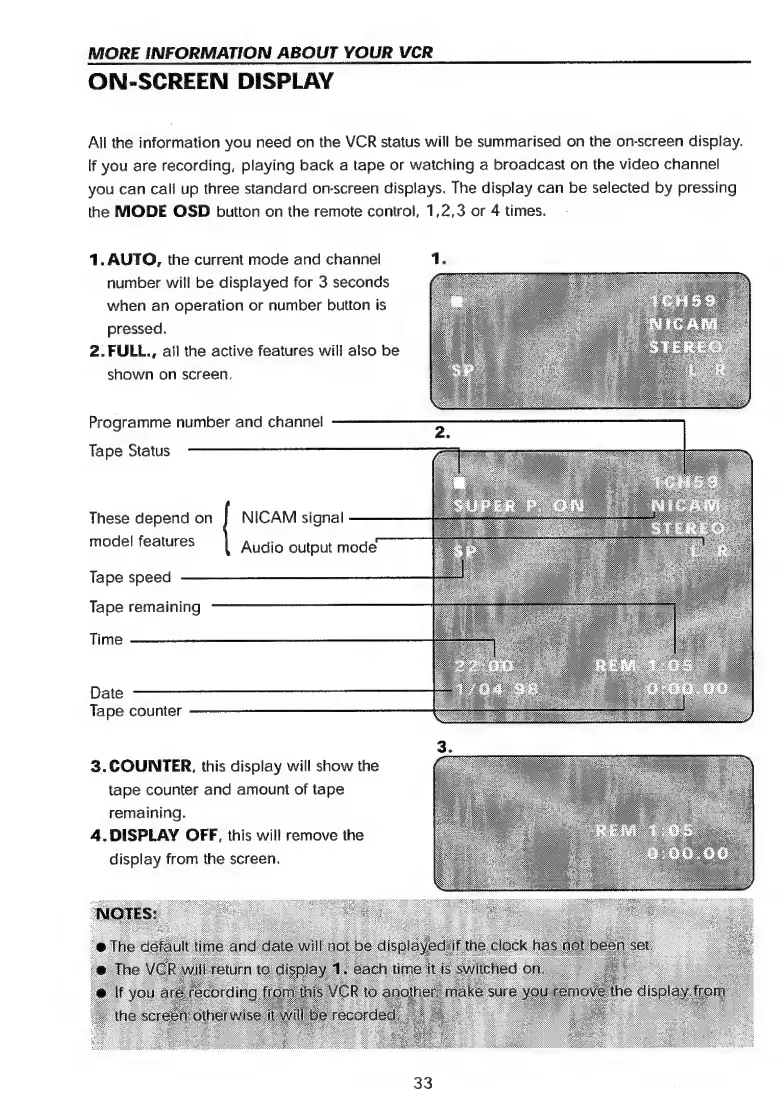
1.
AUTO,
the
current
mode
and
channel
number
will
be
displayed
for
3
seconds
when
an
operation
or
number
button
is
pressed.
2.FULL.,
all
the
active
features
will
also
be
shown
on
screen,
Programme
number
and
channel
Tape
Status
These
depend
on
]
NICAM
signal
model
features
Audio
output
mode
Tape
speed
Tape
remaining
Time
Date
Tape
counter
3.
COUNTER,
this
display
will
show
the
tape
counter
and
amount
of
tape
remaining.
4.DISPLAY
OFF,
this
will
remove
the
display
from
the
screen.
33

Related product manuals