EasyManua.ls Logo

Sharp VC-MH321HM - Page 36

Sharp VC-MH321HM
41 pages
Print Icon
To Next Page IconTo Next Page
To Previous Page IconTo Previous Page
Loading...
MORE
INFORMATION
ABOUT
YOUR
VCR
OE
ee
VCR
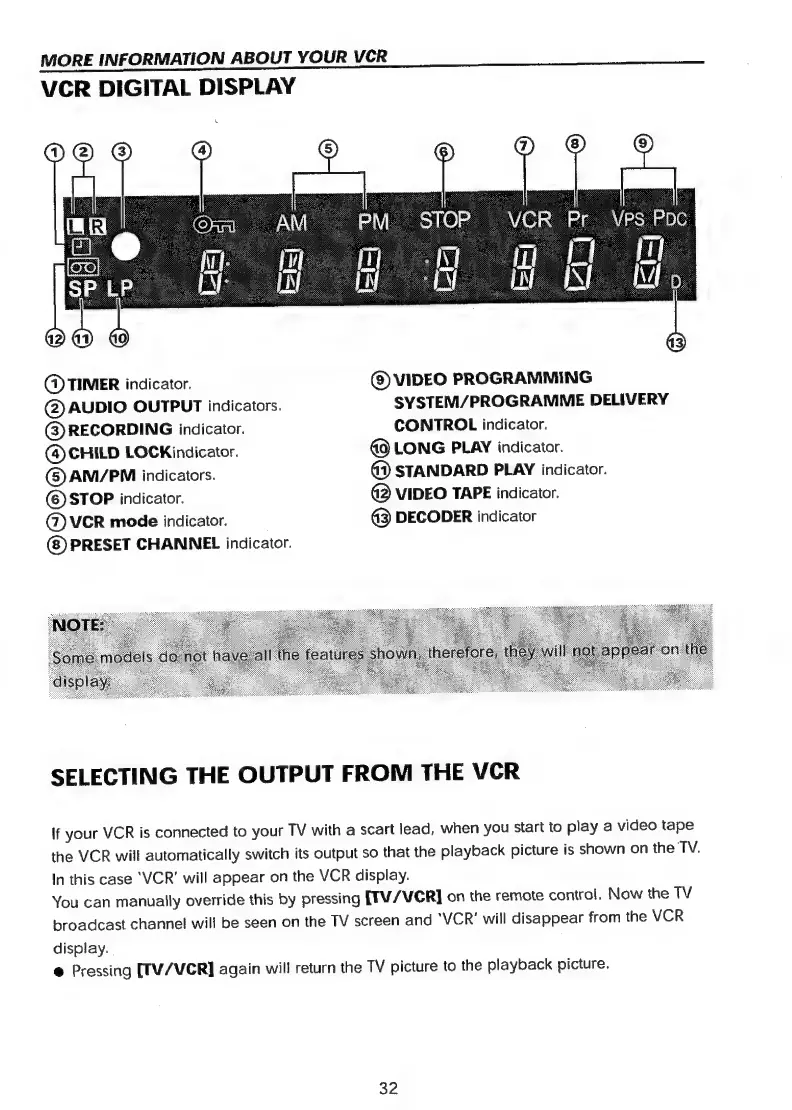
DIGITAL
DISPLAY
(@)
TIMER
indicator.
©
VIDEO
PROGRAMMING
@
AUDIO
OUTPUT
indicators.
SYSTEM/PROGRAMME
DELIVERY
(3)
RECORDING
indicator.
CONTROL
indicator.
(@
CHILD
LOCKindicator.
G9
LONG
PLAY
indicator.
(©)
AM/PM
indicators.
42)
STANDARD
PLAY
indicator.
©
STOP
indicator.
3
VIDEO
TAPE
indicator.
@)
VCR
mode
indicator.
43)
DECODER
indicator
(8)
PRESET
CHANNEL
indicator.
SELECTING
THE
OUTPUT
FROM
THE
VCR
if
your
VCR
is
connected
to
your
TV
with
a
scart
lead,
when
you
start
to
play
a
video
tape
the
VCR
will
automatically
switch
its
output
so
that
the
playback
picture
is
shown
on
the
TV.
In
this
case
‘VCR’
will
appear
on
the
VCR
display.
You
can
manually
override
this
by
pressing
[TV/
VCR]
on
the
remote
control.
Now
the
TV
broadcast
channel!
will
be
seen
on
the
TV
screen
and
‘VCR’
will
disappear
from
the
VCR
display.
@
Pressing
[TV/VCR]
again
will
return
the
TV
picture
to
the
playback
picture.
32

Related product manuals