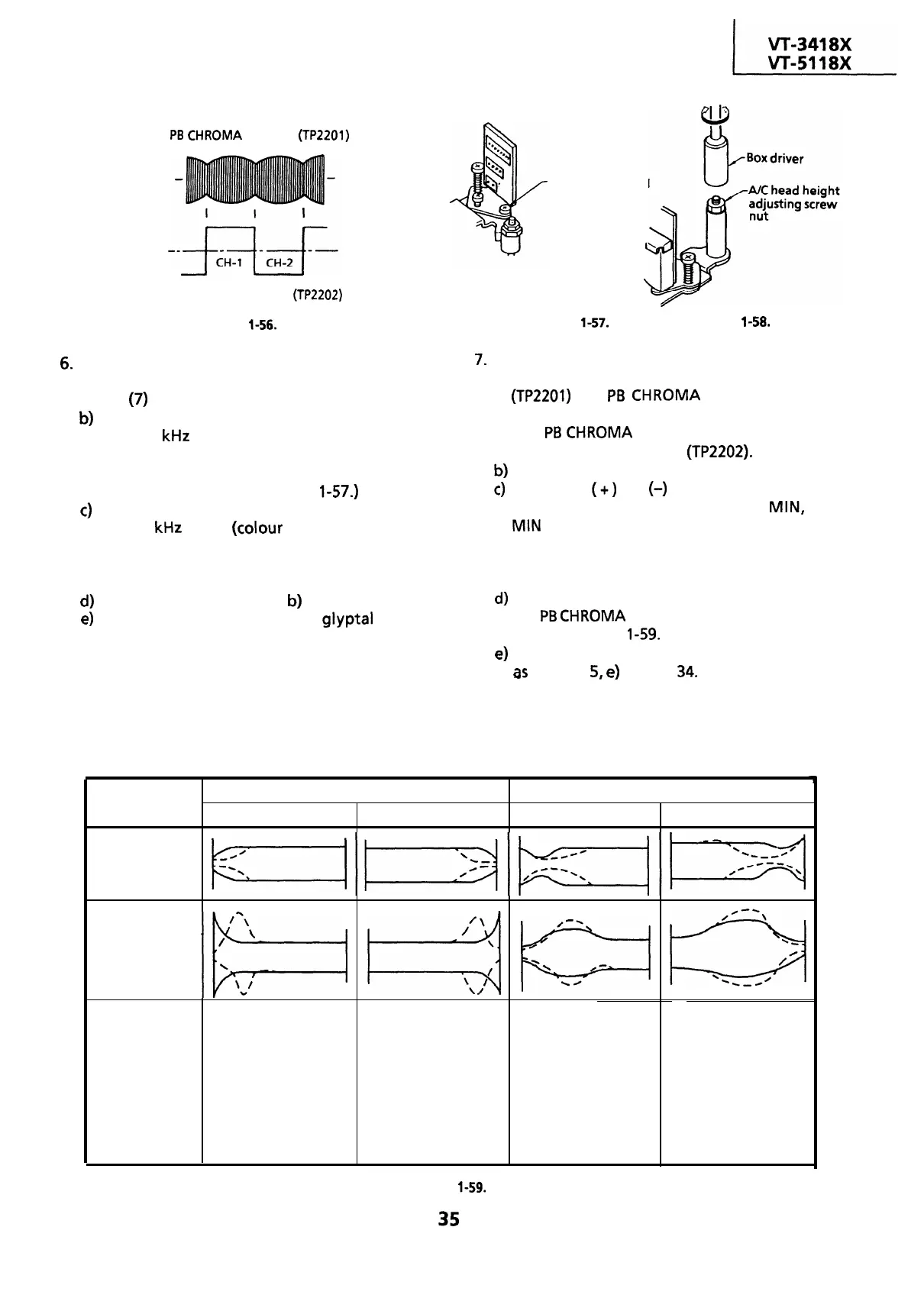
PB
CHROMA
envelope
(TP2201)
Head switching pulse
(TP2202)
Figure
l-56.
6.
Adjustment of A/C head height and azimuth
a) Connect an oscilloscope to the audio output.
(Pin
(7)
of EL connector)
b)
Use the alignment tape and play back its
audio 7
kHz
signal (monoscope pattern for
video signal). Adjust the azimuth adjusting
screw to obtain the maximum audio output
on an oscilloscope. (See Figure
l-57.)
c)
Use the alignment tape and play back its
audio 1 kHz signal (colour bar for video signal)
and slowly rotate the A/C head height
adjusting nut with the special box driver to
obtain the maximum audio output.
d)
Perform the adjustment in
b)
again.
e)
After this adjustment, apply glyptal to the
screws and nuts to fix them.
Azimuth adjusting
screw
Figure
l-57.
Figure
l-58.
7.
Adjustment of tape drive train and X-Position.
a) Connect the oscilloscope to the test points
(TP2201)
for
PB
CHROMA envelope output.
Set the synchronism of the oscilloscope to EXT.
The
PB
CHROMA
signal is to be triggered by
the head switching pulse (TP2202).
b)
Play back the tape drive train alignment tape.
c)
Push the
(+)
or
(-)
button to change the
envelope waveform from MAX to
MIN,
and
MIN to MAX. Adjust the guide roller’s height
on the supply and take-up sides with an
adjusting screw driver, to obtain an envelop
waveform that is as flat as possible.
d)
If the tape is above or below the helical lead,
the
PB
CHROMA
waveform will take the shape
shown in Figure
l-59.
e)
Adjust for maximum flatness of the envelope
as
the step
5,
e)
in page
34.
When the tape is above the helical lead.
When the tape is below the helical lead.
Supply side
Take-up side
Supply side
Take-up side
~~~tyzqyy~t-yyjjq
,pJ
yJ
E---l
Kr>
Supply side guide Take-up side guide
Supply side guide
Take-up side guide
roller rotated in roller rotated in
roller rotated in
roller rotated in
clockwise direction
clockwise direction
counterclockwise
counterclockwise
direction (raises guide
Adjustment
(lowers guide roller) to
(lowers guide roller) to
direction (raises guide
roller) to make the
flatten envelope. flatten envelope.
roller) to make the
tape float above the
tape float above the
helical lead. The supply
helical lead.
side guide roller is
The take-up side guide
roller is then rotated in
then rotated in the
the clockwise direction
clockwise direction to
to flatten the
flatten the envelope.
envelope.
Figure
l-59.
35


 To Next Page
 Loading...



