6
VT-G14
VT-G21
LOCATION OF USER'S CONTROL (Continued)
TV/VIDEO
CH
PLAY
STOP
REW
REC PAUSE
DPSS
PROG
MENU
TV
•
VCR COMBINATION
SET
RETURNCONFIRM
FF
TR
123
456
78
0
9
COUNTER
RESET
TAPE
SPEED
TIMER
ON/OFF
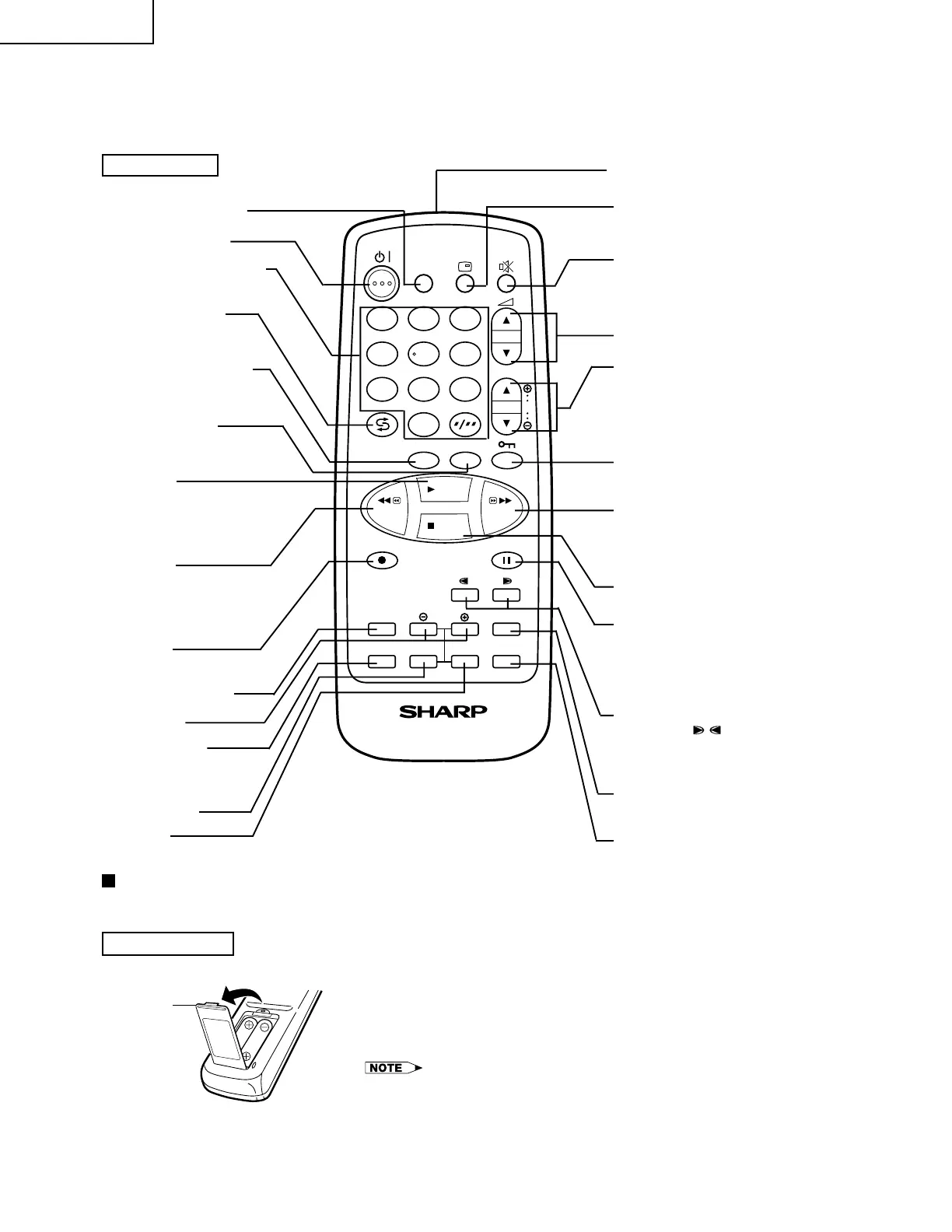
RETURN button
CONFIRM button
• Used to confirm the
programme setting.
REW button
• Used to rewind the tape or to
conduct Reverse Video Search
during playback mode.
Remote Control
REC button
• Used to record a programme.
STANDBY/ON button
CHANNEL SELECT buttons
FLASHBACK button
Returns to previously
viewed channel.
TAPE SPEED button
• Used to select the recording
tape speed.
PLAY button
• Used for tape playback.
• Used to cancel the PAUSE/
STILL mode and return to nor-
mal playback operation.
SET button
TV/VIDEO Select button
Infrared Transmitter Window
MUTE button
Press → Mutes sound.
Press again → Restores
sound to previous level.
VOLUME UP/DOWN buttons
CHANNEL UP/DOWN
buttons (TRACKING ±/—)
• Used to select the
CHANNEL.
• Used to adjust the TRACK-
ING while playing the tape.
COUNTER RESET button
• Used to reset the tape
counter.
CHILD-PROOF LOCK button
• Used to lock any selected
mode.
FF button
• Used to fast forward the tape
or to conduct Forward Video
Search during playback
mode.
STOP button
• Used to stop the tape.
PAUSE button
• Used to temporarily stop the
tape during recording mode.
• Used to display a still
picture during playback
mode.
DPSS buttons
• Press the ( / ) button to
search for the index signal
and begin playback auto-
matically.
PROGRAMME button
• Press the button to set the
programme Timer.
MENU button
• Used to select the menu
screen.
Inserting batteries
Pull up
±, — buttons
TIMER ON/OFF button
Installing dry batteries in the remote control unit
Before using the TV set for the first time, install the supplied dry batteries in the remote control.
! With your thumb nail, pull up the slit as indicated by the arrow
to remove the back cover.
@ Insert two batteries (size “AA”). Be sure to match the battery
±/— terminals with the ±/— marks inside the compartment.
# Replace the battery cover.
• Remove batteries if weak or if the unit is not in use for long periods.
• Do not mix old and new batteries.
• Incorrect installation of the batteries may damage the remote control.
DISPLAY button
• Used to display the different
current settings on the
screen.



 To Next Page