3
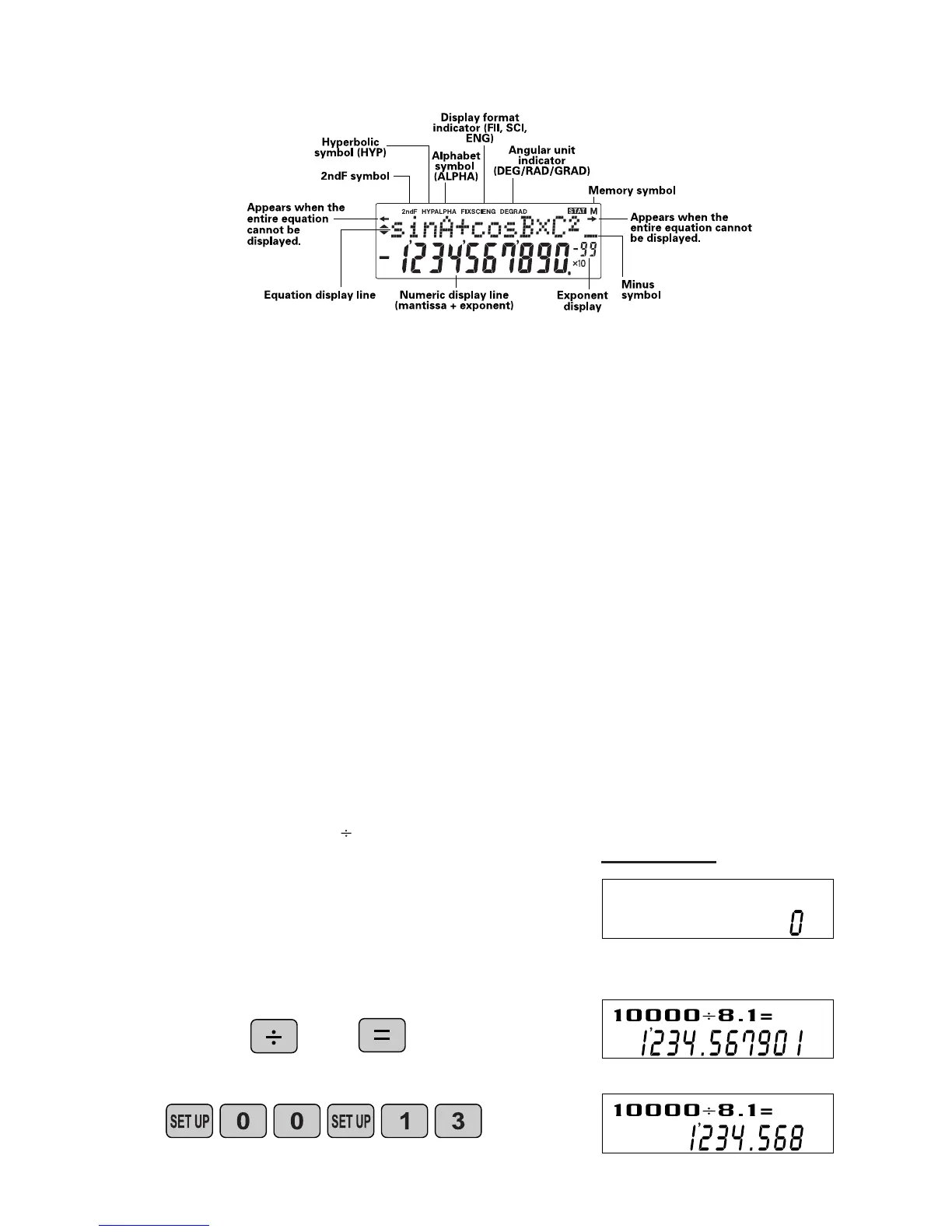
For convenient and easy operation, this model can be used in one of four display modes.
The selected display status is shown in the upper part of the display (Format Indicator).
N ote: If more 0’s (zeros) than needed are displayed when the O N /C key is pressed, check
whether or not the calculator is set to a Special Display Format.
• Floating decimal point format (no symbol is displayed)
Valid values beyond the maximum range are displayed in the form of a [10-digit
(mantissa) + 2-digit (exponent)]
• Fixed decimal point format (FIX is displayed)
Displays the fractional part of the calculation result according to the specified
number of decimal places.
• Scientific notation (SCI is displayed)
Frequently used in science to handle extremely small or large numbers.
• Engineering scientific notation (ENG is displayed)
C onvenient for converting between different units.
(specifies normal mode)
<Example>
Let’s compare the display result of
[10000 8. 1 =] in each display format.
4 . D I S P L AY F O R M AT A N D
D E C I M A L S E T T I N G F U N C T I O N
3 . D I S P L AY P AT T E R N
Initial display
N ote: The calculator has two settings for displaying a
floating point number: N O RM1 (default setting) and
N O RM2. In each display setting, a number is
automatically displayed in scientific notation outside a
preset range:
• NO RM1: 0.000000001 x 9999999999
• NO RM2: 0.01 x 9999999999
(FIX mode TAB = 3)


 To Next Page