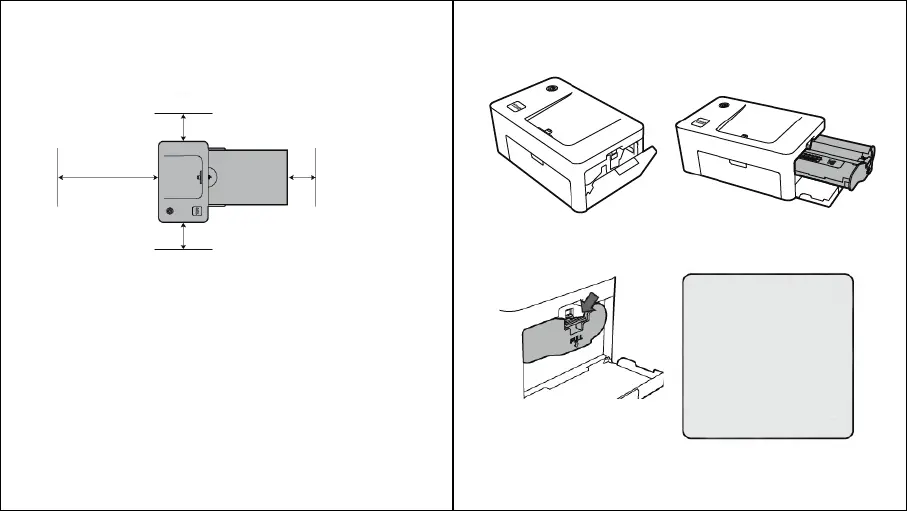
INSTALLING PHOTO PRINTER DECK
Choose the right place to put the Smartphone Photo Printer Dock. Place the
printer on a table or other flat, stable surface. Do not place the printer on an
unstable or tilted surface.
• Leave a minimum of 5 cm (2 in.) of open space around the printer.
• Leave a minimum of 20 cm (8 in) in front of the printer.
• Make sure the power cord is not interfering with the area where the
paper comes in and out.
• Avoid using the printer in dusty areas. It may damage the printer or
cause a malfunction.
- 8 -
- 9 -
INSERTING CARTRIDGE
MINIMUM 5CM
(
2 IN.
)
MINIMUM 5CM
(
2 IN.
)
MINIMUM 5CM
(
2 IN.
)
MINIMUM 20CM
(
8 IN.
)
1. Open the cartridge cover.
2. Insert the cartridge using the arrow
specified until you hear a clicking
sound.
3. Press down and pull out the lever
to replace used cartridges.
• When inserting the
cartridge, do not touch
the ink sheet with your
hands.
• Do not reuse used
cartridges. this could
result in a product
malfunction.



 To Next Page