EasyManua.ls Logo

Sharper Image Drone Air Racer - User Manual

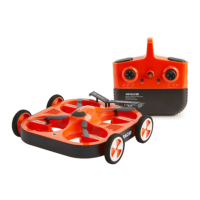
Sharper Image Drone Air Racer
8 pages
Print Icon
To Next Page IconTo Next Page
Loading...
Sharper Image
®
name and logo are registered trademarks. Distributed by
and © 2022 MerchSource, LLC. Irvine, CA 92618. All rights reserved.
Distributed by MerchSource, LLC, Irvine, CA 92618.
For technical support, please visit www.merchsource.com or call
1-800-374-2744.
The artwork and design of this manual are protected by US copyright law
and may not be reproduced, distributed, displayed, published or used for
any purpose without prior written permission. It is not permitted to alter,
remove or reproduce any trademarks or copyright notice from this manual.
Printed in China.
Drone Air Racer
KEEP THIS INSTRUCTION MANUAL AS IT CONTAINS IMPORTANT
INFORMATION FOR FUTURE REFERENCE.
Due to continuous product improvements, the picture on the manual may
differ slightly from the actual product.
PATENT PENDING
CUSTOMER SUPPORT
(800) 374-2744
Before calling please locate the 10-digit
code printed on the back of your remote
QUESTIONS OR CONCERNS?
PLEASE GIVE US A CALL ... WE’RE HERE TO HELP
1. PREPARE FOR FLIGHT
• Drone must be charged before each use (Cable included).
• Indicator light will turn off once fully charged.
• Install batteries in remote.
2. PAIR YOUR DRONE
Before each flight pair the remote with the drone:
• Turn your drone on and place on a flat, level surface.
• Turn on the remote on and move the left joystick up, then down.
• The beep will indicate successful pairing.
• Repeat steps 1 and 2 if necessary.
3. REMOTE CONTROL OVERVIEW
Practice flying your drone below 10 feet and at low speeds until comfortable with all controls to
avoid unnecessary damage or injury.
• Left joystick: left/right controls spin and Up/Down controls elevation.
• Right joystick: controls flight direction.
• Direction Trim: use to eliminate drift.
To cut power to drone, move left joystick to down position.
Getting to Know Your Drone
PLEASE READ ALL WARNINGS AND
INSTRUCTIONS PRIOR TO USE. KEEP THIS
DOCUMENT AS IT CONTAINS IMPORTANT
INFORMATION ABOUT YOUR DRONE.
14+
ADULT ASSEMBLY, CHARGING, AND
BATTERY INSTALLATION IS REQUIRED.
ADULT SUPERVISION IS REQUIRED.
Question and Answer IconNeed help?

Do you have a question about the Sharper Image Drone Air Racer and is the answer not in the manual?

Summary

Getting to Know Your Drone

Prepare for Flight

Ensures the drone and remote are ready for use by charging the drone and installing batteries.

Pair Your Drone

Connects the drone to the remote control for operation via joystick movements.

Remote Control Overview

Explains the function of the joysticks and trim for controlling drone movement and orientation.

Safety and Warnings

Safety Warnings

Lists critical safety precautions for operating the drone, including age restrictions and environmental considerations.

Troubleshooting

Provides solutions for common issues such as remote not illuminating, dim controls, or pairing problems.

Drone Components and Setup

Remote Battery Information

Details on how to install AA batteries into the remote controller.

Lithium-Polymer Battery Warning

Highlights risks and proper handling procedures for the drone's Li-Po battery.

Battery Warning - Alkaline (AA)

Provides essential precautions for using and replacing alkaline AA batteries.

Drone Operation and Maintenance

Charging Battery

Instructions on how to charge the drone's battery and the expected charging time.

Replacing Propellers

Step-by-step guide on how to safely remove and attach drone propellers.

Flight Operations

Pre-Flight Checklist

Essential steps to perform before taking the drone into the air.

Choosing a Location

Guidance on selecting a safe and appropriate area for flying the drone.

Driving Mode

Instructions on how to activate and use the drone's driving mode on a flat surface.

Lift Off

Steps for safely taking off and elevating the drone into the air.

Advanced Flight Control

Operating Drone in Flight

Details on how to correct drone drift using trim buttons.

Landing Drone

Guidance on using auto-land or manual controls for safe drone descent.

Retrieving Drone

Steps to safely power down and retrieve the drone after flight.

Align

Instructions on activating and using the drone's alignment mode for directional control.

Sharper Image Drone Air Racer Specifications

General IconGeneral
BrandSharper Image
ModelDrone Air Racer
CategoryDrones
LanguageEnglish

Related product manuals