EasyManua.ls Logo

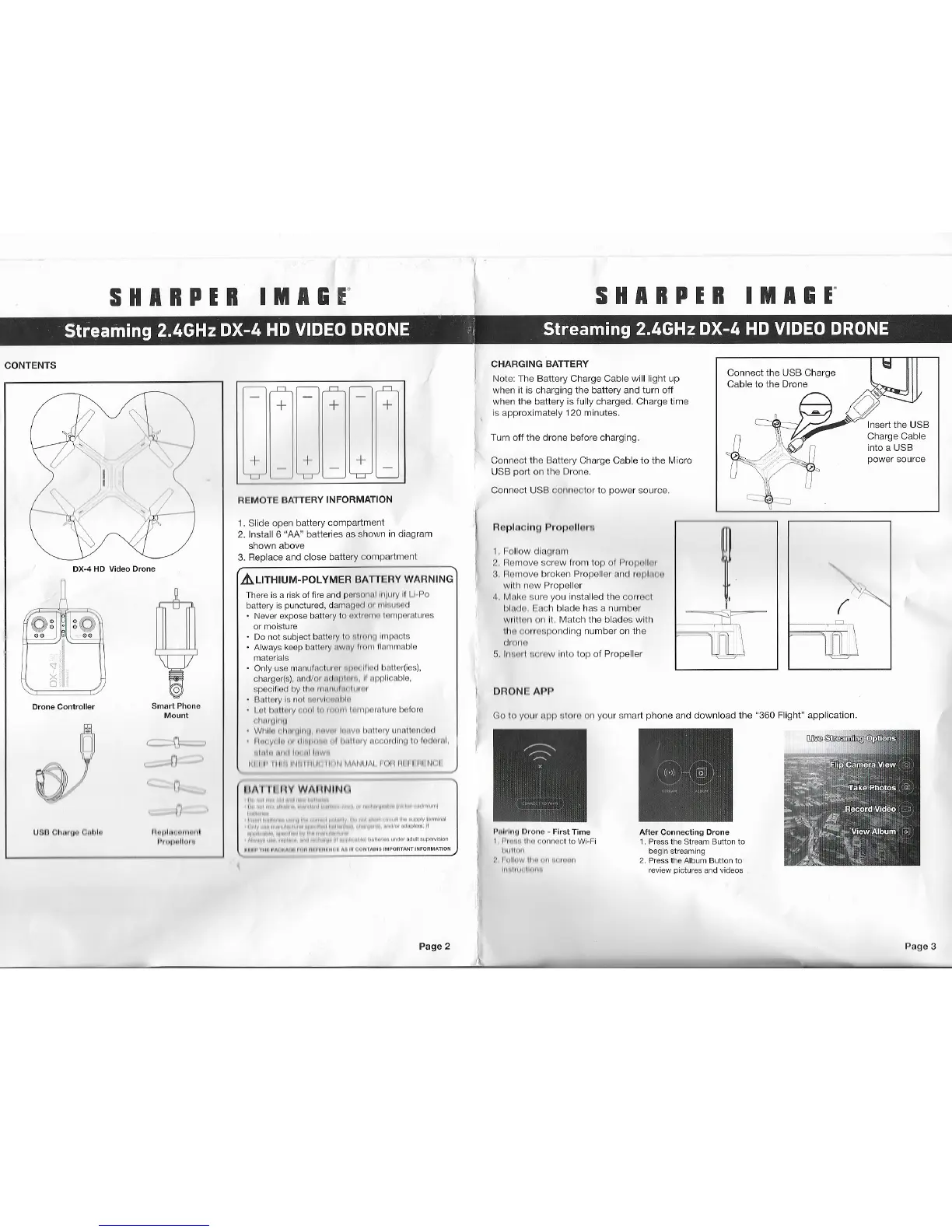
Sharper Image DX-4 - Drone Components and Setup; Remote Battery Installation; Battery Charging Procedure; Connecting to the Drone App

Sharper Image DX-4
6 pages
Print Icon
To Next Page IconTo Next Page
To Previous Page IconTo Previous Page
Loading...
I
S
H
A
RP
E
R
I
M
A&
r
S
H
A
R
P
E
R
I
M
A
&
r
C
O
N
T
E
N
T
S
D
X
-
4
HD
V
id
eo
D
r
on
e
D
r
one
C
on
t
r
o
ll
e
r
S
m
a
rt
P
h
o
ne
M
o
u
n
t
9
C
n
-
,_J
0
,___
n
n
n
U
S
O
O
h
11
111
"
C
l1
1
1J
h
1
1
11
,
11
11
,
,
11
1
,
11
1
11
1
I·
11
1
11
11
ll
111
+
I
I
+
I
J
+
+
+
R
E
M
O
T
E
B
A
TT
E
R
Y
I
N
F
O
R
M
A
T
I
ON
1
.
S
l
i
d
e o
p
e
n b
at
t
ery
c
o
m
pa
rt
m
e
n
t
2
. I
n
s
t
a
ll
6
"
AA
"
ba
tt
e
r
i
e
s
a
s
s
h
o
w
n
i
n
d
i
ag
r
a
m
s
ho
w
n a
bo
v
e
3
.
R
e
p
l
a
c
e
a
n
d
c
l
o
s
e ba
tt
ery
c
o
m
p
a
r
t
men
t
~
LI
T
H
I
U
M
-
P
O
L
Y
ME
R B
A
TT
E
R
Y
WA
RN
I
N
G
The
r
e
i
s
a r
i
sk
o
f f
i
r
e
a
n
d
o
e
r
s
o
n
nl
h
I
/
1
11
y
11
I
I
-
l
~
o
ba
tt
e
ry
i
s
pun
c
t
u
r
e
d
,
d
a
rn
a
q
m
l
1
11 111
l
111
1
11
o
c
l
N
e
v
e
r
e
x
po
s
e ba
tt
e
ry
t
o
o
x
I
11
I
11
11
,
I
111
,,
po
ro
t
u
r
e
s
o
r
m
o
is
t
u
r
e
D
o
n
o
t
s
u
b
j
e
c
t
b
a
tt
e
ry
I
N
11
1
11
11
1
11
h
11
p
n
c
t
s
A
l
w
a
ys
ke
ep
b
a
tt
e
ry
11
w
11
y
I
11
1
11
1
11
11
,
n
m
a
b
l
e
m
a
t
e
r
i
a
l
s
O
n
l
y
u
s
e
m
a
n
u
t
n
o
u
u
m
111
11
11
l
lli
1
t
l
l>
n
U
e
r
(
i
e
s
)
,
c
h
a
r
ge
r
(
s)
,
n
n
c
l
/
rn
1
I
1
ll
1
p
l
11
1
~
,
II
u
pp
t
l
c
n
b
l
e
,
s
ccc
tn
oo
1
1
y
ll
11
1
I
111
1
11
11
I
,
11 11
11
,
11
8
'1
II
0
1
y
l
u
1
I
c-,
I
li
ll
l
V
lc
11
11
11
!
11
I
ot
h
11
t1
111
y
111
11
1
1
11
'
"
"
'
'
1
l
11
I
,I
p
11
1
n
ll
I
r
e
be
f
o
r
e
11
1
1111
11
1
1111
W
li
ll
11
,
1
1111
11
1
11
11
,
11
11
v
11
I
l
11
,
w
11
l
11
1
1l
lll
y
l1
1
1
n
t1
0
1
1
tl
11
tl
l
lt
u
y
,
l
11
"
1
d
l
~
I
"
'
"
"
l
l
1
11
1l
1
11
y
1
1
o
c
:
0
1
t
ll
11
r,
l
c-,
l
1
11
l
111
11
I
,
11
111
1
1111
1
11
1
l,
11
1
1
li
,
w
~
I I
I
I
'
I
1
1
1
11
11
1
,
,
11
1
11
1
I
Ii
1
11
M
/1
1
1
11
11
I
I
I
1
1
1
11
1
I
I
I
II
N
L
I
1
1
1\
I
II
I
I
Y
W
A
I
I
N
I
N
<
P
a
g
e 2
C
H
AR
G
I
N
G
B
A
TT
E
R
Y
N
o
t
e
:
T
h
e
B
a
t
t
e
r
y
C
ha
r
g
e
C
ab
l
e
w
i
ll
l
i
g
h
t
up
w
h
e
n
i
t
i
s c
ha
r
g
i
n
g
t
he
b
a
tt
e
ry
a
nd
t
u
rn
of
f
w
h
e
n
t
h
e
ba
t
t
e
r
y
i
s
f
u
ll
y c
h
a
r
ge
d
.
C
h
a
r
g
e
t
i
m
e
i
s
a
p
p
ro
x
i
ma
t
e
l
y
1
2
0
m
i
n
u
t
e
s
.
T
u
rn
o
f
f
t
he d
r
o
n
e
be
fo
r
e
c
h
a
r
g
i
n
g
.
C
o
nn
e
c
t t
h
e
B
a
tt
ery
C
h
a
r
g
e
C
a
b
l
e
t
o
t
h
e
M
i
c
r
o
U
S
B
p
o
rt
o
n
t
h
e
D
r
on
e
.
C
o
nne
c
t
U
S
B
c
o
nne
c
t
o
r
t
o
p
o
w
e
r
s
o
u
r
c
e
.
R
op
l
no
l
nfl
P
ro
p
<
li
e
1
1
.
I
o
u
o
w
d
l
o
g
r
w
,
1
::>
.
11
om
o
v
o
s
c
r
e
w
fr
om to
p
o
f
P
1
o
p
11
ll
1
11
3
.
ll
o
rn
o
v
e
b
r
o
k
e
n
P
r
ope
ll
e
r
0
1
1
<
1
1
op
l
111
:
11
w
i
th
n
o
w
P
r
o
p
e
ll
e
r
4
.
M
n
l
<
o
o
u
r
e
y
o
u
i
n
s
t
a
ll
ed
t
h
e
c
o
uo
o
;
11
1
11<
1
0
.
l
-
a
c
h
b
l
ad
e
h
a
s
a n
u
m
b
e
r
w
,
I
I
I
0
11
o
n
I
t. Ma
t
c
h
t
h
e
b
l
a
d
e
s
w
i
t
h
ll
u
I
o
rn
ro
:i
no
n
d
i
ng
n
u
m
b
e
r
o
n
t
h
e
(
h
OI
II
I
5
.
1
11
11
11
1
I
0
0
I
0
w
I
n
t
o to
p
o
f
P
r
o
p
e
ll
e
r
D
R
O
N
I!
A
PP
i
l
nl,
1
11
(1
O
r
on
o
-
F
i
r
s
t
T
i
m
e
I
l'
II
H
I
R
11111
c
o
nnoot l
o
Wi
-
F
i
1
11
1
1111
11
:
I
1
1
ll
11
w
ll
11
,
1111
m
,
11
,
111
I
11
11
I
1111
ll
11
11
1
C
on
ne
c
t t
h
e
U
S
B
C
h
a
r
g
e
C
a
b
l
e to
t
he
D
ro
ne
I
n
s
e
rt
t
h
e
U
S
B
C
h
a
r
ge
C
a
b
l
e
i
n
t
o
a
U
S
B
po
w
e
r
s
o
u
r
c
e
A
ft
e
r
C
on
n
e
c
t
i
n
g D
r
o
n
e
1
.
P
r
ess th
e
St
r
e
am B
u
tt
o
n
t
o
b
egin
s
t
r
e
am
i
n
g
2
.
P
re
ss the A
l
b
um Bu
tt
o
n
t
o
revie
w
p
ic
t
u
r
e
s a
n
d
v
i
d
eos
G
o
t
o
y
o
r
u
1
I
p
p
11
1
0
11
1
o
n
y
o
u
r
s
ma
rt
p
h
o
n
e
a
n
d
d
o
w
n
l
o
ad
t
h
e
"
360
F
li
g
h
t
"
a
p
p
l
i
c
a
t
i
o
n
.
P
a
g
e 3
1
1
11
11
1
1
I
..
/\
11
ti
0
1
\J
/\
1
I
l
l
I
OI
I
/\
ii
I
P
I
l
f
f
I
I
I
ll

Related product manuals