Need help?
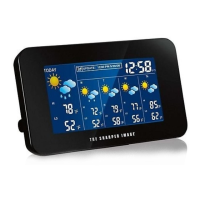
Do you have a question about the Sharper Image LM516 and is the answer not in the manual?
Lists all items included in the product box.
Lists optional accessories and consumables for the device.
Explains the automatic time synchronization via WWVB signal.
Instructions for inserting batteries into the transmitter and the main unit.
Steps to prepare and set up the remote temperature/humidity sensor.
Steps for the initial power-on and configuration of the main unit.
Provides details on how the weather station receives the WWVB signal.
A detailed breakdown of all icons and data shown on the weather station's LCD.
Identifies the physical buttons used for operation and programming.
Introduces the device's programming mode for settings and customization.
Step-by-step guide to manually set the time and date on the device.
Guide to selecting a city for accurate sunrise/sunset and weather data.
Configure the correct time zone and daylight saving time behavior.
Select preferred units for temperature (°F/°C) and pressure (inHg/hPa).
How to change the brightness and clarity of the LCD screen.
Explains how the device calculates celestial event times.
Method to view the duration of daylight hours and minutes.
How to check celestial times for different dates or locations.
How to view and reset the minimum/maximum indoor readings.
How to view and reset the minimum/maximum outdoor readings.
Information on adding and managing multiple outdoor sensors.
How to configure high and low temperature alarms for remote sensors.
Explains the comfort level display based on temp/humidity.
Details on how the weather forecasting feature works.
Interpretation of the various weather icons shown on the display.
How to fine-tune the sensitivity of weather forecast icon changes.
Understanding the arrows indicating air pressure trends.
Setting up alerts for significant drops in air pressure.
Details on displaying and calibrating barometric pressure.
Explanation of the graph showing past air pressure trends.
Instructions for securely attaching the remote sensor.
Options for freestanding placement or wall mounting the main unit.
Basic advice on cleaning and protecting the device from damage.
Solutions for common problems like faint display or missing data.
Specific steps to resolve problems with time and date updates.
Technical details including operating ranges, data checking intervals, and power requirements.
Regulatory information regarding product compliance and safety standards.
Explains the device's compliance with FCC rules and regulations.
Details on what the warranty covers, duration, and how to obtain service.
 General
| Brand | Sharper Image |
|---|---|
| Model | LM516 |
| Category | Weather Station |
| Language | English |

 To Next Page