Need help?
Do you have a question about the Shearwater DiveCAN Petrel 1 and is the answer not in the manual?
Specifies which Petrel models this manual applies to, including DiveCAN Rebreather Controller.
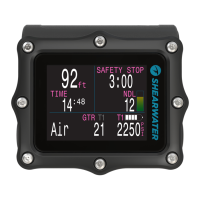
Highlights the differences between the Petrel 1 and Petrel 2 models, noting the compass and Bluetooth features.
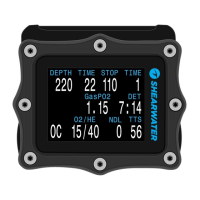
Explains how button hints on the screen guide users through menus and settings.
Details how text color indicates normal, warning, or critical alert conditions.
Shows the time elapsed since the end of the last dive.
Explains what happens when sensor readings disagree and consensus cannot be reached.
Shows whether the computer is in Open Circuit (OC) or Closed Circuit (CC) mode.
Displays the percentage of Oxygen and Helium in the current breathing gas.
Indicates the remaining time at current depth before decompression stops are needed.
Displays the total time to ascend to the surface, including deco stops.
Explains the supersaturation gradient and predicted time-to-surface metrics.
Shows diluent partial pressure of oxygen and Central Nervous System toxicity percentage.
Displays the requested PPO2 setpoint and the system's average PPO2.
Details millivolt readings, average/maximum depth, and fraction of inspired oxygen.
Explains ceiling depth and supersaturation gradient for a Bühlmann profile.
Shows predicted time-to-surface based on current depth and a 5-minute extension.
Explains the display of internal and external battery voltage and status.
Details the Gradient Factor (GF) and VPM-B decompression algorithms.
Covers display of current pressure, temperature, date, and time.
Information on the device's unique serial number and firmware version.
Lists compass capabilities and potential sources of interference or inaccuracy.
Explains how menus adapt to the current dive mode for simplicity.
Details on the 'Turn Off' function and the 'Calibrate' menu for O2 sensors.
Compares gas selection to tuning radio stations for OC and CC modes.
Introduces the Dive Setup+ menu and editing low setpoints.
How the Petrel handles switching to OC mode and displays PPO2.
Options for fixed and automatic brightness settings to manage battery life.
Details the 0.19 PPO2 setpoint used only for setup and transportation.
How to view, navigate, and interpret recorded dive profiles and data.
Instructions for connecting to a computer to download dive log data.
Allows modification of log numbers to match lifetime dive counts.
Explains how water type (Fresh, EN13319, Salt) affects depth measurement.
Details how to set and edit the PPO2 low and high setpoints.
Allows editing of open circuit bailout gases, displaying all five simultaneously.
Allows editing of closed circuit diluent gases, displaying all five simultaneously.
Configure calibration gas oxygen fraction and sensor display mode.
Sets up automatic switching between PPO2 setpoints based on depth.
Configure display units (metric/imperial) and screen brightness.
Set altitude compensation and screen orientation (normal/flipped).
Configure compass display range and magnetic declination adjustment.
Provides tips for ensuring accurate compass calibration.
Configure date, time, unlock codes, and load firmware upgrades.
Customize title colors and set the delay before ending dive mode.
Configure battery icon behavior and select gas menu interface style.
Details on maintenance, cleaning, and authorized service centers.
Information regarding FCC and Industry Canada compliance for radio frequency devices.
 General
| Display | Full-color LCD |
|---|---|
| Weight | Approximately 200 grams |
| Dimensions | 82 x 74 x 33 mm (3.2" x 2.9" x 1.3") |
| Battery Type | Rechargeable Lithium-ion |
| Gas Support | Air, Nitrox, Trimix |
| Connectivity | Bluetooth |
| Display Size | 2.2 inches |
| Algorithm | Bühlmann ZHL-16C |
| Compass | Yes |

 To Next Page