LCD Display Information
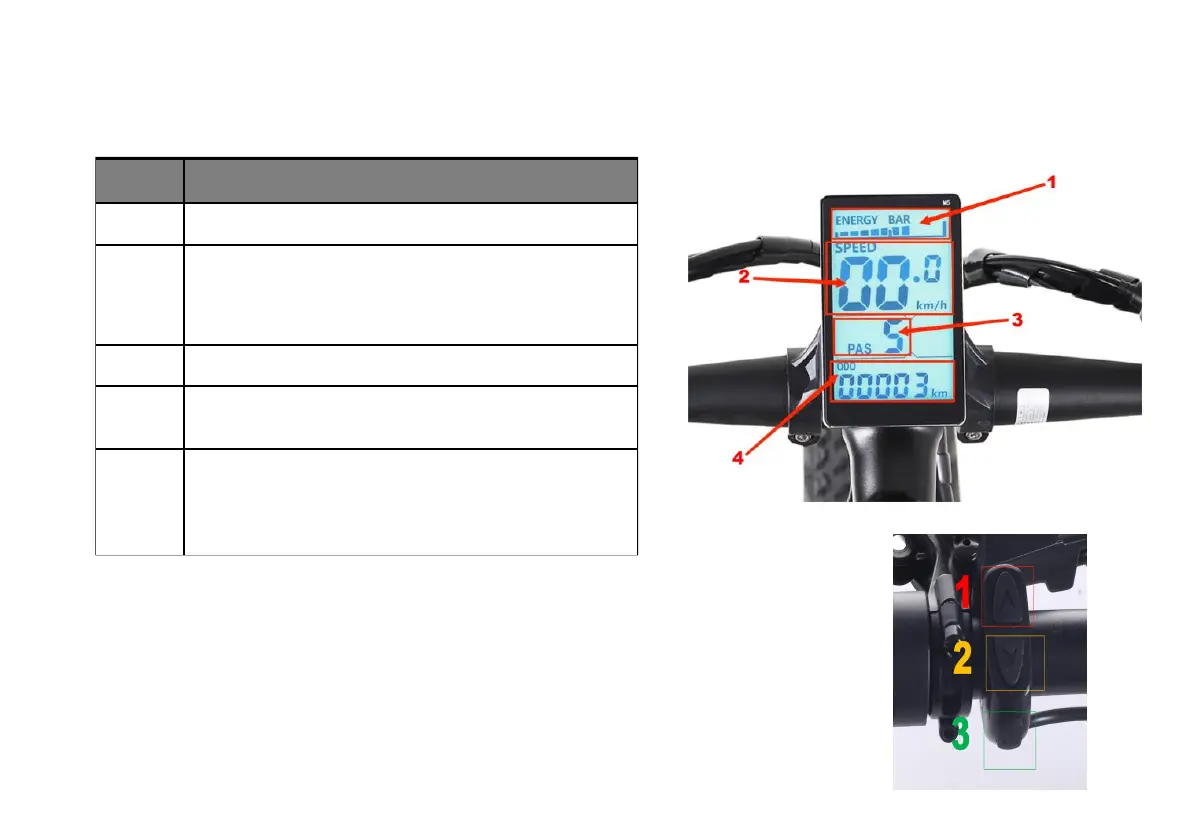
The table and image below show the various features and information displayed on the LCD display.
LCD Display Controls
T
he display is controlled using the 3-button display remote mounted on the left side of the
handlebar (depicted at right). The top button shows an arrow pointing up (1), the bottom button
shows an arrow pointing down (2), and the middle button is labeled "MODE" (3). Reference
the LCD Display Operations table in this manual for instructions on how to perform various
operations using these buttons and, when applicable, other components of the bike.
Speed Display Area:
Maximum speed MAX, average speed
AVG
Unit MPH, KM/H
The meter will calculate the true speed based on the wheel diameter and
signal data.
Vehicle Mode:
Walk boost mode; Cruise: constant speed cruise
mode; PAS: Power file position: 0 ~ 5.
Headlight:The instrument can be manually turned on and the
brightness of the sensing environment is automatically turned on(light
sensitivity support.
is required)
Multifunctional Display Area: Total mileage (ODO); Single
mileage (TRIP A); Single mileage (TRIP B); Battery current voltage
(VOL); Current operating current (CUR); Remaining mileage (RM);
Instrument boot time (TM)
Display error codes(E006, E007, E008, E009, E010)


 To Next Page