EasyManua.ls Logo

Shenzhen S5B - Operating Modes; Switching Stabilizer Modes

Shenzhen S5B
22 pages
Print Icon
To Next Page IconTo Next Page
To Previous Page IconTo Previous Page
Loading...
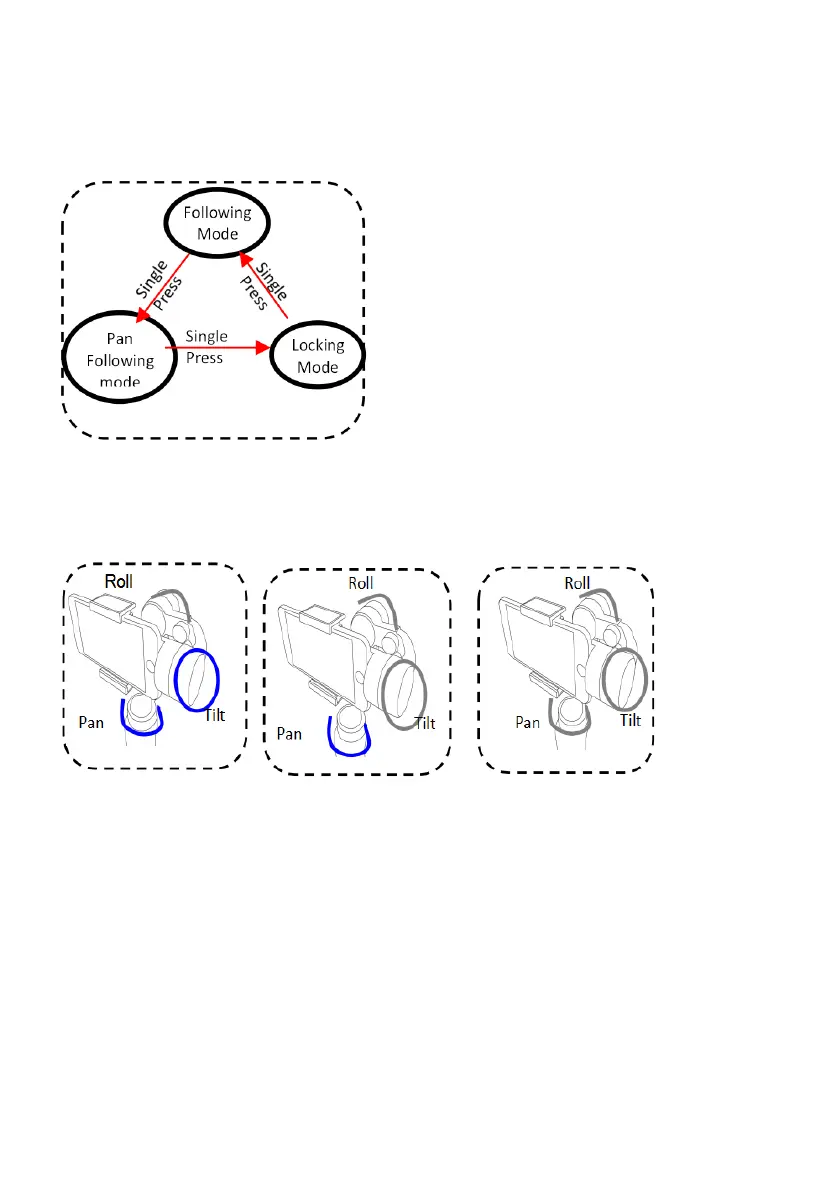
OPERATING MODES
Locking Mode
All 3 axes are locked.
The camera keep still and
stable, which mean the
camera, cannot follow
movement of handle/
Pan Following Mode
Tilt & Roll are locked.
Pan axis rotates smoothly
with turn of wrist.
Following Mode
Roll axes is locked.
The camera pan and tilt
are following the
movement of camera.
SWITCHING STABLIZER MODES
a. The stabilizer enters default
Pan & Tilt Following Mode each
time when powered on.
Step 2: Click power button to
Switch into Pan Following
Mode.
Step 3: Single Press the power
button to enter into Locking
Mode
Notes:
The Joystick Function can be
used in all 3 modes.
(The any camera-position
adjustment can be manually
control by hands)