Overview 2
Controls
The Omega - X contains upper-panel and lower-panel control-pads.
Upper-Control-Pad
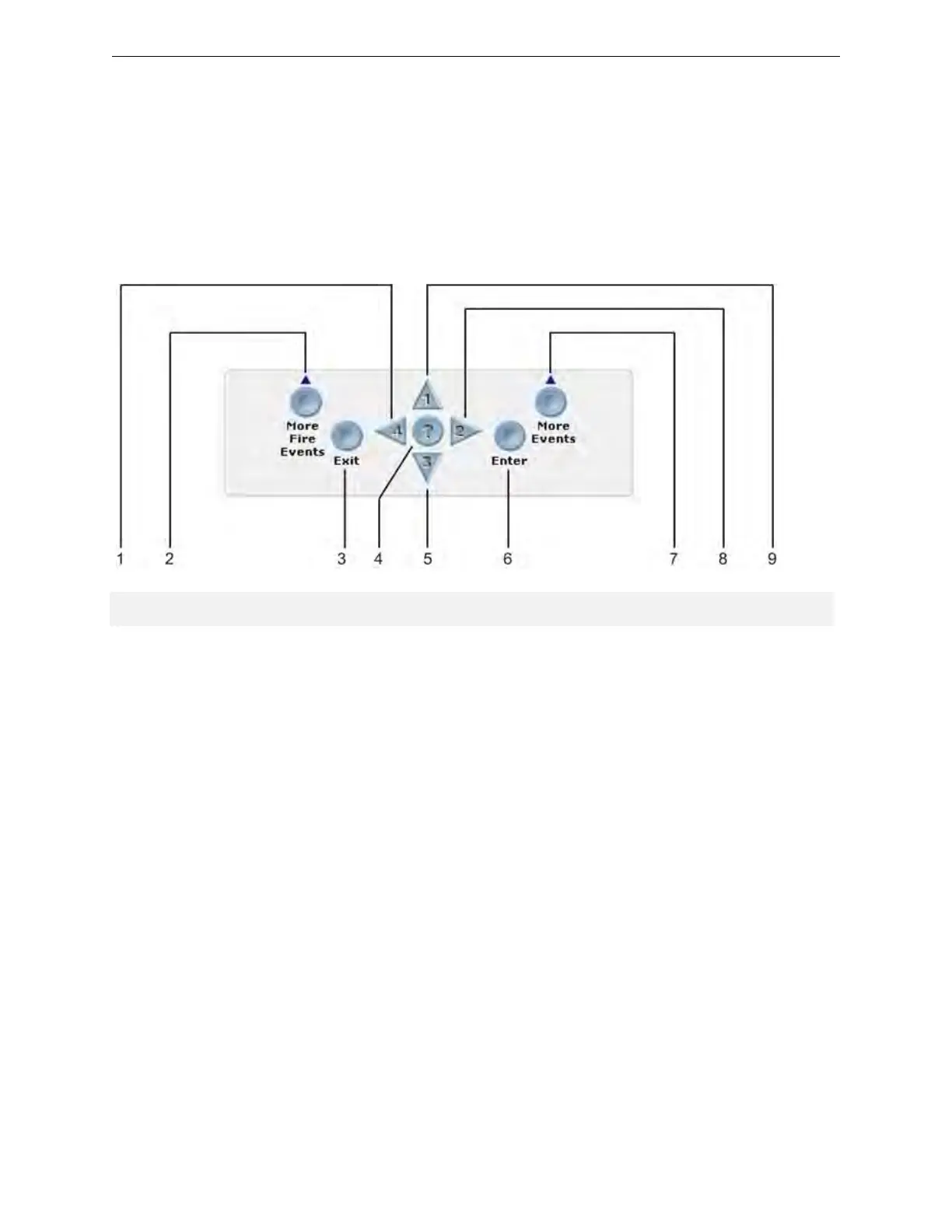
The figure below illustrates the Omega - X upper-control-pad:
Figure 2-1
Upper-Control-Pad
Key Name Description
1 Central keypad number four Navigates menu selections to the left.
2 More Fire Events
Displays the number of alarms present on the
Omega - X Panel and overrides the display provided by menu navigation.
3 Exit Cancels the current menu selection.
4 Central keypad question mark Provides a “help screen” for the current menu display and also
displays status. For example, recommendations are displayed
during alarm or fault conditions. If a menu function is accessed then
help relating to that function will be displayed.
5 Central keypad number three Navigates menu selections down.
6 Enter Enables the menu selection.
7 More Events Displays the number of events present and overrides menu
navigation. Provides event status for Fire, Pre-Alarm, Trouble,
Disablements and Other.
8 Central keypad number two Navigates menu selections to the right.
9 Central keypad number one Navigates menu selections up.
Shield Fire, Safety and Security Ltd.
Shield Omega - X Panel Installation Manual
SH3514-00, Revision E03.04
Issue Date: 1 April 2014
Page 9 of 118


 To Next Page
 Loading...