3 4
Take-off Landing
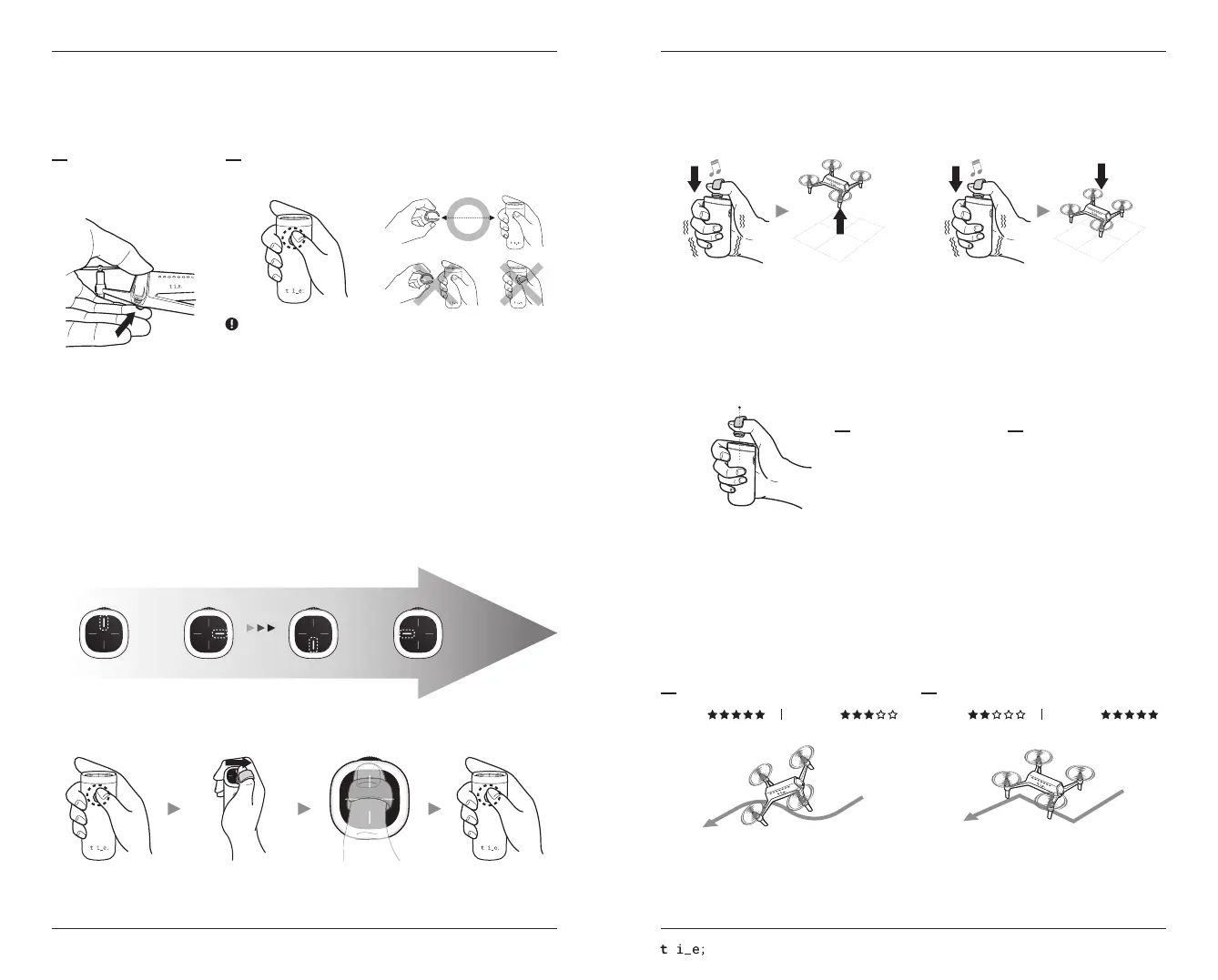
Touch the center of the pad with the ring for 1 sec
for take-off.
While the drone is hovering, touch the center of the
pad with the ring for 1 sec.(Refer to below for hovering)
Aircraft flies according to control/movement by the
ring very dynamically. Recommend this mode to pro
and thrill-seeker.
Aircraft flies very stably by fixed speed and altitude.
Recommend this mode to beginner and stable shootings
of videos and pictures.
Switching Shooting Mode
You can switch between stable shooting mode and free flight mode.
To change the flight mode holding the jog during flight for 1 sec.
Free Flight Mode Stable Shooting Mode
Dynamic
Dynamic
Stability Stability
English
Pairing
Aircraft and controller are auto-paired after they are powered on.
Don’t forget. Level 4 is high-speed. Please be careful to flight.
Speed Setting
SHIFT drone supports 4-speed level modes.
To change the speed, briefly press the controller’s power button once.
Current mode appears on pad of the controller.
Speed
Casual Joy Sporty Extreme
Level 1 Level 2 Level 3 Level 4
Place your thumb with the ring on the mode you want. Then, touch the center of the pad to save your setting.
To release from the setting function, press the power button briefly.
Enter Select Save Set
Power On / Off
Aircraft Controller
Press the power button for 2 sec
for on/off the aircraft.
Press the power button for 2 sec for on/off the controller.
30 cm
When it is turned on, place the controller ring at least 30 cm (1.0ft) away from the
controller. If the distance between the Controller and the Control Ring is too close,
the Controller will not turn on or cause a severe malfunction.
SHIFT RED Quick Start Guide
ⓒ this is engineering Inc. All rights reserved.
Hovering
For safe flying, aircraft is automatically hovering after take-off.
For operating manually, refer to the below way for hovering and its release.(Same way for both)
Center
Hold for 2 - 3 seconds
Keep your thumb on the center of
the controller pad at least 3 secs
with wearing the control ring.
(Do not touch the pad)
When the control ring is out of
the detection range,
it automatically switches to
hovering mode.
Release the Hovering Set the Hovering


 To Next Page
 Loading...