65
Español
Para más información : https://www.thisiseng.com/supports/download
Vuele responsablemente sobre la base de las normas y normas de seguridad para volar en cada territorio.
SHIFT RED es una marca registrada de this is engineering Inc.
ⓒ this is engineering Inc. Todos los derechos reservados.
SHIFT Drone App.
Search “SHIFT Drone” on Google Play or App Store, and download it to your device.
Before starting app, Turn on the drone and connect your device’s Wi-Fi network to
‘SHIFT-DRONE-XXXXXXXX’. (Password: 1234567890)
1.
2.
Download and Connect
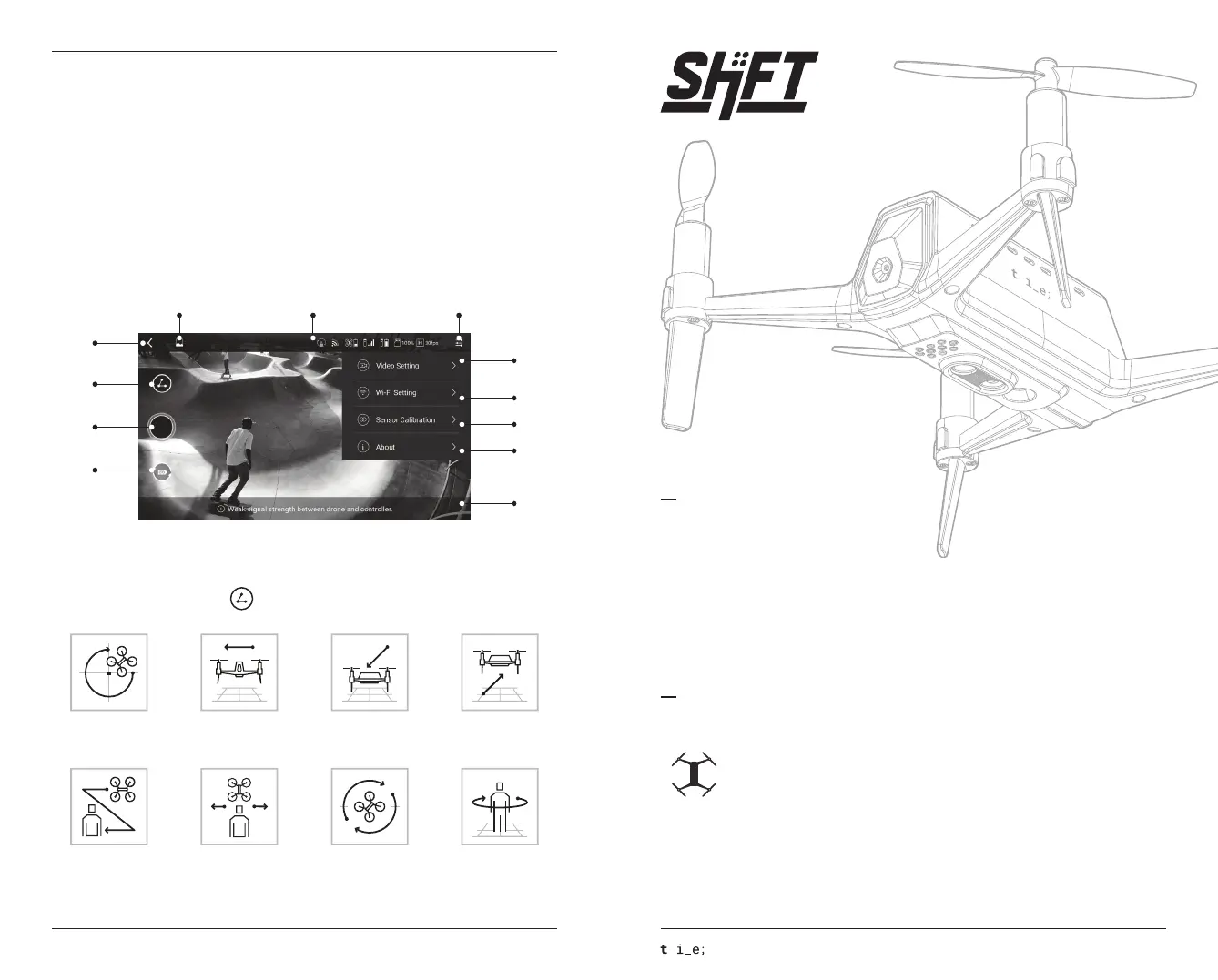
SHIFT Drone app allows you to see the real-time camera view and to shot video with the various camera works.
App Interface
Go to the
main screen
Go to the
gallery
Drone/controller
status information
Setting
menu
Lezero Pilot
mode
Take
video/photo
Change video/photo
mode
Video quality/frame
settings
Wi-Fi setting
Sensor calibration
Version information
Notice
Lezero Pilot Modes
To use the Lezero Pilot Mode, Touch in the SHIFT DRONE app, then select the mode like below.
Orbit Dolly Dolly in Dolly out
The drone flies in orbit
round and round.
The drone flies steadily
from right to left.
The drone moves
near from far.
The drone moves
far away.
Following Horizontal tracking Yaw tracking Hero
The drone flies to follow
an objected input.
The drone tracks an object
input in horizontal flying
The drone performs a yaw
rotation toward the target
while flying in position.
The drone flies while tracking
an object input, and orbits
once when the object stops.
SHIFT RED Quick Start Guide
ⓒ this is engineering Inc. All rights reserved.
Antes de que empieces
- Cargue las baterías del dron y el controlador para el primer uso.
- Lea atentamente el manual del usuario.
- Para comprobar la versión del firmware. La última versión del firmware para las aeronaves y el
controlador está disponible en el sitio web SHIFT continuación.
- Después de cargar la batería, desconecte y almacenarlo de la aeronave.
SHIFT RED : The Perfect Small
Guía De Inicio Rápido
Despegue Restricciones Advertencia
Coloque la lente de la cámara mirando hacia adelante y prepararse para el despegue.
Cuando las condiciones correctas de despegue no se cumplen SHIFT RED indicará al hacer los siguientes movimientos de la hélice.
- Si uno de hélice giros brevemente : Colocar la aeronave en una superficie firme y horizontal firme.
- Si la hélice y vueltas brevemente : Por favor despegue re-intento en un entorno más brillante.
- Si la hélice gira brevemente : Asegúrese de que la batería está suficientemente cargada. Es posible comprobar
el estado de la batería a través de la aplicación móvil. La batería debe ser cargada al menos al 50% para una
experiencia de vuelo estable.


 To Next Page
 Loading...