FreeScan UE_ User Manual _V1.2.0.0 2
Adjustment of the size of display in
the software window
Point cloud indicator: Only after the indicator
of the Device lights up can the user enable
the software for operations. When the light
is on, the point cloud indicator lights up
around the menu button.
Scanning button
⚫ Single click: Prescan/scan/pause
⚫ Press and hold: Generate point
cloud
Scanning distance indicator:
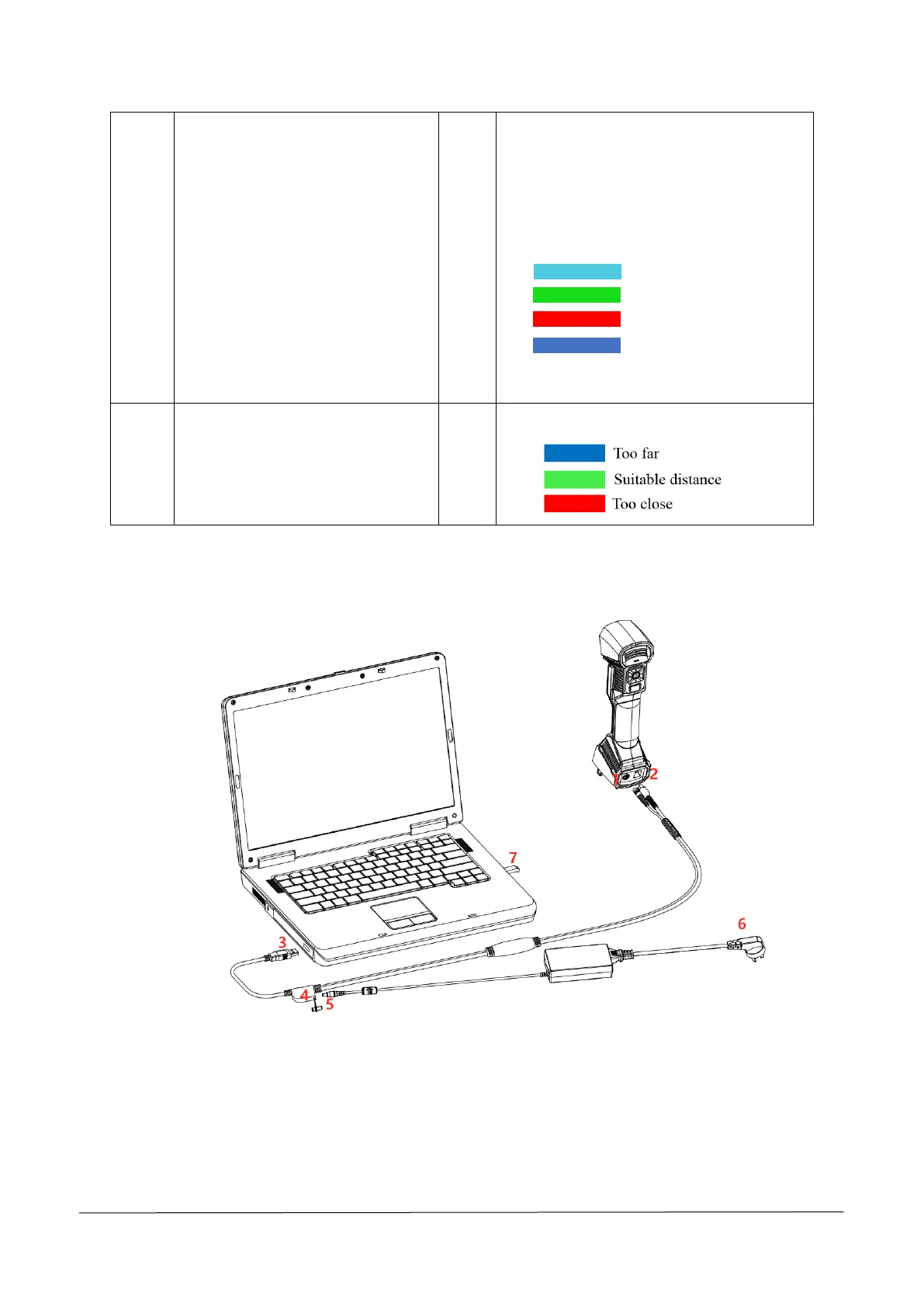
1.3 Connect Cables
Step 1 Connect aviation cable (4) to power port (2) and USB port (1) on the Scanner.
Step 2 Connect power cord (6) and the power adapter (5).
Step 3 Connect power adapter (5) into aviation cable (4).
Step 4 Connect USB port (3) on the aviation cable to the PC USB 3.0 port.
Step 5 Insert the Dongle (7) into the PC USB port.














 To Next Page