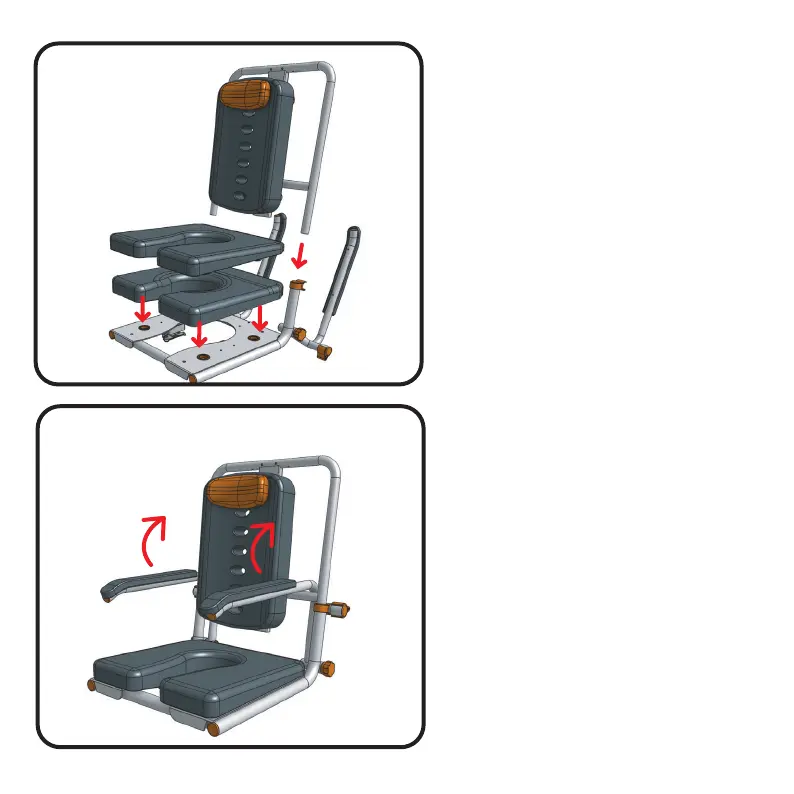
Step 3
Fit your new seat cushion (part
#500-166-R for P1 and part #500-167
for P2) as shown.
Your new seat cushion is a direct
replacement of your existing shower
chair and will fit in the existing holes in
the seat base plate.
Note: If fitting to SB2T or SB3T you will
need to reconnect the tilt release
handle (part #75) back using the holes
provided on the handle of your
pediatric kit.
Step 4
Once all the elements of the kit have
been fitted, check to make sure
everything is fitted correctly, tightened
up and that the arms can fold freely
back and forward.
5 P1 & P2 Pediatric Conversion Kit
P1
P2



 To Next Page