9
2.5 Chase Direction
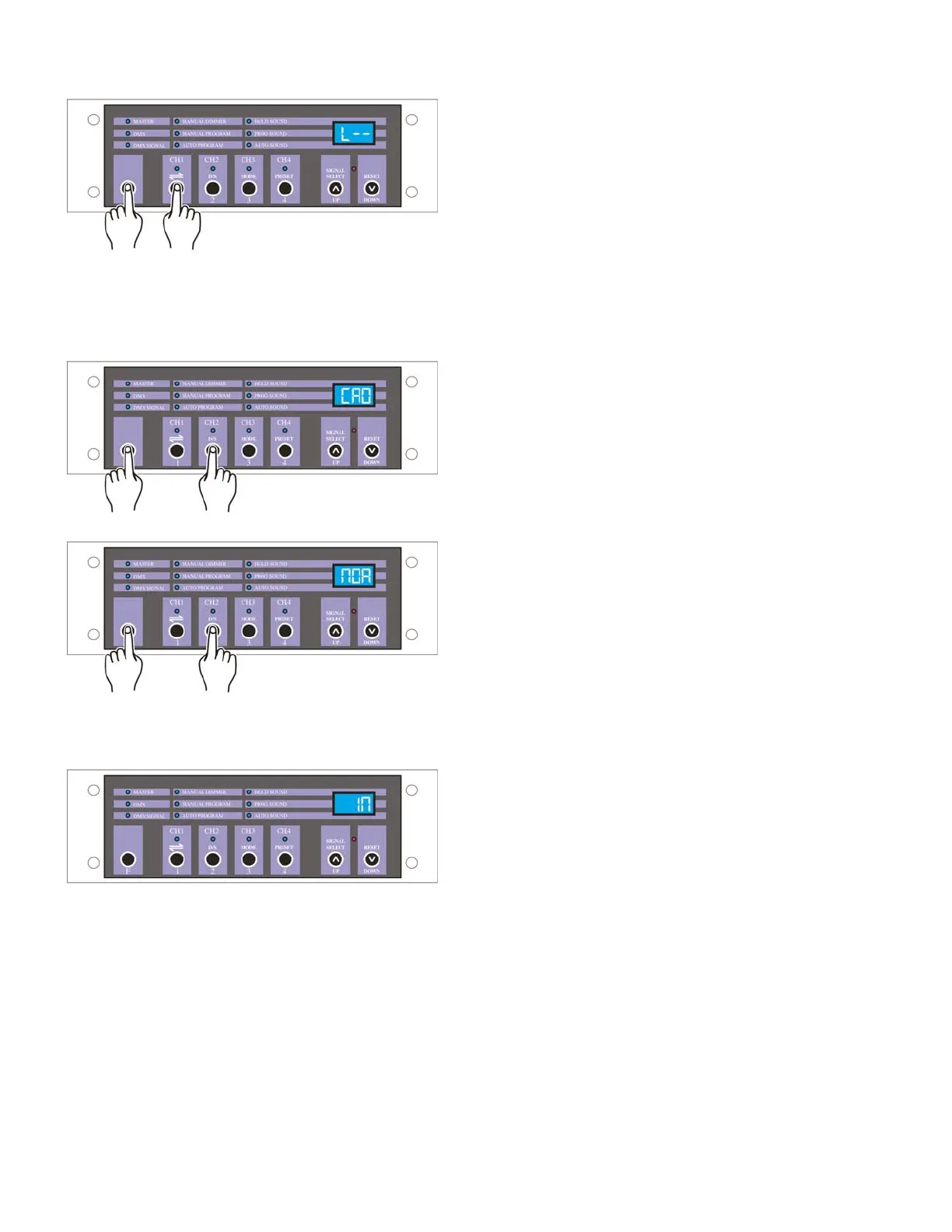
Keep pressing F button, tap the channel button to select
chase direction, the Segment Display shows "L--" or "R-
-". "L--" indicates the programs will chase from left to
right, and "R--" indicates the programs will chase from
right to left.
2.6 Cross and Normal Dimmer
Keep pressing F button, tap D/S button to select dimmer
mode from Cross / Normal dimmer.
The Segment Display shows "CRO" when cross dimmer
is active. In Cross mode, if output level is 50% or more,
the fixture will be fully on; if output is less than 50%, the
fixture will be fully off.
The Segment Display shows "NOR" when normal
dimmer is active. In Normal mode, output level varies
according to manual control.
2.7 Initialization
Press F, Signal Select and Reset buttons at a time, this
unit will initialize its memory, the Segment Display
shows "888". Release all three buttons, this unit will
return to default setting, the Segment Display shows
"IN", and Manual Dimmer LED lights.


 To Next Page