EasyManua.ls Logo

Shure AONIC 40 - User Manual

Shure AONIC 40
20 pages
Print Icon
To Next Page IconTo Next Page
Loading...
AONIC 40
Wireless Noise Cancelling Headphones
The Shure wireless headphones, AONIC 40, user guide.
Version: 1.2 (2022-A)
Question and Answer IconNeed help?

Do you have a question about the Shure AONIC 40 and is the answer not in the manual?

Summary

General Description

Important Safety Information

ShurePlus PLAY Mobile Listening App

ShurePlus PLAY App Features

Import/play files, customize EQ, adjust volume, create playlists, and use EQ presets for varied listening.

Environment Mode Functionality

Enhance ambient noise for awareness during music or calls; controlled via button or app.

PausePlus Feature Explanation

Augments ambient noise when music is paused, reverting to previous settings upon resuming.

Button Control Customization

Personalize earphone button functions for music, calls, and volume via the app interface.

Prompts and Tones Configuration

Select audio feedback for events (power, Bluetooth, battery) with adjustable volume and muting.

Bluetooth Pairing Procedures

Manual Bluetooth Pairing

Step-by-step guide for manual Bluetooth pairing if automatic pairing fails.

Multipoint Bluetooth Connectivity

Connect to two devices simultaneously for alternating input; includes troubleshooting.

Using Headphone Buttons

Power Button Operations

Manage power, Bluetooth pairing, battery status, and device list clearing with the power button.

Center Button Music Controls

Control music playback: play/pause, skip tracks, and restart the current song.

Volume Button Adjustments

Adjust audio volume levels up or down using the dedicated volume buttons.

Environment Mode and ANC Switch

Toggle Active Noise Cancellation, Environment mode, and microphone mute functions.

Hardware Reset Procedure

LED Indicator Guide

Cable Connections and Usage

Auto Power Off Configuration

Care and Maintenance

Storage Recommendations

EQ Preset Modes Overview

Customizing EQ Settings

Adding New EQ Presets

Create custom EQ presets by adjusting frequency, gain, and bandwidth parameters.

Duplicating EQ Presets

Copy existing presets and edit them to create personalized sound profiles.

Adjusting EQ via Screen Orientation

Retaining EQ Settings

Updating Shure AONIC Product Firmware

Firmware Update Procedure

Steps for a successful firmware update: airplane mode, pairing, app usage, and update initiation.

Successful Update Confirmation

Confirmation screen, warnings against powering off, and tips for resolving failed update attempts.

Verifying Firmware Version

Confirm the new firmware version via the app's About menu.

Tips for Reliable Firmware Updates

Furnished Accessories List

Replacement Parts Information

Product Specifications

Supported Audio Codecs

Safety Precautions and Warnings

Earphone Usage and Maintenance

Use, clean, and maintain earphones per manufacturer instructions for safe operation.

Understanding Safety Symbols

Explanation of 'WARNING' and 'CAUTION' symbols for incorrect use severity.

General Warning Risks

Risks include fire, shock, injury from modification, and danger from unawareness of surroundings.

General Cautionary Advice

Avoid disassembly, extreme force, liquids; consult physician for ear treatment.

Hearing Damage Risk

Risk of hearing damage from prolonged listening at high volume levels.

Important Safety Instructions

Bluetooth Product Safety Guidelines

Bluetooth Battery Warnings

Battery safety: explosion risk, toxic materials, no opening/heating, avoid excessive heat, no unauthorized alterations.

Bluetooth Product Cautions

Cautions: driving laws, magnetic material, battery heat/pressure exposure, temperature/humidity.

Bluetooth Usage Warnings

Risks of water/foreign objects, personal injury from modification, fire/electric shock.

Product Certifications

Limited Warranty Information

Warranty Terms and Conditions

Covers defects, repair/replacement, proof of purchase, and warranty exclusions.

Warranty Limitations and Disclaimers

Excludes abuse, misuse, wear, acts of God; limits implied warranties and consequential damages.

Overview

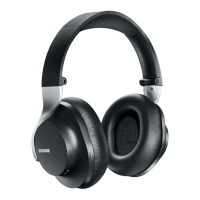
The Shure AONIC 40 Wireless Noise Cancelling Headphones offer a premium audio experience with a focus on comfort, durability, and customizable sound. Engineered with decades of experience, these headphones deliver studio-quality sound in a portable and lightweight design, making them suitable for various listening environments.

Function Description:

The AONIC 40 headphones are designed to provide an immersive listening experience by blocking out unwanted sounds with adjustable noise cancellation. They feature three digital ANC settings, offering extended low-frequency cancellation and a natural sound experience. For situations where awareness of the surroundings is desired, the Environment Mode allows users to hear ambient noise with the push of a button. The headphones support Bluetooth® 5 wireless technology for stable connections up to 30 feet (10 meters) and can pair with phones, tablets, and laptops. They also offer multipoint pairing, enabling simultaneous connection to two devices and alternating input reception. For wired connections, the headphones include a 3.5mm analog audio input for devices like airplane entertainment systems and a USB-C digital input for charging, calls, and audio streaming. Premium call quality is ensured through beamforming microphones, making them ideal for video conferencing and phone calls. The headphones support multiple codecs, including Qualcomm® aptX™, aptX™ HD, AAC, and SBC.

Usage Features:

The AONIC 40 headphones are equipped with easily accessible controls for quick management of calls, volume, and ANC/Environment Mode levels.

  • Power On/Off: Press and hold the power button for 2 seconds.
  • Bluetooth Pairing: For first-time use or new audio sources, the headphones automatically enter pairing mode. Manual pairing involves turning off the headphones, pressing and holding the power button for 6 seconds until "Bluetooth pairing mode" is heard, and then selecting "Shure AONIC 40" from the audio source.
  • Multipoint Pairing: The headphones can connect to two devices simultaneously. If issues arise, users can clear the paired device list via the ShurePlus PLAY app, power off/on the headphones, and re-pair.
  • Battery Check: Double-press the power button for an audible status notification.
  • Clear Paired Device List: Turn off the headphones, plug them into a charger, and press and hold the power button for 7 seconds.
  • Music Control: The center button allows for Play/Pause (one press), Next track (two presses), Previous track (three presses), and Restart track (three presses after 6 seconds of music).
  • Phone Calls: Answer/End a call with one press, Decline a call with a 2-second press and hold, and Activate voice assistant with a 2-second press and hold.
  • Volume Control: Use the '+' button to increase volume and the '-' button to decrease volume.
  • Active Noise Cancellation / Environment Mode: Press the dedicated switch once to toggle between these modes. To turn noise control off, press and hold the switch for 4 seconds. Mute/unmute the microphone by pressing the switch two times.
  • Hardware Reset: If buttons are unresponsive, a hardware reset can be performed by simultaneously pressing the '+', '-', and power buttons to force a power off, then powering the headphones back on. This does not reset changed settings.
  • ShurePlus PLAY App Integration: The free ShurePlus PLAY app for iOS and Android unlocks the full potential of the headphones. It allows users to customize EQ settings (choosing from multiple presets or creating custom ones), adjust noise cancellation and Environment Mode levels, and configure auto power off settings. The app also enables customization of button controls for music, phone calls, and volume, and allows users to select between voices, tones, or mute for audio feedback prompts.
  • Firmware Updates: The ShurePlus PLAY app facilitates firmware updates, which provide additional features and design enhancements. Users should enable Airplane mode, turn on Bluetooth, pair the device, and ensure both earphones/adapters are connected and in close range for a successful update. The app will indicate when an update is available and guide the user through the process.

Maintenance Features:

  • Cleaning: To clean the headphones, use a soft, damp cloth. Avoid cleansers containing solvents and keep liquids and foreign objects out of the driver openings.
  • Storage: Store the headphones in their protective zippered carrying case when not in use to ensure durability and protection.
  • Auto Power Off: The ShurePlus PLAY app allows users to configure an auto power off feature, which turns off the headphones after a specified period of inactivity when disconnected. Options include 10 minutes (default), 1 hour, 4 hours, or never.
  • Battery Life: The headphones offer up to 25 hours of battery life, with a quick charge capability providing 5 hours of use from just 15 minutes of charging.

Shure AONIC 40 Specifications

General IconGeneral
Headset typeBinaural
Product typeHeadphones
Product colorBlack
Wearing styleHead-band
Recommended usageMusic
Designed for childrenNo
USB connectorUSB Type-C
3.5 mm connectorYes
Bluetooth version5.0
Bluetooth profilesAAC, SBC
Connectivity technologyWired & Wireless
Microphone type-
Fast charging time15 min
Continuous audio playback time25 h
Harmonized System (HS) code85183000

Related product manuals