Shure Incorporated
8/20
1.
2.
3.
◦
◦
◦
◦
Auto Power Off
You can configure the Auto Power Off feature in the PLAY app to turn off your headphones when not in use:
Select Device
Select Battery & Power
Specify the auto power off time in Power Off When Disconnected
After 10 Minutes (default)
After 1 Hour
After 4 Hours
Never
Care and Maintenance
To clean the headphones, use a soft, damp cloth.
CAUTION: Do not use cleansers that contain solvents. Keep liquid and foreign objects out of the driver openings.
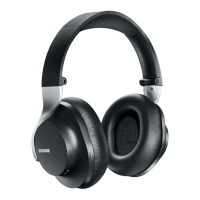
Storage
Store headphones in protective case when not in use.


 To Next Page