English
12
CHECKING THE TRANSMITTER BATTERY
Turn the transmitter PWR/OFF switch to the PWR position and observe that one or
two of the three lights on the transmitter glows. The amount of battery life remaining will
be indicated by the color of the light(s), as shown in the following table.
*Estimated operating time assumes the use of a fresh 9 V alkaline battery.
NOTE: A rechargeable 8.4V nicad battery causes the indicators to change more
quickly than if using a 9V alkaline battery. Actual times depend on the type and brand
of battery used.
CONNECTING A MICROPHONE OR INSTRUMENT CABLE TO THE LX1
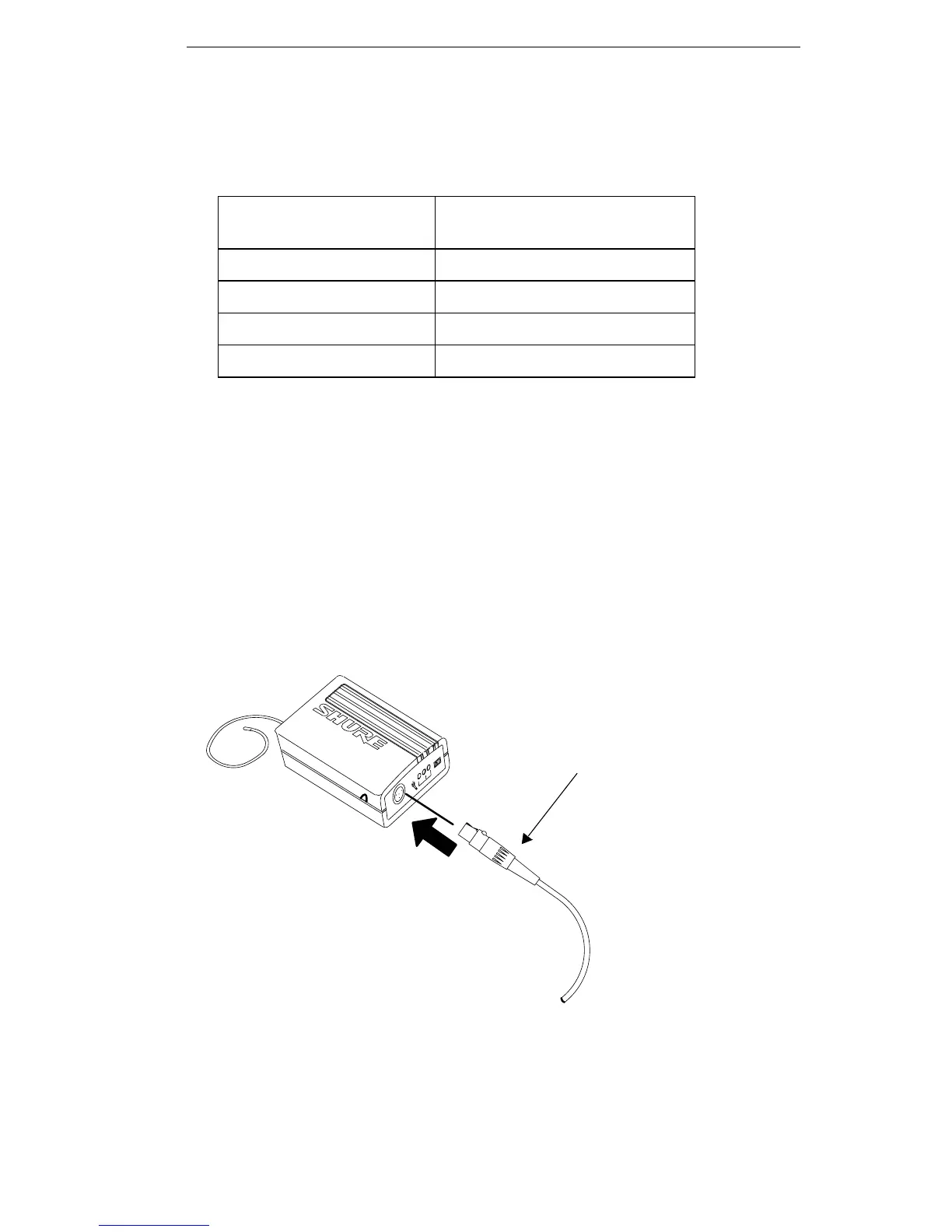
1. Connect the microphone cable or instrument cable to the transmitter input jack.
2. Install the microphone by attaching it to the user's tie, shirt, or collar (lavalier mic),
placing it over the user's head (headset mic), or affixing it to an acoustic musical
instrument (instrument mic).
3. If using an instrument adapter cable, attach the other end of the instrument cable to
the instrument output connector.
LX1 BODY-PACK TRANSMITTER CABLE CONNECTION
FIGURE 11
Battery Life Indicators Remaining Transmitter
Operating Time*
Green 6 to 20 hours
Green and Amber 4 to 6 hours
Amber 2 to 4 hours
Red 1 hour or less
MICROPHONE CABLE OR WA302
INSTRUMENT ADAPTER CABLE












 To Next Page