11
LX Wireless System
TRANSMITTER SETUP
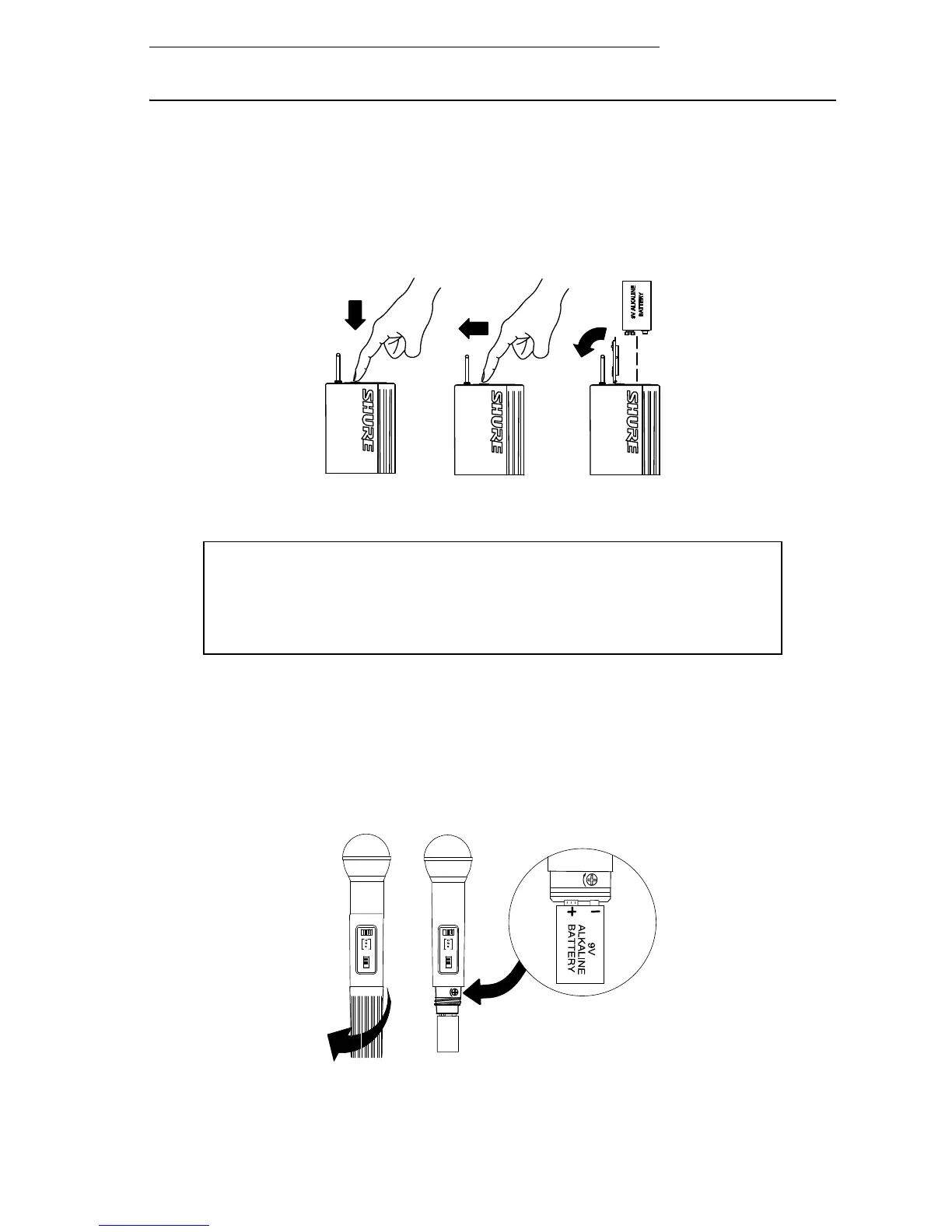
LX1 BODY-PACK TRANSMITTER BATTERY INSTALLATION
1. With the transmitter POWER PWR/OFF switch in the OFF position, press down on
the OPEN side of the battery compartment cover, slide it back and flip it open.
2. Insert a new 9V alkaline battery in the compartment. Observe proper battery polar-
ity (“+/–”).
LX1 BODY-PACK TRANSMITTER BATTERY INSTALLATION
FIGURE 9
LX2 HAND-HELD MICROPHONE-TRANSMITTER BATTERY INSTALLATION
1. With the transmitter PWR/OFF switch in the OFF position, hold the upper part of
the transmitter and unscrew the battery cover.
2. Install a fresh 9V alkaline battery. Make sure the battery terminals match the termi-
nals in the transmitter.
3. Screw the battery cover back into place.
LX2 MICROPHONE-TRANSMITTER BATTERY INSTALLATION
FIGURE 10
IMPORTANT: A fresh 9V alkaline battery should provide 18 to 20
hours of operation. However, an 8.4V nickel-cadmium (nicad)
battery will only provide 3 hours of operation. Carbon-zinc and
zinc-chloride batteries will not provide sufficient power, and are not
recommended.












 To Next Page