EasyManua.ls Logo

SICK KTX-WB9114125A Series - User Manual

SICK KTX-WB9114125A Series
10 pages
Print Icon
To Next Page IconTo Next Page
Loading...
제품 데이터 시트
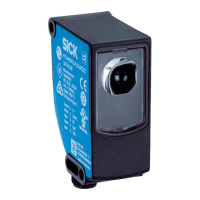
KTX-WB9114125AZZZZ
KTX Prime
콘트라스트 센서

Questions and Answers

  • S
    sean40Aug 11, 2025
    What to do if “Err” flashes and there is no signal change at the switching output for object detection for SICK Accessories?
    • A
      Ashley CampbellAug 11, 2025
      If the "Err" flashes, the Q LED and TCH LED are yellow, and there's no signal change at the switching output for object detection with your SICK Accessories, it typically means the programmed contrast or contrast difference isn't sufficient for stable contrast detection. Try these steps: * Readjust the sensor. * Clean the sensor. * Check the application conditions. * Restart the teach process. * Increase the contrast difference.
  • D
    Daniel Rojas IIAug 15, 2025
    Why is there no switching output from my SICK Accessories?
    • M
      Mr. Raymond OconnorAug 15, 2025
      If you no longer have a switching output from your SICK Accessories, consider the following possible causes: * Inconsistent distance or angle to the material: Clean the sensor. * Dirty light emission (optics): Readjust the sensor. * Incorrect manual switching threshold: Check the parameter settings or perform the teach process again.
  • M
    Matthew KellyAug 20, 2025
    How to fix “Err” flashing and Q LED (yellow) flashing on SICK Accessories?
    • C
      Chelsea HudsonAug 20, 2025
      If the “Err” is flashing and the Q LED (yellow) is flashing on your SICK Accessories, this could indicate a short-circuit or overcurrent message. Try disconnecting the sensor from the power network. It could also mean the sensor isn't connected properly, so check the pin assignment and reconnect the sensor. Also, check the current at the switching output.
  • S
    Steven WilliamsAug 26, 2025
    What to do if there is no change to the segment display in Mounting feedback mode for SICK Accessories?
    • K
      Kayla FieldsAug 26, 2025
      If there's no change to the segment display in Mounting feedback mode for your SICK Accessories, the distance between the sensor and the background might be too large or too small, so clean the sensor. The light emission (optics) might also be dirty, so check the application conditions. You can also try restarting the adjustment process.
  • K
    Kevin JohnsonAug 30, 2025
    What does 'Busy' mean on my SICK Accessories?
    • J
      jeffrey44Aug 30, 2025
      If your SICK Accessories display shows "Busy", it means the sensor is undergoing an internal process. Wait until the process has finished.
  • A
    Ann PhillipsSep 4, 2025
    What to do if “Err” flashes and Q LED (yellow) flashes on SICK Accessories?
    • E
      elizabetharroyoSep 4, 2025
      If the “Err” flashes and the Q LED (yellow) flashes on your SICK Accessories, it could be due to a short-circuit or overcurrent. Try disconnecting the sensor from the power network. Alternatively, the sensor might not be connected properly, so check the pin assignment and reconnect the sensor. You may also need to check the current at the switching output.

SICK KTX-WB9114125A Series Specifications

General IconGeneral
Enclosure ratingIP67
Protection classIII
Operating voltage10 V DC ... 30 V DC
Output typePNP
Housing materialPlastic
Ambient temperature+55 °C

Related product manuals