Index dec
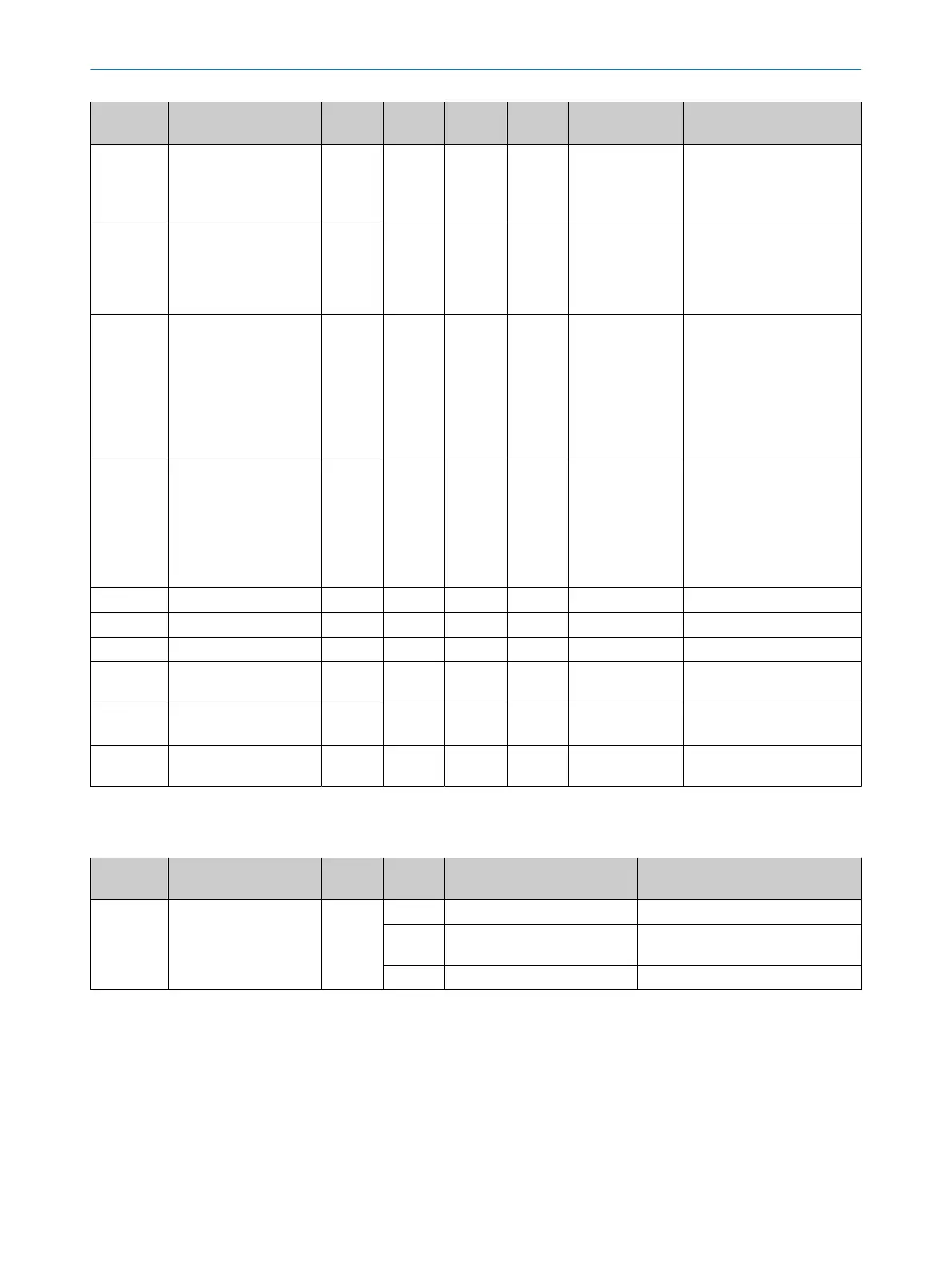
(hex)
Name Format
(Offset)
Length Access
1)
Default
value
Value/Range Remark [Unit]
17 (0x11) Vendor text String 24byte
s
ro SICK
Sensor
Intelli‐
gence
18 (0x12) Product Name String 16byte
s
ro RFH5xx-
100430
1
(Device
specific)
19 (0x13) Product ID String 16byte
s
ro 607284
0,
607284
1 or
607284
2
(Device
specific)
20 (0x14) Product text String 64byte
s
ro RFH5xx-
100430
1 HF
RFID
device
(Device
specific)
21 (0x15) Serial Number String 8bytes ro
22 (0x16) Hardware version String 5bytes ro
23 (0x17) Firmware version String 5bytes ro
24 (0x18) Application Specific Tag String 32byte
s
rw ***
40 (0x28) Process data input PD in 32byte
s
ro
41 (0x29) Process data output PD out 32byte
s
ro
1)
ro = read only, wo = write only, rw = read/write
2)
Subindex access not supported
Table 13: Standard command
Index dec
(hex)
Access
1)
Value Name Remark [Unit]
2 (0x02) System command wo 128 Device reset Reboots the device.
130 Restore factory settings All device parameters are reset to
their default values.
160 Locate Device -
1)
ro = read only, wo = write only, rw = read/write
8.3.2.2 SICK device specific
SIO mode parameters
In addition to data exchange in IO-Link mode, the device can also switch in SIO mode
(standard I/O).
To do so, configure SIO mode in parameter 0x41. In SIO mode, the device offers four
evaluation conditions each (subindex 0x01 or 0x06) for both the Q1 or Q2 digital
outputs.
OPERATION 8
8025309/1KDE/2023-12-19 | SICK O P E R A T I N G I N S T R U C T I O N S | RFH5xx
41
Subject to change without notice



 To Next Page