Installation & User Manual, Radio Remote rev 1_0_4 Page 8
How to use a bow thruster
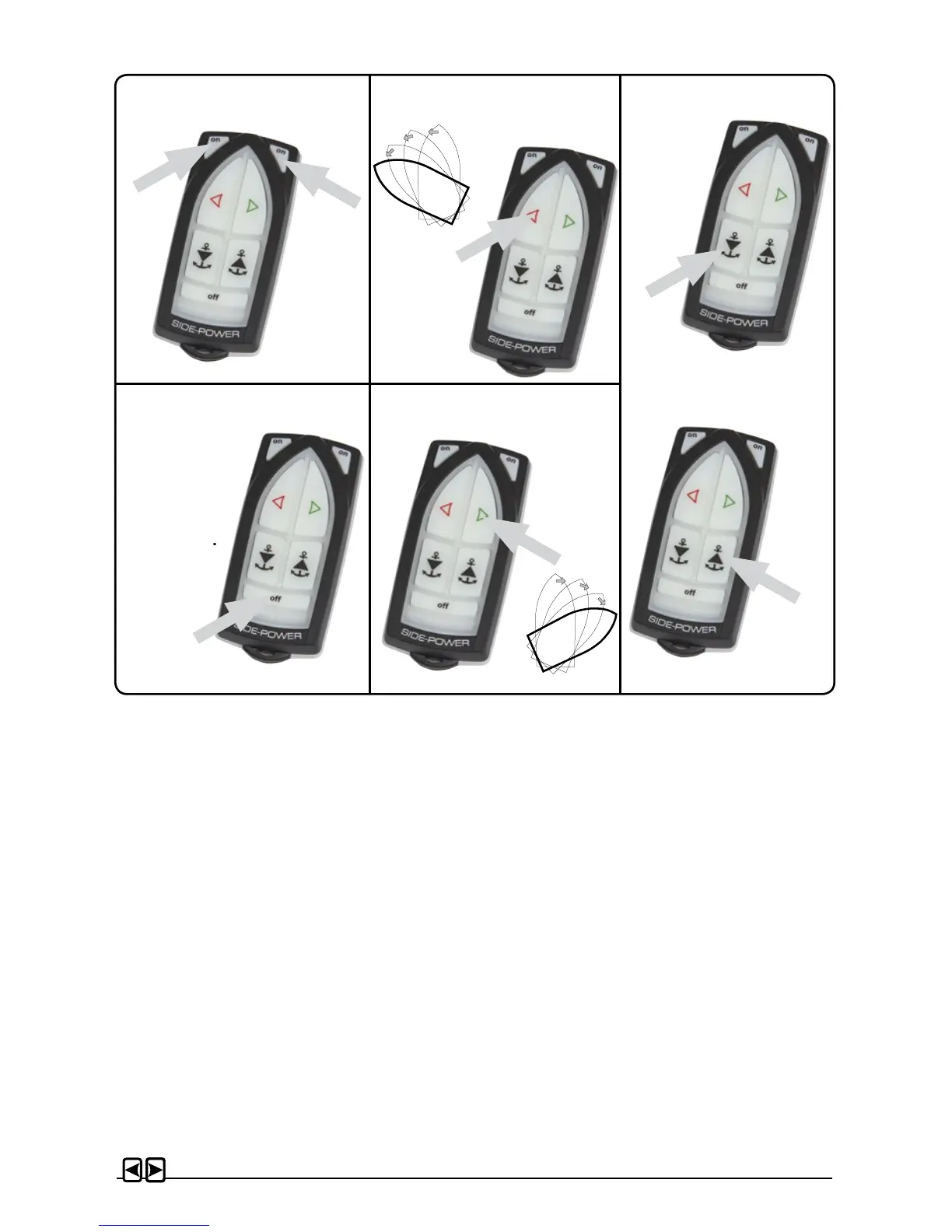
1. Turn the main power switch for the bow thruster on. Turn on main switch so the receiver has
power.
2. Turn on the transmitter by pushing the transmitter’s two “ON” buttons. The remote system is
now activated and then turns o automatically appr. 4 min. after the last usage.
3. Please take some time to exercise thruster usage in open water to avoid damages to your boat.
4. Turn the bow in the desired direction. By pushing the red button for port movement or the
green button for starboard movement.
How to use the windlass
1. Turn the main power switch for the windlass on. Turn on the power to the receiver.
2. Turn on the transmitter by pushing the transmitter’s two “ON” buttons. The remote system is
now activated and then turns o automatically appr. 4 min. after the last usage.
3. Please consult your windlass manual for use and precautions.
Remote Control Deactivation
Push the transmitter’s “OFF” button for two seconds (the remote control deactivates automati-
cally after approx. 4 minutes after the last usage).
• If in doubt, try in open water rst!
Remote control “ON” Turn boat to Port
Windlass
Remote control “OFF”
Turn boat to Starboard
Auto-OFF
appr. 4 min.
Down
Up
Hold for
2 seconds
RC-21E



 To Next Page