EasyManua.ls Logo

Siemens POL903.00/100 - User Manual

Siemens POL903.00/100
11 pages
Print Icon
To Next Page IconTo Next Page
Loading...
CC1N7219en
10/28/2020
Smart Infrastructure
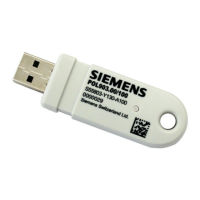
WLAN stick
POL903.00/100
Temporary WLAN interface for POS controllers, POL controllers, and DXR
controllers during commissioning and service. Allows the controller to be
configured and programmed via smartphone or tablet.
Apps such as Climatix smart HMI or ABTGo cut down on programming time,
configuration time, and commissioning time.
The POL903.00/100 and this Data Sheet are intended for original equipment
manufacturers (OEMs) using the POL903.00/100 in or on their products.
Use
The POL903.00/100 can be used with all Siemens controllers that have a compatible
USB interface.
The following Siemens controllers with a compatible USB interface are available:
Type Data sheet
Climatix C400 A6V11276159
Climatix C600 A6V10990076
Climatix S300 A6V11417931
Actuating DXR1 A6V11393935, A6V11393929, A6V11393931, A6V11393933
The respective data sheets clearly define the controller versions that are compatible
with POL903.00/100.
Question and Answer IconNeed help?

Do you have a question about the Siemens POL903.00/100 and is the answer not in the manual?

Summary

Safety and Warning Notes

General Safety Precautions

Covers qualified staff, temporary use, environmental conditions, static discharge, PC usage, and vibration.

Controller Usage Warning

Specific warning about electric shock risk when using with controllers that lack protective housing or have galvanic mains connection.

Standards and Certifications

Applied Directives and Regulations

Details on Radio Equipment Directive (RED), RoHS, and various ETSI, EN, FCC, and IEC standards compliance.

Compliance Marks

Information on EAC Conformity, ISO certifications (9001, 14001, OHSAS 18001), China RoHS, and FCC marks.

Declarations and Statements

EU Declaration of Conformity

Statement confirming compliance with EU Directive 2014/53/EU for the radio equipment type POL903.00/100.

FCC and Industry Canada Compliance

Details FCC Class B compliance, potential interference, and Industry Canada's license-exempt RSS statements.

RF Exposure and Software Information

Radiofrequency Radiation Exposure

Statement on compliance with FCC and IC radiation exposure limits for uncontrolled environments.

Open-Source Software (OSS) Declaration

Information regarding third-party software components, OSS licenses, and source code availability.

Technical Specifications and Disposal

Disposal Guidelines

Instructions for proper disposal of electrical and electronic components, adhering to local legislation.

Technical Data Summary

Includes general unit data, environmental conditions for storage, transport, and operation, and LED signaling.

Operation and Configuration

Reset Button Functionality

Procedure to reset the WLAN stick to factory settings by pressing the reset button for 3 seconds.

Handling and Commissioning

Steps for connecting the WLAN stick, relevant commissioning data, and accessing the web interface.

Settings Management

Access Point Settings

Configuration options for the WLAN network, including channel, SSID, and security mode.

IP and DHCP Configuration

Details of current network settings such as IP address, subnet mask, gateway, and DNS server.

Firmware and Controller Access

Firmware Update Procedure

Instructions on how to update the WLAN stick's firmware using the 'Update' menu.

Direct Controller Web Access

Information on accessing a connected controller's web interface directly via the WLAN stick.

Connection Diagram and Notes

Connection Diagram

Illustrations showing the correct connection of the POL903.00/100 WLAN stick to controllers.

Connection Precautions

Important notes and attention alerts regarding the proper physical connection of the WLAN stick.

Product Dimensions

Overview

The Siemens POL903.00/100 is a WLAN stick designed as a temporary interface for commissioning and servicing POS, POL, and DXR controllers. It enables configuration and programming of these controllers via a smartphone or tablet, facilitating the use of apps like Climatix smart HMI or ABTGo to reduce programming, configuration, and commissioning times.

Technical Specifications:

  • Supply Voltage: 5 V DC ±10%
  • Current Consumption: Typically 120 mA, Max. 200 mA
  • Degree of Protection: IP30
  • Safety Class: III
  • Degree of Pollution: 3
  • WLAN Modes: IEEE802.11g and b
  • Mounting Position: Optional
  • Dimensions (L x W x H): 67.5 mm x 22 mm x 10 mm
  • Cable Length (WLAN stick to controller): Max. 2.5 m
  • Weight: 10 g
  • Frequency Band: 2,400 MHz
  • Max. Transmission Power: 14.15 dBm

Environmental Conditions:

  • Storage:
    • Climatic conditions: DIN EN 60721-3-1 Class 1K3
    • Mechanical conditions: Class 1M2
    • Temperature range: -40°C to +60°C
    • Humidity: <90% r.h. (non-condensing)
  • Transport:
    • Climatic conditions: DIN EN 60068-2 and EN 60721-3-2 Class 2K2
    • Mechanical conditions: Class 2M2
    • Temperature range: -40°C to +80°C
    • Humidity: 5% to 90% r.h. (non-condensing)
  • Operation:
    • Climatic conditions: DIN EN 60721-3-3 Class 3K3
    • Mechanical conditions: Class 3M2
    • Temperature range: -15°C to +60°C
    • Humidity: <90% r.h. (non-condensing)
    • Installation altitude: Max. 2,000 m above sea level
    • Condensation, ice formation, and water ingress are not permitted.

Usage Features:

The POL903.00/100 is compatible with all Siemens controllers featuring a compatible USB interface. This includes Climatix C400 (A6V11276159), Climatix C600 (A6V10990076), Climatix S300 (A6V11417931), and Actuating DXR1 (A6V11393935, A6V11393929, A6V11393931, A6V11393933). The specific compatible controller versions are detailed in their respective data sheets.

To use, connect the WLAN stick to a USB port on the controller. The connection between the terminal unit (e.g., notebook, cell phone) and the WLAN network (SSID "Siemens-WLAN-Stick") is established automatically.

Commissioning Data:

  • SSID: Siemens-WLAN-Stick
  • Password for the terminal unit: SIBPAdmin
  • DNS Name: siemens.wlanstick

Siemens AG recommends changing the default password during commissioning. All settings can be adjusted via the web interface.

Connecting to the Web Interface for Configuration:

The IP address is issued automatically via DHCP. The default IP address of the WLAN stick is 10.123.45.1. An integrated DNS server allows access via the name "siemens.wlanstick" regardless of its IP address.

Available URLs for the web interface:

  • http://10.123.45.1:8080
  • http://siemens.wlanstick:8080
  • https://10.123.45.1:441
  • https://siemens.wlanstick:441

When using a Climatix controller, its web interface can be accessed directly via http://10.123.45.1 in the default settings, without specifying a particular port.

Settings Menu:

The WLAN stick's settings are managed under the "Settings" menu. The overview page displays current settings, which can be modified by clicking the pencil (edit) icon.

Access Point Tab:

  • Channel: WLAN network channel.
  • Network Name (SSID): WLAN network identifier.
  • Security Mode: Chosen WLAN encryption technology.
  • SSID Mode: Encryption status of the SSID.

Password Tab:

  • Allows changing the WLAN password.

IP & DHCP Tab:

  • Displays current network settings: IP address, Subnet mask, Gateway, DNS server.
  • Contains settings for the integrated DHCP server, used for assigning IP addresses to connected WLAN clients.

Firmware Update:

Firmware updates are performed via the "Update" menu.

  • Drag and drop the firmware file from your PC into the "Browse files or Drag&Drop it here" field.
  • Alternatively, click in the field to select the firmware file.
  • Click the "Update" button to initiate the update.

Maintenance Features:

Reset Button:

To restore the WLAN stick to its factory settings, press and hold the reset button for 3 seconds while the stick is active. A red flashing LED indicates the reset process.

LED Signaling:

  • Green: Initialization.
  • Green, flashing slowly: Normal operating status.
  • Green, flashing quickly: Communication.
  • Red, flashing: Saving a new configuration or during a firmware upgrade.
  • Red: Fault status.

Safety and Important Notes:

  • This device is intended for original equipment manufacturers (OEMs) for integration into their products.
  • All activities (mounting, installation, service) must be performed by qualified staff.
  • The WLAN stick is a temporary maintenance solution, not for continuous operation.
  • Avoid condensation and damp environments. If exposed, ensure the device is completely dry before reconnecting power.
  • Prevent electrostatic charges, as they can damage electronic components.
  • The WLAN stick is only for use with listed controllers, not as a standard WLAN stick for a PC.
  • In environments with strong vibrations, ensure the mechanical connection to the USB interface is not interrupted (e.g., using a connecting cable).
  • Warning: When used with controllers lacking protective housing or having a galvanic connection to the mains, there is a risk of electric shock.
  • The POL903.00/100 must be connected to the controller as shown in the connection diagrams.
  • If a cable is used instead of direct insertion, it must be shielded and no longer than 2.5 meters.
  • Interventions and changes to the device are strictly forbidden. Siemens is not responsible for damage from unauthorized interventions.

Compliance and Certifications:

  • CE: Complies with Radio Equipment Directive (RED 2014/53/EU) and RoHS Directive (2011/65/EU).
  • FCC: Complies with Part 15 of the FCC rules. Operation is subject to two conditions: no harmful interference, and acceptance of any interference received. Changes or modifications not expressly approved by Siemens Switzerland Ltd. could void the user's authority to operate the equipment.
  • Industry Canada (ISED): Complies with ISED's license-exempt RSSs. Operation is subject to two conditions: no interference, and acceptance of any interference received.
  • EAC: Eurasian Conformity.
  • ISO: Certified to ISO 9001:2015, ISO 14001:2015, OHSAS 18001:2007.
  • China RoHS: Hazardous substances information available online.

Open-Source Software (OSS) Declaration:

The product contains third-party software components, including open-source software. Relevant OSS license conditions take priority. Siemens provides the OSS part at no additional cost. Users may edit and reverse engineer linked products for personal use to correct errors, but not distribute these edits. Source code for certain OSS licenses can be requested. Siemens charges a handling fee for this request. Warranty obligations are defined in the contract with Siemens; modifications or non-specified use voids the warranty. Siemens makes no warranty obligations on behalf of third-party licensors. A list of all OSS components and their licenses is available on the Siemens website.

Disposal Notes:

The WLAN stick contains electrical and electronic components and must not be disposed of with domestic waste. Local and currently valid legislation must be complied with.

Siemens POL903.00/100 Specifications

General IconGeneral
BrandSiemens
ModelPOL903.00/100
CategoryRecording Equipment
LanguageEnglish

Related product manuals