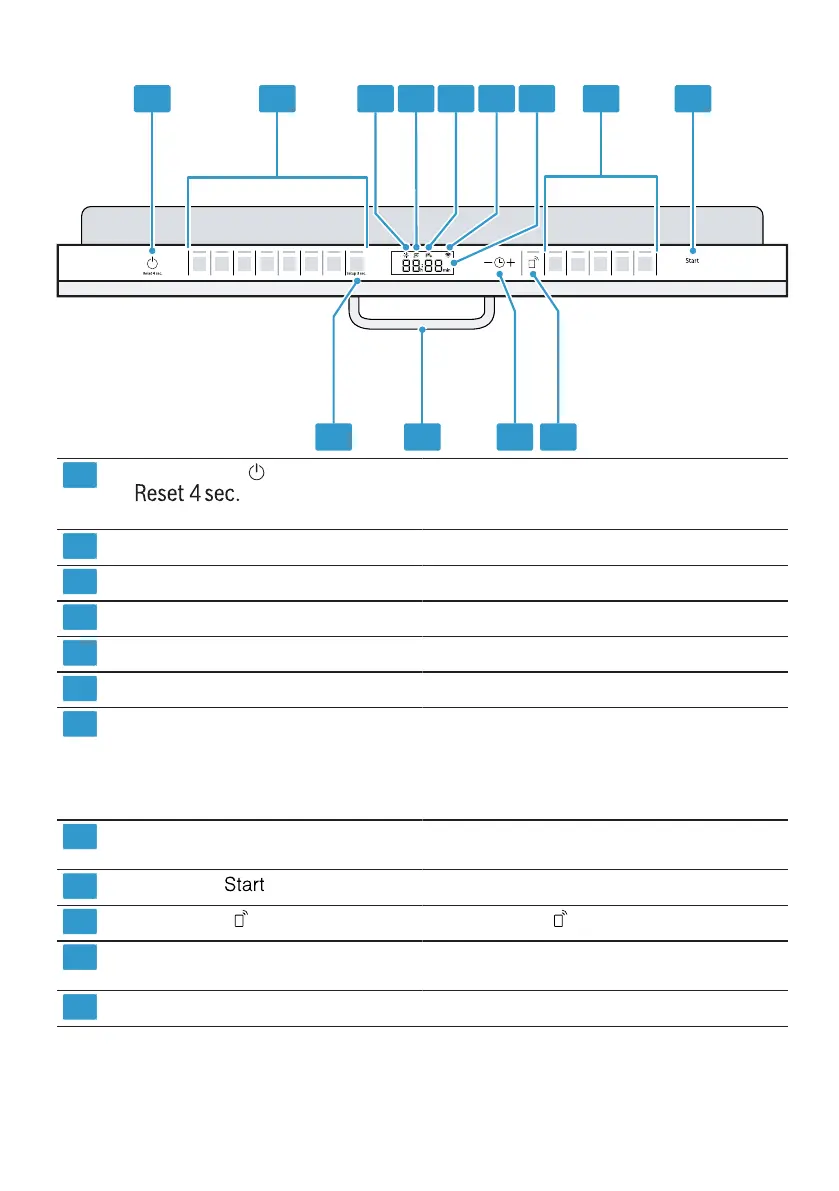
en Familiarising yourself with your appliance
18
1 2 3 4 5 6 7 8 9
10111213
ON/OFF button and reset button "Switching on the appliance" →Page34
"Switching off the appliance" →Page36
"Terminating the programme" →Page36
Programme buttons "Programmes" →Page20
Rinse aid refill indicator "Rinse aid system" →Page29
Special salt refill indicator "Water softening system" →Page26
Water supply display Display for water supply
WLAN display "Home Connect" →Page40
Display The display shows information about the remain-
ing running time or the basic settings. You can
change the basic settings via the display and the
setting buttons.
→"Changing basic settings", Page40
Programme buttons and additional
functions
"Programmes" →Page20
"Additional functions" →Page22
Start button "Starting the programme" →Page35
Remote Start →"Remote Start ", Page41
Timer programming and setting but-
tons
"Setting timer programming" →Page35
"Changing basic settings" →Page40
Door opener
1
"Opening the appliance door" →Page34
1
Depending on the appliance specifications



 To Next Page