en Familiarising yourself with your appliance
16
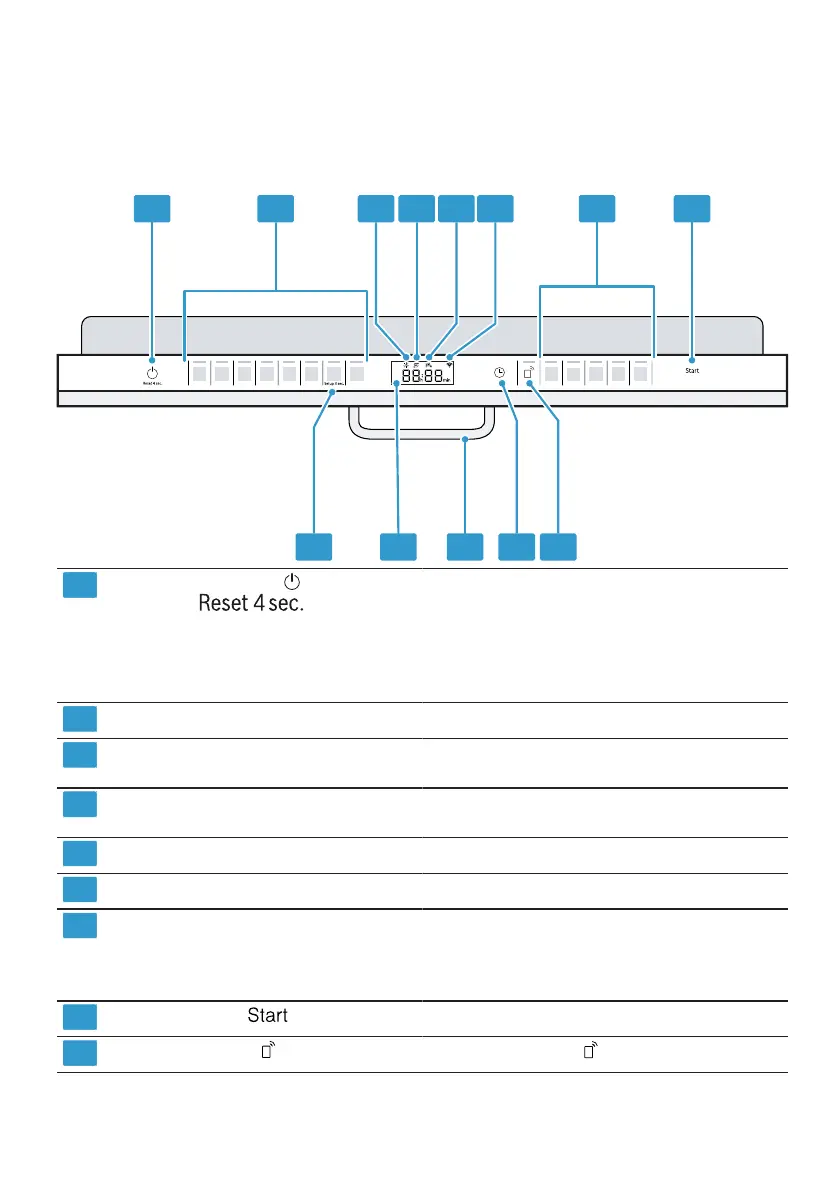
6.2 Controls
You can use the control panel to configure all functions of your appliance and
to obtain information about the operating status.
With some buttons you can perform different functions.
ON/OFF button and reset
button
Switching on the appliance
→Page32
Switching off the appliance
→Page33
Terminating the programme
→Page33
Programme buttons
Programmes →Page18
Rinse aid refill indicator Rinse aid system
→"Adding rinse aid", Page26
Special salt refill indicator Water softening system
→"Adding special salt", Page25
Water supply display Display for water supply
WLAN display
Home Connect →Page39
Programme buttons and addi-
tional functions
Programmes
→"Programmes", Page18
Additional functions
→"Additional functions", Page20
Start button
Starting the programme →Page33
Remote Start
→"Remote Start ", Page40
1
Depending on the appliance specifications




 To Next Page