Need help?
Do you have a question about the Sighta CLOVER 5 and is the answer not in the manual?
Ensures safe operation by specifying the ambient temperature range for the device.
Guidelines to protect the unit from damage by water, rain, and other liquids.
Advises against self-repair to maintain product warranty and directs service to distributors.
Stipulates the use of official power adapters and batteries for optimal performance and safety.
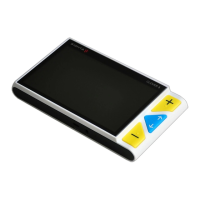
Introduces the CLOVER 5 handheld video magnifier and its key features.
Identifies front panel controls including LCD screen, zoom, and color mode buttons.
Details rear and side components like camera, LED lights, writing stand, and battery slot.
Details power LED, power button, beep function, and freeze button on the top panel.
Describes the USB Type-C port and TV output port for connectivity.
Steps to install the battery into the device, including opening the cover and inserting the battery.
Instructions for charging the device's battery using the provided USB cable and adapter.
Explains the status and color of the power LED indicator during charging and operation.
Details on turning the unit on/off and checking status by pressing the power button.
Explains different beep types and how to control them.
Instructions on how to use the Color Mode Up and Down buttons to cycle through color combinations.
How to quickly switch between Full color mode and enhanced contrast mode using button combinations.
Procedure to switch between Simplified and Integrated color lists using button combinations.
Instructions on how to adjust display brightness using button combinations with the power button.
Details on fine-tuning foreground and background colors in Enhanced contrast mode using button combinations.
How to turn the LED lighting on or off using a combination of the Power and Freeze buttons.
Instructions on how to use the Freeze button to capture and lock the current image on the screen.
How to release the locked image using the Freeze button again.
Using combo button presses with Power button to navigate frozen images when magnification is increased.
Instructions on selecting the correct TV output mode (PAL or NTSC) when connecting to a TV.
Information on how the image automatically returns to the unit's LCD screen after unplugging the TV cable.
Describes how the unit automatically memorizes and restores the most recent settings upon power-on.
Explains the automatic power-off feature that activates after 3 minutes of inactivity.
Procedure to reset the unit to default factory settings by holding specific buttons simultaneously.
Solutions for the unit failing to power on, including checking power, battery, and reinstallation.
Troubleshooting steps for a black or white screen, often related to surface placement.
Addresses issues like black/white screens, TV connection problems, and restarting the unit.
Explanation that the image will not change if the unit is in freeze mode.
Tips for checking status, restarting the unit, and reinstalling the battery for troubleshooting.
Solutions for smudges or blemishes on the screen, including adjusting brightness and cleaning.
 General
| Brand | Sighta |
|---|---|
| Model | CLOVER 5 |
| Category | Magnifiers |
| Language | English |

 To Next Page