EasyManua.ls Logo

Sigma 6000+ - Page 34

Sigma 6000+
42 pages
Print Icon
To Next Page IconTo Next Page
To Previous Page IconTo Previous Page
Loading...
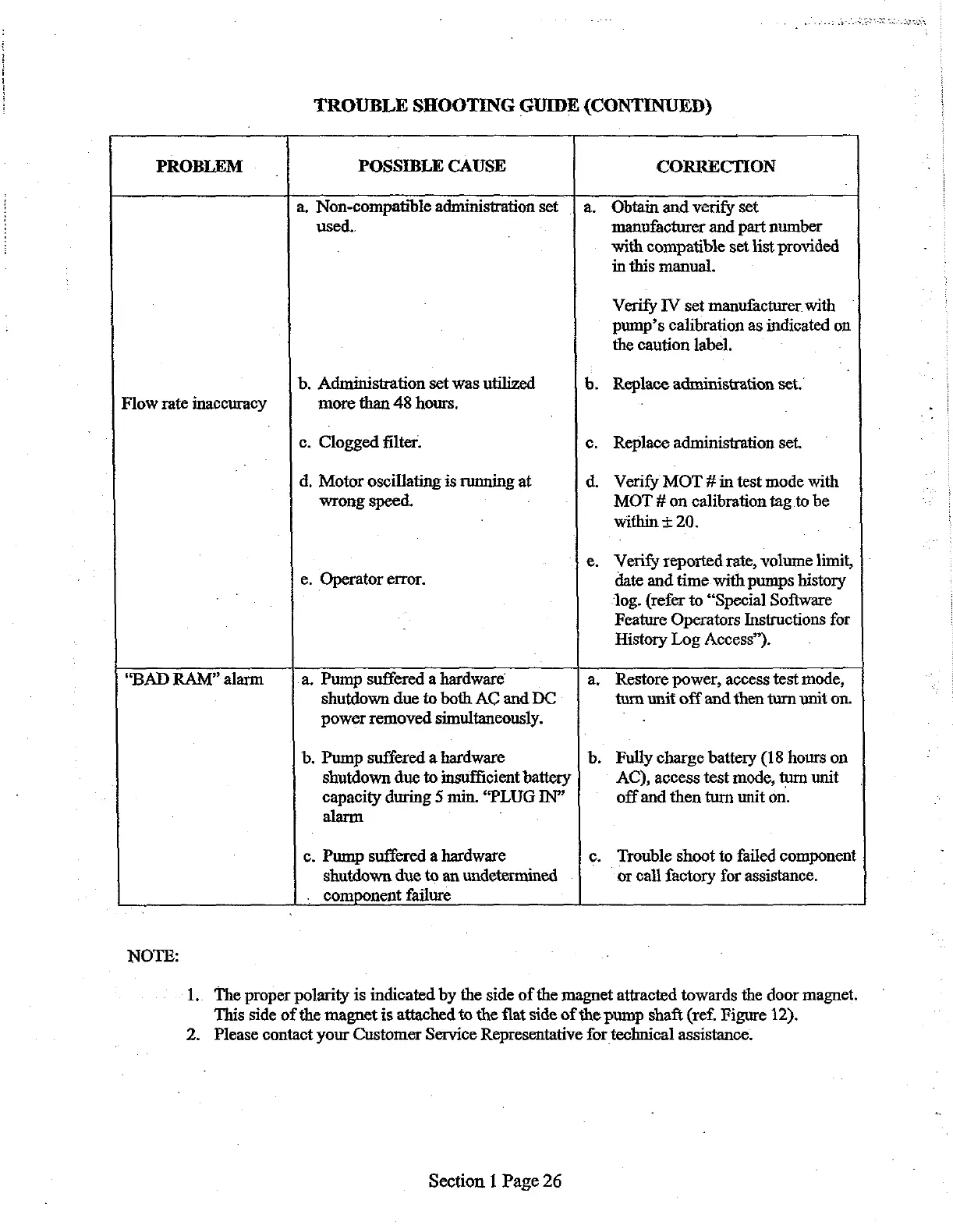
TROUBLE
SHOOTING
GUIDE
(CONTINUED)
PROBLEM
POSSIBLE
CAUSE
CORRECTION
.
Non-compatible
administration
set
Obtain
and
verify
set
used..
manufacturer
and
part
number
with
compatible
set
list
provided
in
this
manual.
Verify
IV
set
manufacturer.
with
pump’s
calibration
as
indicated
on
the
caution
label.
.
Administration
set
was
utilized
.
Replace
administration
set.
Flow
rate
inaccuracy
more
than
48
hours.
.
.
Clogged
filter.
Replace
administration
set.
.
Motor
oscillating
is
running
at
.
Verify
MOT
#
in
test
mode
with
wrong
speed.
MOT
#
on
calibration
tag
to
be
'
within
+
20.
.
Verify
reported
rate,
volume
limit,
.
Operator
error.
date
and
time
with
pumps
history
log.
(refer
to
“Special
Software
Feature
Operators
Instructions
for
History
Log
Access”).
“BAD
RAM”
alarm
.
Pump
suffered
a
hardware
shutdown
due
to
both
AC
and
DC
power
removed
simultaneously.
.
Pump
suffered
a
hardware
shutdown
due
to
insufficient
battery
capacity
during
5
min.
“PLUG
IN”
alarm
.
Pump
suffered
a
hardware
shutdown
due
to
an
undetermined
.
component
failure
Restore
power,
access
test
mode,
turn
unit
off and
then turn
unit
on.
.
Fully
charge
battery
(18
hours
on
AC),
access
test
mode,
turn
unit
off
and
then
turn
unit
on.
Trouble
shoot
to
failed
component
or
call
factory
for
assistance.
NOTE:
1.
The
proper
polarity
is
indicated
by
the
side
of
the
magnet
attracted
towards
the
door
magnet.
This
side
of
the
magnet
is
attached
to
the
flat
side
of
the
pump
shaft
(ref.
Figure
12).
2.
Please
contact
your
Customer
Service
Representative
for
technical
assistance.
Section
1
Page
26

Related product manuals