EasyManua.ls Logo

Sigma 6000+ - Page 33

Sigma 6000+
42 pages
Print Icon
To Next Page IconTo Next Page
To Previous Page IconTo Previous Page
Loading...
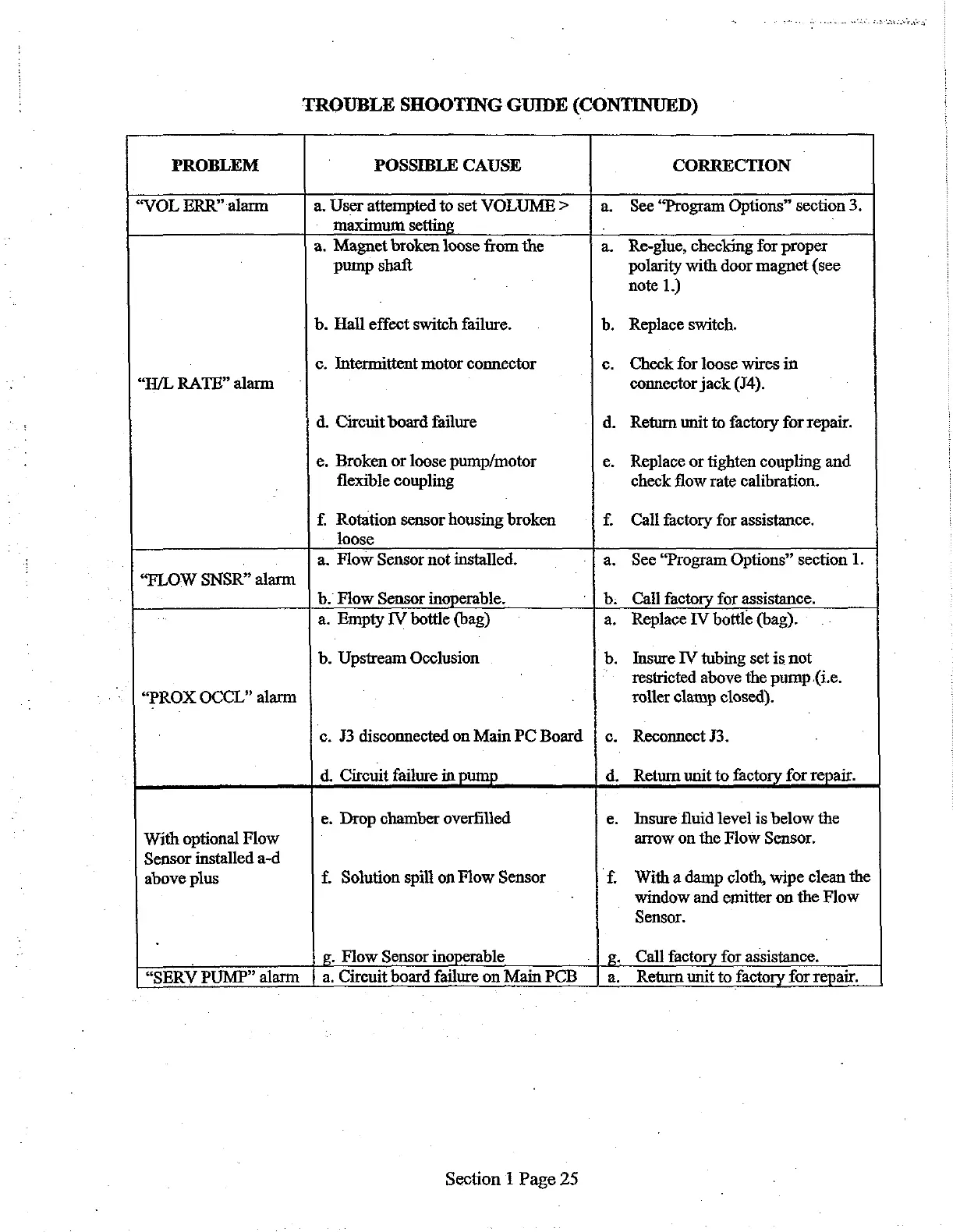
TROUBLE
SHOOTING
GUIDE
(CONTINUED)
PROBLEM
POSSIBLE
CAUSE
CORRECTION
|
“VOL
ERR”
alarm
a.
User
attempted
to
set
VOLUME
>
j
a.
See
“Program
Options”
section
3.
maximum
setting
.
:
a.
Magnet
broken
loose
from
the
a.
Re-glue,
checking
for
proper
pump
shaft
polarity
with door
magnet
(see
note
1.)
b.
Hall
effect
switch
failure.
b.
Replace
switch.
c.
Intermittent
motor
connector
6.
Check
for
loose
wires
in
“H/L
RATE”
alarm
connector
jack
(J4).
d.
Circuit
board
failure
d.
Return
unit
to
factory
for
repair.
e.
Broken
or
loose
pump/motor
e.
Replace
or
tighten
coupling
and
flexible
coupling
check
flow
rate
calibration.
f.
Rotation
sensor
housing
broken
f.
Call
factory
for
assistance.
loose
.
a.
Flow
Sensor
not
installed.
a.
See
“Program
Options”
section
1.
“FLOW
SNSR”
alarm
b.
Flow
Sensor
inoperable,
b.
Call
factory
for
assistance.
a.
Empty
IV
bottle
(bag)
a.
Replace
IV
bottle
(bag).
b.
Upstream
Occlusion
b.
Insure
IV
tubing
set
is
not
restricted
above
the
pump
(i.e.
“PROX
OCCL”
alarm
roller
clamp
closed).
‘c.
J3
disconnected
on
Main
PC
Board
|
c.
Reconnect
13.
d.
Circuit
failure
in
pump
d.
Return
unit
to
factory
for
repair.
e.
Drop
chamber
overfilled
e.
Insure
fluid
level
is
below
the
With
optional
Flow
]
arrow
on
the
Flow
Sensor.
Sensor
installed
a-d
|
above
plus
f.
Solution
spill
on
Flow
Sensor
f.
With
a
damp
cloth,
wipe
clean
the
window
and
emitter
on
the
Flow
Sensor.
.
g.
Flow
Sensor
inoperable
_|
g.
Call
factory
for
assistance.
“SERV
PUMP”
alarm
|
a.
Circuit
board
failure
on
Main
PCB
|
a.
Return
unit
to
factory
for
repair.
Section
1
Page
25

Related product manuals