EasyManua.ls Logo

Signet 9900 - User Manual

Signet 9900
72 pages
Print Icon
To Next Page IconTo Next Page
Loading...
*3-9900.090*
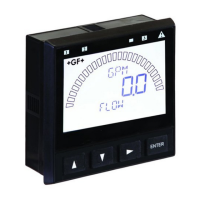
Signet 9900 Transmitter
3-9900.090 Rev. G 02/17
English
The 9900 Transmitter, a member of Signet's line of SmartPro
®
instruments,
provides a single-channel interface for all Flow, pH/ORP, Conductivity/Resistivity,
Salinity, Pressure, Temperature, Level, Dissolved Oxygen, Turbidity, Batch and
other applications.
The 9900 is available in either Panel or Field Mount. Both versions run on
10.8 to 35.2 VDC power (24 VDC nominal), and can power certain sensors on
loop power (see NOTE on page 11).
The 9900 Transmitter, also allows third-party 4 to 20 mA signals to be used as an
input (optional Signet 8058 i-Go
®
Signal Converter required, sold separately).
Your new Signet 9900 Transmitter needs to be calibrated and the
sensor needs to be initialized prior to use. The following steps
outline the recommended procedure to start up a new system.
1. Module Installation (page 3)
2. Installation (page 7)
3. Wiring (page 8)
4. Sensor Wiring (page 11)
5. Power Wiring (page 17)
6. Relay and Open Collector Wiring (page 18)
7. Relay Functions (page 19)
8. Operation (page 23)
9. Menu System (page 25)
Look for the
Quick Start
icon to quickly
set up your
new 9900.
Panel Mount
Operating Instructions
Field Mount
The 9900 is compatible with all GF Signet
products listed in the column to the right.
pH and ORP electrodes require the
Signet 2750/2751 DryLoc
®
Sensor
Electronics (sold separately).
Conductivity/Resistivity or Salinity
measurement requires either the optional
Direct Conductivity/Resistivity Module
(part number 3-9900.394) or the Signet
2850 Conductivity/Resistivity Sensor
Electronics (sold separately).
NOTE: If using the 2850, use the one-
channel Digital (S
3
L) models. The two-
channel model 3-2850-63 may be used
with only one channel connected. Do
not use with both channels connected.
The 4 to 20 mA models 3-2850-52 and
3-2850-62 are incompatible with the 9900.
Turbidity measurement using Signet 4150
or Dissolved Oxygen measurement using
Signet 2610-31 requires Signet 8058 i-Go
Signal Converter (sold separately).
Flow
515*/8510*, 525*, 2000,
2100, 2507, 2536*/8512*,
2537, 2540*, 2551, 2552
pH/ORP
2724-2726 with 2750*/2751
2734-2736 with 2750*/2751
2756-WTx–2757-WTx with
3719 and 2750*/2751
2764-2767 with 2750*/2751
2774-2777 with 2750*/2751
Conductivity/Resistivity, Salinity
2819-2823 with
2850 or Cond/Res Module
2839-2842 with
2850 or Cond/Res Module
Level, Temperature, Pressure
2250*, 2350*, 2450*
Turbidity
4150 requires 8058
Dissolved Oxygen
2610-41 direct to 9900
2610-31 requires 8058
* Can be run on Loop Power
(see NOTE on page 11)
Quick Start
Description
Compatibility
English
Deutsch
Français
Español
Italiano
中文

Questions and Answers

  • S
    samuel99Jul 27, 2025
    How to fix Signet 9900 Transmitter K-Factor out of range error?
    • D
      Donald CarrollJul 27, 2025
      If you receive a 'K-Factor Out Of Range' error on your Signet Transmitter, it's because K-Factors cannot be set to 0. To fix this, enter a K-Factor value between 0.0001 and 99999.
  • A
    Adriana HollandAug 4, 2025
    Why is the Signet Transmitter 9900 backlight not working?
    • F
      farroyoAug 4, 2025
      If the Signet Transmitter 9900's backlight is inoperative, it could be due to the unit operating on loop power. To resolve this, connect the 9900 to a 10.8 to 35.2 VDC power supply. Alternatively, the backlight may be turned off. Check the OPTION menu and set the BACKLIGHT to LOW, HIGH, or AUTO.
  • J
    joshuaparksAug 11, 2025
    What to do if Signet Transmitter shows wrong sensor?
    • S
      Shawn WrightAug 11, 2025
      If you're encountering issues with the sensor on your Signet Transmitter, it might be due to an incorrect sensor being installed. Ensure you connect the correct sensor. Also, verify that the sensor TYPE is correctly configured in the INPUT menu of the 9900.
  • C
    Christina MartinAug 18, 2025
    What to do if Signet 9900 Transmitter displays wrong code?
    • M
      Marvin ValenzuelaAug 18, 2025
      If you're getting a 'Wrong Code' error on your Signet Transmitter, it means an incorrect password was entered. Make sure to enter the correct password.

Summary

Operating Instructions

Quick Start

Steps to set up a new system for the 9900 Transmitter.

Product Information

Safety Information

General safety instructions for installation and use.

Module Installation

Optional Modules

H COMM Module

Enables HART communication with the 9900.

Wiring

Sensor Wiring

Power Wiring

Relay and Open Collector Wiring

Relay Functions

Relay Outputs

Setpoint Modes

Overview of relay output modes (Low/High Setpoint).

Window and Pulse Modes

Relay modes: Window In/Out, Proportional Pulse.

Operation

System Setup: Menu Navigation

Basic procedure for navigating menus.

Menu System

System Setup Menu

Automated system setup for sensors.

Common Menus

RELAY Menu

Setting relay modes, setpoints, and delays.

Sensor-Specific Menus

Flow

Setup checklist and menus for Flow sensor.

pH

ORP

Conductivity; Resistivity

Pressure

Level; Volume

Temperature

4 to 20 mA

Salinity

Dissolved Oxygen

Troubleshooting

Calibration Procedures - pH

Calibration Procedures - ORP

Calibration Procedures - Conductivity; Resistivity

Calibration Procedures - Flow

Calibration Error Messages

H COMM Module

Installation

Installing the H COMM module.

Wiring

Wiring HART with loop-powered and handheld devices.

Hart Commands

Signet 9900 Specifications

General IconGeneral
Enclosure MaterialPolycarbonate
Power Consumption5 W
Inputs4-20 mA
Outputs4-20 mA, 0-10 VDC
EnclosureNEMA 4X/IP65
Operating Temperature-20°C to 60°C
Storage Temperature-20 to 80 °C (-4 to 176 °F)
Humidity0 to 95% non-condensing
Analog Output4-20 mA

Related product manuals