Home
signia
Remote Control
miniPocket
Page 6 (Key Lock Operation)
signia miniPocket - Key Lock Operation
36 pages
Manual
Save Page as PDF
To Next Page
To Next Page
To Previous Page
To Previous Page
Loading...
6
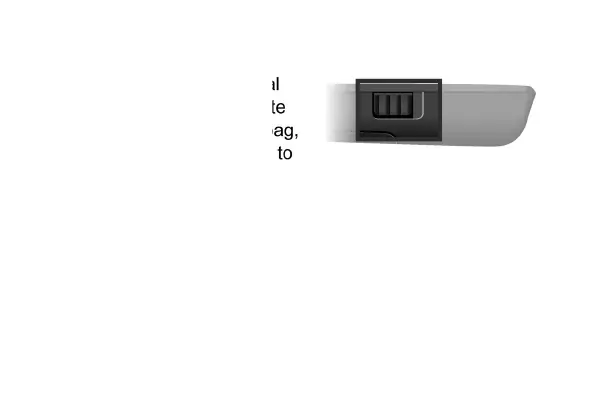
Key lock
X
To prevent any accidenta
l
operation while the remot
e
control is in a pocket or b
ag,
move the key lock switch
to
the lock position (red color visible).
When the key lock is active, all buttons on the remote control
are disabled.
5
7
Table of Contents
Main Page
Table of Contents
2
Your Remote Control
4
Components
5
Key Lock
6
Pairing Hearing Instruments
7
Function Overview
11
Further Information
13
Cleaning
13
Replacing the Battery
14
Troubleshooting
17
Service
19
Adjusting the Signal Strength
20
Important Safety Information
22
Personal Safety
22
Product Safety
24
Important Information
27
Intended Use
27
Symbols
28
Operating, Transport, and Storage Conditions
30
Disposal Information
31
Conformance Information
32
Country-Specific Information
33
Other manuals for signia miniPocket
Instructions
5 pages


 To Next Page