The SIIG USB-C to 4-in-1 Multiport Video Adapter is a versatile device designed to expand the video output capabilities of your USB-C enabled computer. This adapter allows you to connect your USB-C computer, which supports DisplayPort Alt Mode, to a variety of display types including DVI, VGA, DisplayPort (DP), or HDMI. This functionality makes it an ideal solution for users who need to connect their modern USB-C laptops or desktops to older or different display technologies without requiring multiple adapters.
Function Description
The primary function of this adapter is to convert the DisplayPort Alt Mode signal from a USB-C port into one of four common video output formats: DVI, VGA, DisplayPort, or HDMI. This enables seamless connectivity between your USB-C computer and a wide range of monitors, televisions, or projectors. The adapter is designed to be plug-n-play, meaning it does not require any driver installation, simplifying the setup process. It also operates without the need for an external power adapter, drawing power directly from the USB-C port of your computer, which enhances its portability and convenience.
Usage Features
- Multiport Connectivity: The adapter features four distinct video output ports: DVI-D (25-pin, Female), D-sub VGA (15-pin, Female), DisplayPort (20-pin, Female), and HDMI Type-A (19-pin, Female). This comprehensive selection ensures compatibility with virtually any display device you might encounter.
- High-Resolution Support: The device supports high resolutions across all its output types. For DisplayPort, it can achieve resolutions up to 4K@60Hz, providing crisp and fluid visuals. HDMI output supports up to 4K@30Hz, suitable for high-definition content. For DVI and VGA, it supports resolutions up to 1080p@60Hz, which is standard for most monitors and projectors.
- Audio Support: Beyond video, the adapter also supports high-quality audio. It can transmit up to 7.1 channel surround sound through its DisplayPort and HDMI outputs, enriching your multimedia experience when connected to compatible displays or audio systems. Note that DVI and VGA connections do not carry audio.
- Single Output Operation: It is important to note that the adapter supports only one video output at a time. This means you can connect to a DVI, VGA, DP, or HDMI display, but not simultaneously to multiple types.
- Output Priority: When multiple video output ports are connected, the adapter follows a specific priority order for output: DisplayPort (DP) takes precedence, followed by HDMI, then DVI, and finally VGA. This ensures a predictable behavior when you have multiple cables plugged in.
- Plug-n-Play Design: The adapter is designed for ease of use. Simply connect the USB-C end to your computer and the appropriate video cable (not included) from the adapter to your display. No software installation or complex configuration is required.
- Portable and Lightweight: With its compact and lightweight design, the adapter is highly portable. This makes it an excellent solution for professionals on the go, students, or anyone who needs to connect their USB-C device to various displays in different environments, whether at home, in the office, or during travel.
Maintenance Features
- Troubleshooting Connectivity Issues: If the adapter is not working properly, the first step is to ensure all cable connections between the adapter and the monitor are firm and tight. Loose connections can often lead to display problems.
- Resetting Connections: For persistent issues, unplugging the connected monitor cable from the adapter and then plugging it back in can often resolve minor glitches. If the problem continues, unplugging the entire adapter from the USB-C port of the computer and re-connecting it can help reset the connection and resolve potential communication errors.
- Switching Video Outputs: To switch between different video outputs (e.g., from HDMI to DVI), you must first unplug the currently connected monitor cable from the adapter. After disconnecting, you can then plug the desired monitor cable into the new output port you intend to use. This ensures the adapter correctly recognizes the intended output.
- DisplayPort Signal Requirement: The adapter functions correctly only when the USB-C port on your computer transmits a DisplayPort signal (DisplayPort Alt Mode). If your USB-C port does not support this mode, the adapter will not be able to output video.
- No Audio on DVI/VGA: Users should be aware that DVI and VGA connections do not support audio transmission. If audio is required, ensure you are using the DisplayPort or HDMI output and that your display or audio system is configured to receive audio through these connections.
In summary, the SIIG USB-C to 4-in-1 Multiport Video Adapter is a practical and efficient tool for expanding the display options of USB-C computers, offering broad compatibility, high-resolution support, and user-friendly operation in a portable form factor.

 Need help?
 General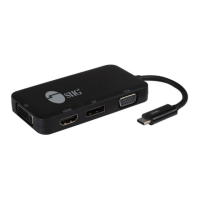

 To Next Page