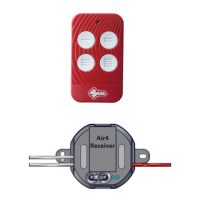
Air4 Universal Receiver
Copyright Silca S.p.A 2020. All right reserved
8
English
Further copies can be made using either the Master or Slave remote control. The Master remote
control comes together with the Air4 Universal Receiver, whereas Slave remote controls are the ope-
raonal ones copied later.
IMPORTANT: if you have a Silca AIR4 V remote control (with soware version equal to or above 1.6)
with other automaon buons memorized on it and you make a copy of the Air4 Universal Receiver
code on the same remote control, the memorised automaons will be deleted and will have to be
re-entered.
Note: We recommend memorising the receiver rst, and then the automaons.
Reseng Air4 Universal Receiver
Note: All the remote control buons in the universal receiver will be deleted.
Simultaneously press and hold down buons ‘P’ and ‘S’ for approximately 10 seconds unl LEDs ‘L1’
and ‘L2’ start ashing rapidly; release the buons and wait a few seconds unl the LEDs go out. Air4
Universal Receiver has now been reset.
Deleng a remote control buon on the Air4 Universal Receiver
• Press buon ‘P’ on the Air4 Universal Receiver for a few seconds unl LED ‘L1’ illuminates and ashes
rapidly; release the buon.
• Press buon ‘S’ for a few seconds unl LED ‘L2’ illuminates (both LED ‘L1’ and ‘L2’ illuminated) and
then release the buon.
• Hold down the remote control buon you wish to delete.
• Wait for LEDs ‘L1’ and ‘L2’ to go out.
Technical details of the Air4 Universal Receiver relay outputs
The Air4 Universal Receiver outputs can be programmed in four modes, congurable at any me. The-
se modes can be useful, for example, for controlling courtesy lights on vehicle entrances/pedestrian
paths.
• ON/OFF mode, bistable output
Output is closed when the remote control is pressed and is opened when it is next pressed. Output
status is maintained unl the remote control or any associated remote control is pressed again. A
power failure will take the output to its standby status, i.e. open.
• Impulsive mode (by default the outputs are set in this mode)
When the associated remote control buon is pressed the output relay remains acve unl the remo-
te control buon is released.
• Seconds mer mode
A me in seconds can be set, aer which the output is deacvated. Unless set otherwise, the basic
seng for the mer is 30 seconds. The mer is recharged every me a remote control associated to
the output is pressed.
• Minutes mer mode.
A me in minutes can be set, aer which the output is deacvated.


 To Next Page
 Loading...