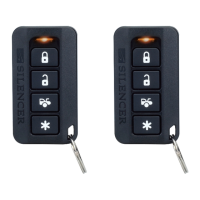
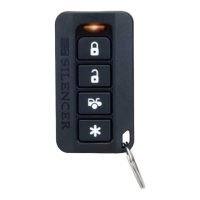
ALARM FEATURE “C” PROGRAMMING:
1 Turn the Ignition 'switch ʻON/OFFʼ 3 TIMES and stay in OFF position.
2 Push the Valet switch 5 times and hold on the 5
th
push. When a long chirp is heard,
release the valet switch. You are now in the Alarm feature “C” programming mode.
3 Press the transmitter button corresponding to the feature you want to program.
Press
Transmitter
Button
One Chirp /
LED one pulse
Factory Default Setting
Two Chirps /
LED two pulse
Three Chirps
/
LED three
pulse
1
Gray Wire = Trunk
(Channel 3) Output
Gray Wire = Two Step
Door Unlock Output
Gray Wire =
Pager
Output
2
Car Jacking feature Off
Car Jacking feature On
3
ALARM with Keyless
Entry
Keyless Entry ONLY
Exit: Turn Ignition to 'ON' position, or leave it for 15 seconds. 3 long chirps will confirm
exit
ALARM FEATURE “D” PROGRAMMING:
Press
Transmitter
Button
One Chirp /
LED one pulse
Factory Default Setting
Two Chirps /
LED two pulse
1 Shock Sensor Program
Mode
ADJUST AND TEST THE SENSITIVITY LEVEL O
Turn the Ignition switch ʻON/OFFʼ 3 TIMES and stay in OFF position.
Push the Valet switch 6 times holding in on the 6th push. until a long chirp will be
heard. Release the valet switch. You are now in the feature ʻShock Sensorʼ
programming mode.
Press and hold
button for 2 seconds. One long siren chirp will indicate the unit is
ready to accept adjustments of the shock sensor. Press
button on the transmitter
once. This will decrease sensitivity level by one. Each time the button is pushed and a
decrease is made the siren/horn chirp will respond with [1] chirp. Two chirps indicate the
minimum sensitivity. Warn away & full trigger will be deleted when minimum sensitivity
is selected. Shock sensor OFF. Press
button on the transmitter once. This will
increase sensitivity level by one. Each time an increase is made the siren/horn chirp will
respond with [1] chirp. Two chirps indicate the maximum sensitivity. Hit the bumper or
strong metal part of the vehicle to test the threshold level of the sensor.
a). Activate the warn-away (first stage the shock sensor), the siren will emit a short
chirp.
b). Activate the full alarm (second stage the shock sensor), the siren will emit a long
chirp.
When you are satisfied with the setting, press the
button to lock in the adjustment.
One long siren chirp will indicate the unit has locked in the adjustment.
Note: If 30 seconds of inactivity expires or you turn ON the ignition during of above
steps, the unit will exit the program mode. Three long chirps will confirm exit.
SL-2
QUICK START INSTALLATION GUIDE
If you are not proficient in the installation of this product or would
like a full version of the installation manual, Please visit our
website@ www.silencer.com
FOR PROFESSIONAL INSTALLATION ONLY!
1.Turn the Ignition 'switch ʻON/OFFʼ 3 TIMES and stay in OFF position.
Push the Valet switch 3 times and hold in on the 3rd push. When a long chirp is
heard, release the valet switch. You are now in the Alarm feature ʻAʼ
programming mode.
2. Press the transmitter button corresponding to the feature you want to program.
The factory default settings is always [1] LED flash, [1] chirp.
3. Press the transmitter button again to change the feature. Simply keep pressing the
transmitter button again until the module advances to your desired setting.
Press
Transmitter
Button
One Chirp /
LED one pulse
Factory Default Setting
Two Chirps /
LED two pulse
1
Chirps on
Chirps off
2
Automatic Rearm OFF
Automatic Rearm ON
3
45 sec. Delay Door Ajar error
chirp.
Instant Door Ajar error chirp
Exit: Turn Ignition to 'ON' position, or leave it for 15 seconds. 3 long chirps will confirm
exit.
ALARM FEATURE “ B ” PROGRAMMING:
1 Turn the Ignition 'switch ʻON/OFFʼ 3 TIMES and stay in OFF position.
2 Push the Valet switch 4 times and hold in on the 4
th
push. When a long chirp is
heard, release the valet switch. You are now in the Alarm feature “ B ”
programming mode.
3 Press the transmitter button corresponding to the feature you want to program.
Press
Transmitter
Button
One Chirp /
LED one pulse
Factory Default
Setting
Two Chirps /
LED two pu
lse
Three Chirps /
LED three pulse
1
0.9-second Door
lock pulses.
3.0-second Door
lock pulse.
Double pulse
unlock
2
Active arming
Passive arming
without passive
door locking
Passive arming
with passive door
locking.
3
Ignition
controlled door
locks & unlocks
Without ignition
controlled door
locks & unlocks
4.
Standard horn
timing
Horn chirp
Duration 30 mS
Horn chirp
Duration
10
mS
Exit: Turn Ignition to 'ON' position, or leave it for 15 seconds. 3 long chirps will confirm
exit.
Enter:
1. Turn the Ignition 'switch ʻOFF/ONʼ 3 TIMES and stay in ON position. Within 15 seconds.
2. Push the Valet switch 3 times and hold in on the 3
rd
push, when a long chirp is heard then release the valet switch. You
are now in the Transmitter programming mode.
Program:
1. Press any button on transmitter 1 until the siren responds with a confirming chirp; the first transmitter is now programmed.
2. Press any button on the second transmitter until the siren responds with a confirming chirp; the second transmitter is now
programmed.
3. Apply the same procedure to progra
m 3rd and 4th
.
transmitters.
Turn Ignition to 'OFF' position, or leave it for 15 seconds. 3 long chirps
and 3 parking Light flashes will confirm exit.

 Need help?

 To Next Page
 General