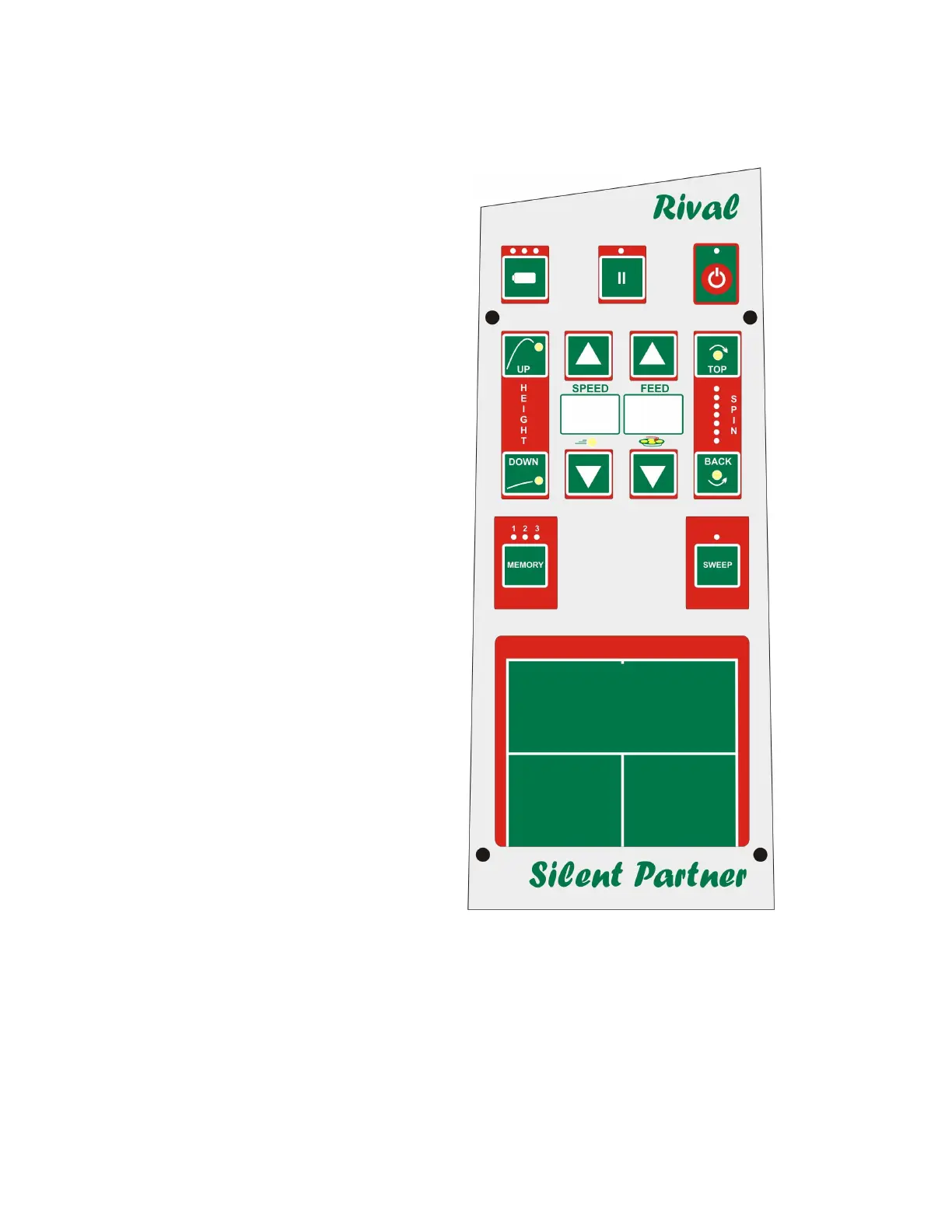
THE CONTROL PANEL OF THE RIVAL
POWER BUTTON
Power is turned ON and OFF by pressing the
button in the upper right hand corner. The red
light above the button stays on as long as the
machine is on.
PAUSE
The pause button controls ball feed. When the
machine is turned on, the feed automatically
goes into pause. This is reflected by the slow
flashing of the light located above the button. To
start feed, press the pause button once. If you
wish to delay the start of the feed by 15 seconds,
press the pause button continuously for two
seconds until it starts flashing rapidly. This will
allow you to get to the other side of the court.
BATTERY LEVEL INDICATOR
Three lights indicate the level of charge of the
battery. Three lights indicate a full battery, while
no lights indicate that it is time to stop playing.
The machine must be turned OFF to check the
battery. For best accuracy, wait a few minutes
before taking the reading.
HEIGHT CONTROL
Pressing the UP button causes the ball to be
ejected increasingly high, while pressing the
DOWN button lowers the trajectory. The
elevation control stops at the end of travel. Stop
pressing the button as soon as the elevation
motor has stopped turning at either the extreme
UP or extreme DOWN position.
SPEED CONTROL
Ball ejection speed can be adjusted from a soft
toss to a challenging drive. Press the UP
ARROW to increase speed, and the DOWN
ARROW to reduce it. Speed is shown in the
window between the two buttons.
-2-


 To Next Page