I. Hardware:
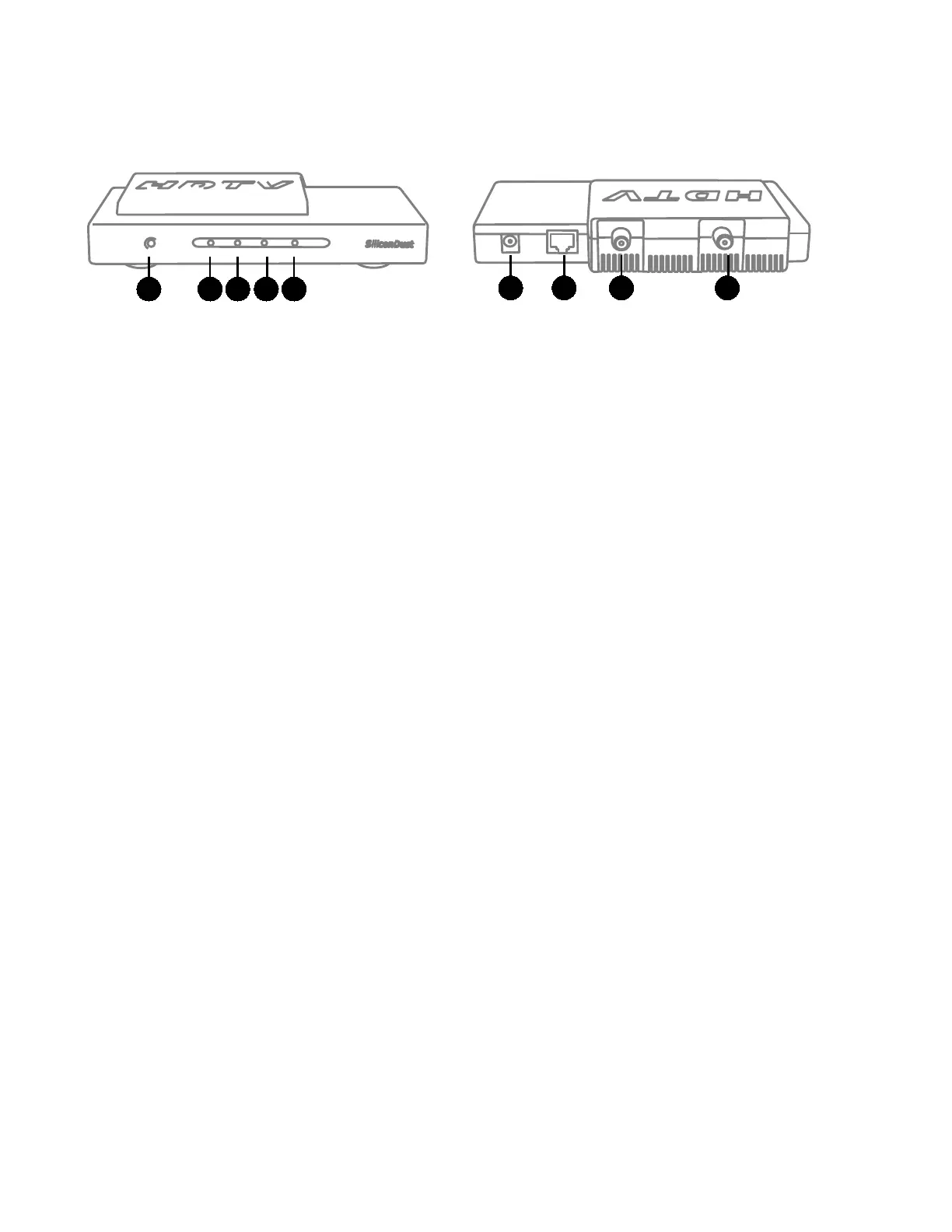
Front
1. Power LED
2. Network LED
3. Tuner0 LED
4. Tuner1 LED
Back
6. Power connector
7. Network connector
8. Tuner1
9. Tuner0
Power:
The HDHomeRun TECH should be used with the supplied 5V 1A power adapter.
Ethernet:
The HDHomeRun TECH can be connected to a network switch (100baseT or Gigabit), or can be
connected directly to a computer/laptop Ethernet port.
Direct-connect: The Ethernet port on the HDHomeRun TECH is Auto-MDX (auto-crossover) and
does not require a cross-over cable when connected directly to a computer/laptop.
Tuners/RF:
Each tuner on the HDHR-TECH-US supports 8VSB, QAM256 (ITU Annex B), and QAM64 (ITU
Annex B) with an RF range of 55-861MHz (cable channels 1 to 135).
The signal level for digital cable must be in the range of -12dBmV to +40dBmV. Lower signal
levels can be measured.
1 2 3 4 5
6 7 8 9


 To Next Page