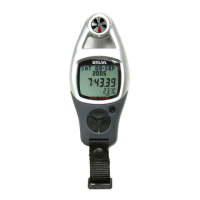
Current Time Mode - Setting the Current Time Mode
To Select Setting Display
The Setting Sequence
!
!
!
!
!
Setting the current time and date, and their
display formats, press and hold the [mode]
button for about 2 seconds to select the
setting display (the '12' indicator will start
flashing).
In setting display, press the [mode] button to
move the setting following the adjacent
diagram.
When the ' ' or ' ' digits starts flash,
press the [set] or [reset] button to switch
between ' ' (12 hour format) and ' ' (24
hour format). When the ' ' digits starts
flash on the display, press [set] or [reset]
button to reset the second to zero.
If one of the settings (minute, hour, year,
month, date) starts flash, press the [set] or
[reset] button to scroll through the setting
(hold down the button to scroll the setting at
a faster pace).
When the above settings finished, press and
hold the [mode] button for about 2 seconds
to exit the setting sequence.
12 24
12 24
second
year
12/24
minute
month
date
second
hour
hold
[mode]
hold
[mode]
[mode]
'12' changes to '24';
'24' changes to '12'.
reset Second to zero
[mode]
[mode]
[mode]
[set]
or [reset]
[set]
or [reset]
[mode]
[mode]
[mode]
[reset]
[set]
hold [reset]
hold [set]
Current Time Setting Sequence
Current Time Mode
scroll through
the settings by
increment
scroll
the setting at
a faster pace
scroll through
the settings by
decrement
scroll
the setting at
a faster pace
06MAR
12:38.28
THU
28.0 C888.2%
6.1


 To Next Page